
This chapter covers Table and Query from the 2nd Year (ICS Part-II) Computer Science syllabus of the Punjab Curriculum and Textbook Board (PTB/PCTB). It explains how to create tables, field data types and properties, the primary key, and how to create and use queries with criteria and sorting. These notes are prepared by freebooks.pk.
Tables store the data and queries find it. This chapter explains how to build tables correctly and how to write queries that retrieve exactly the information needed.
Learning Objectives
- Create a table and define its fields.
- State the common data types and field properties.
- Set a primary key.
- Enter and edit data in datasheet view.
- Create a query with criteria and sorting.
- Describe the types of queries.
Key Concepts
Creating a Table
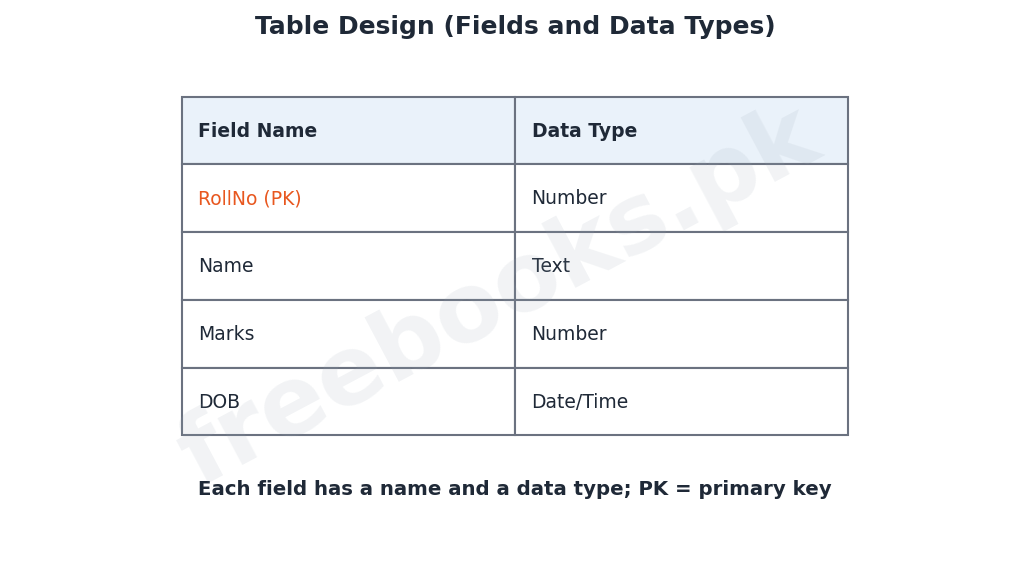
A table is created in Microsoft Access to store the data of one entity. A table can be built in Design View, where the user lists the fields and sets their properties, or in Datasheet View, where data is typed directly. In Design View the user gives each field a name, chooses its data type and sets any properties, and this design determines what kind of data the table can hold.
Data Types
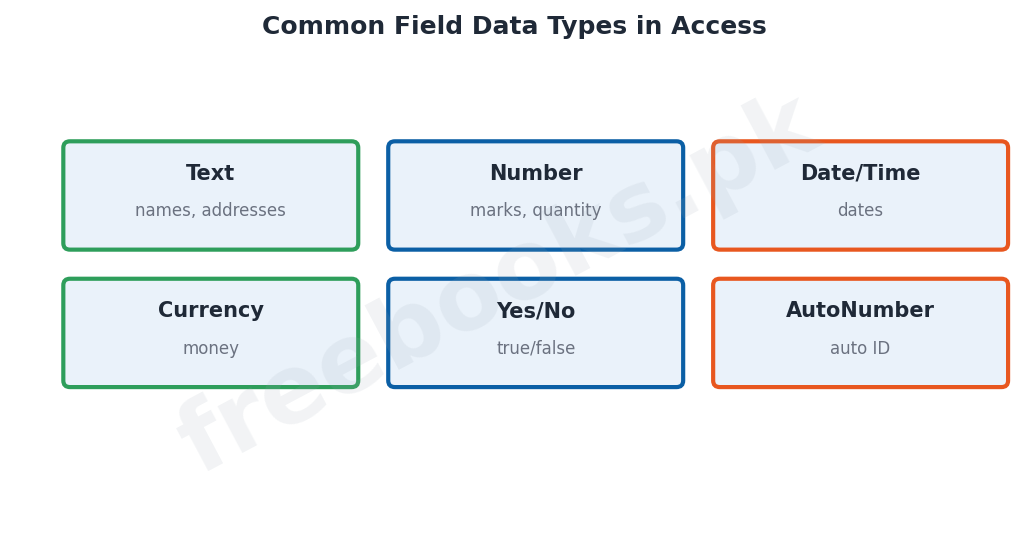
Every field in a table must be given a data type, which tells Access what kind of data the field will store. Common data types include Text (for names and addresses), Number (for numeric values used in calculations), Date/Time (for dates), Currency (for money), Yes/No (for true/false values) and AutoNumber (a number that Access generates automatically for each new record, often used as a primary key). Choosing the correct data type keeps the data valid and saves space.
Field Properties and the Primary Key
As well as a data type, each field has properties that control it, such as the field size, a default value, a format, and a validation rule that limits what may be entered (for example, marks between 0 and 100). One field (or a combination) is chosen as the primary key, which uniquely identifies each record; Access marks it and does not allow duplicate or blank values in it. Setting a suitable primary key is an essential part of table design.
Working in Datasheet View
Once a table is designed, data is entered and viewed in Datasheet View, which shows the records in a grid of rows and columns like a spreadsheet. In this view the user can add new records, edit or delete existing records, move between fields, and adjust column widths. The datasheet is the everyday way of looking at and updating the data stored in a table.
Creating a Query
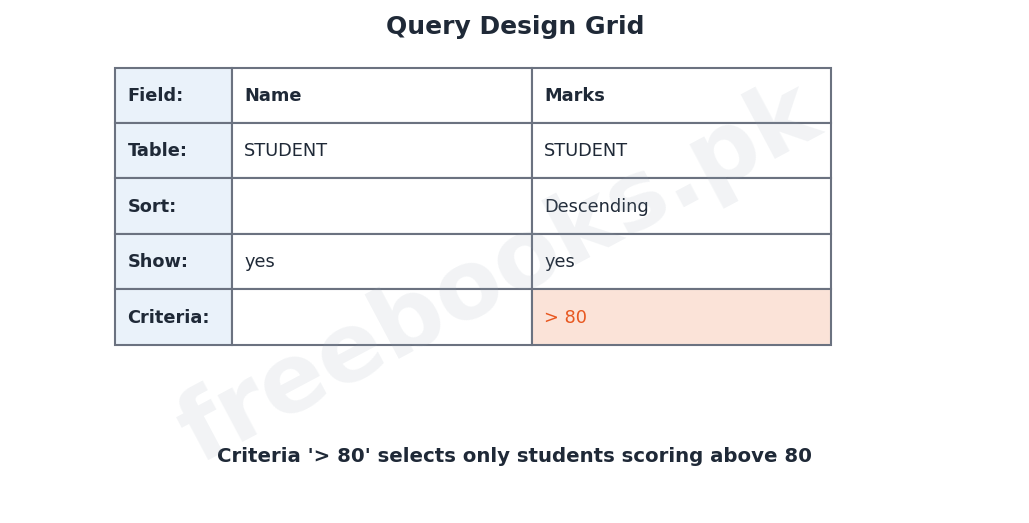
A query is created to retrieve particular data from one or more tables. In the query design grid the user chooses the table, selects the fields to display, and can set a criterion (a condition) for each field to pick out only the records that are wanted; for example the criterion ‘>80’ on the Marks field selects only students who scored above 80. The user can also choose to sort the results and to show or hide particular fields. When the query is run, Access displays the matching records.
Criteria and Sorting
Criteria are conditions written into a query to filter the records. They can use comparison operators such as > (greater than), < (less than) and = (equal to), text values in quotes, and logical operators such as AND and OR to combine conditions. Sorting arranges the results in ascending or descending order of a chosen field, for example listing students from the highest marks to the lowest. Criteria and sorting together let a query answer very specific questions.
Types of Queries
There are two broad kinds of query. A select query retrieves and displays data from tables without changing it; it is the most common type and is used to answer questions and produce lists. An action query changes the data: examples are the update query (which changes values in many records at once), the append query (which adds records) and the delete query (which removes records). Behind all queries lies the language SQL (Structured Query Language), which Access generates automatically from the design grid.
Important Definitions
Design View
The view used to define a table’s fields, data types and properties.
Datasheet View
The grid view used to enter, view and edit the records of a table.
Data type
The kind of data a field can store (Text, Number, Date/Time, etc.).
Field property
A setting that controls a field, such as size or validation rule.
Primary key
The field that uniquely identifies each record in a table.
Query
An object that retrieves selected data answering a question.
Criteria
Conditions in a query that select particular records.
Select query
A query that retrieves and displays data without changing it.
Key Facts & Rules
| Item | Detail |
|---|---|
| Create a table | Design View (fields + types) or Datasheet View |
| Data types | Text, Number, Date/Time, Currency, Yes/No, AutoNumber |
| Primary key | Unique, no duplicates or blanks |
| Query criteria operators | > , < , = , AND , OR |
| Sorting | Ascending or descending order |
| Query types | Select (view) and action (update/append/delete) |
Diagrams & Illustrations
Table design: a table design listing fields with their data types and the primary key marked.
Field data types: common Access data types such as Text, Number, Date/Time, Currency, Yes/No and AutoNumber.
Query design grid: a query design grid showing fields, sorting and a criterion (Marks > 80).
Solved Examples & Practice
Choose a data type
For a field storing a student’s date of birth, the correct data type is Date/Time.
Set the primary key
In a STUDENT table, RollNo is made the primary key so no two students share it.
Write a criterion
To find students who scored above 80, put the criterion >80 in the Marks field of a query.
Sort the result
To list students from highest to lowest marks, sort the Marks field in descending order.
Short Questions & Answers
What is the difference between Design View and Datasheet View?
Design View is used to define the fields, data types and properties of a table; Datasheet View is used to enter, view and edit the actual records.
What is a data type? Give two examples.
The kind of data a field can store, such as Text (for names) and Number (for marks).
What is a primary key?
The field that uniquely identifies each record in a table; it cannot contain duplicate or blank values.
What is a query?
A database object used to retrieve selected data that answers a question, without changing the stored data.
What are criteria in a query?
Conditions written into a query to select only the records that meet them, for example Marks > 80.
Differentiate a select query and an action query.
A select query only retrieves and displays data; an action query changes the data (update, append or delete).
Long Questions & Answers
Q1: Describe how a table is created in Access, including data types, field properties and the primary key.
In Microsoft Access, a table is the object that actually stores the data, and it must be carefully designed. A table can be created in one of two views. In Design View, the user builds the structure of the table by listing each field, giving it a name and choosing its properties, and this is the usual way to design a table properly; in Datasheet View, the user can simply start typing data into a grid and Access works out a basic structure automatically. When designing a table, every field must be given a data type, which tells Access what kind of information the field will hold; the common data types are Text, for words such as names and addresses; Number, for numeric values that may be used in calculations, such as marks; Date/Time, for dates; Currency, for amounts of money; Yes/No, for values that can only be true or false; and AutoNumber, a number that Access itself generates for each new record. In addition to its data type, each field has a set of properties that control it more precisely, such as the field size, a default value that is entered automatically, a display format, and a validation rule that restricts what may be typed, for example insisting that a mark lies between 0 and 100. Finally, one field, or occasionally a combination of fields, is chosen as the primary key, which uniquely identifies every record; Access will not allow the primary key to contain duplicate values or to be left blank. Choosing suitable field names, correct data types, sensible properties and a good primary key produces a well-structured table that stores valid data efficiently.
Q2: Explain how a query is created and used, including criteria and sorting.
A query is the object used in Access to retrieve particular information from the data stored in tables, and it is one of the most powerful features of a database. A query is usually built in the query design grid. The user first chooses the table or tables that hold the required data, and then selects the fields that are to appear in the result. For any of these fields the user may enter a criterion, which is a condition that the records must satisfy in order to be included; for example, placing the criterion greater-than 80 in the Marks field will make the query display only those students who scored above eighty. Criteria may use comparison operators such as greater-than, less-than and equal-to, may contain text values written inside quotation marks, and may be combined using the logical operators AND and OR to express more complex conditions, such as students of a particular class who also scored above a certain mark. The user can also set the sort order of a field, so that the results are arranged in ascending or descending order, for instance listing students from the highest marks down to the lowest, and can choose whether each field is shown or hidden in the result. When the query is run, Access searches the tables and displays just the records and fields that match, without in any way changing the data that is stored. In this way a single well-written query can answer a very specific question about the data quickly and accurately, and the query can be saved and run again whenever the up-to-date answer is needed.
Q3: Describe the different types of queries in Access.
Queries in Access fall into two broad categories according to what they do: select queries and action queries. A select query is the most common and most basic type; its job is simply to retrieve and display data from one or more tables according to the fields, criteria and sort order that the user has specified, and it does not alter the stored data in any way. Select queries are used to answer questions and to produce lists, such as a list of all the students in a particular class or all those who have passed, and their results can also be used as the basis for forms and reports. An action query, by contrast, actually changes the data in the tables, and there are several kinds. An update query changes the values in a field for many records at once, for example adding five bonus marks to every student in a class. An append query adds a group of records from one place to another table. A delete query removes a set of records that meet a given condition, such as deleting all the records of students who have left. A make-table query creates a new table from the results of a query. Because action queries alter data, they must be used carefully. Underlying all of these, whether select or action, is a special language called SQL, which stands for Structured Query Language; SQL is the standard language for working with relational databases, and when a user builds a query in the design grid, Access automatically writes the equivalent SQL statement to carry it out. Thus by choosing the right type of query, a user can not only find data but also update, add to and tidy up the data in the database.
MCQs with Answers
The view used to define a table’s fields is: (a) Datasheet View (b) Design View (c) Form View (d) Report View
Correct Answer: (b) Design View.
Data typed and viewed as a grid is in: (a) Design View (b) Datasheet View (c) Layout View (d) SQL View
Correct Answer: (b) Datasheet View.
The data type for storing money is: (a) Text (b) Number (c) Currency (d) Yes/No
Correct Answer: (c) Currency.
A number generated automatically for each record is: (a) Text (b) AutoNumber (c) Currency (d) Memo
Correct Answer: (b) AutoNumber.
A field that uniquely identifies each record is the: (a) foreign key (b) primary key (c) index (d) criteria
Correct Answer: (b) primary key.
A condition that selects records in a query is a: (a) sort (b) criterion (c) format (d) key
Correct Answer: (b) criterion.
The criterion >80 on Marks selects students who scored: (a) below 80 (b) above 80 (c) exactly 80 (d) 0
Correct Answer: (b) above 80.
A query that only displays data is a: (a) action query (b) select query (c) update query (d) delete query
Correct Answer: (b) select query.
A query that changes many records at once is an: (a) select query (b) update query (c) form (d) report
Correct Answer: (b) update query.
The language behind Access queries is: (a) HTML (b) SQL (c) C (d) Python
Correct Answer: (b) SQL.
Quick Revision Summary
- Create a table in Design View (fields + data types + properties) or Datasheet View.
- Data types: Text, Number, Date/Time, Currency, Yes/No, AutoNumber.
- Field properties (size, validation); primary key = unique, no blanks.
- Datasheet View = enter/edit records in a grid.
- Query: choose fields + criteria (>, <, =, AND, OR) + sorting; select shows matches.
- Query types: select (view) and action (update/append/delete); SQL runs underneath. Notes by freebooks.pk.
Exam Tips
- Distinguish Design View from Datasheet View.
- Learn the common data types and when to use them.
- State the rules for a primary key.
- Write a query criterion with an operator (e.g. >80).
- Explain sorting (ascending/descending).
- Differentiate select and action queries; mention SQL.