
This chapter covers Input / Output from the 2nd Year (ICS Part-II) Computer Science syllabus of the Punjab Curriculum and Textbook Board (PTB/PCTB). It explains how a C program takes input from the keyboard and shows output on the screen using the printf and scanf functions, format specifiers, field width, precision and escape sequences. These notes are prepared by freebooks.pk.
By standard input and output we mean the keyboard and the monitor. In C these operations are carried out by two standard functions, printf and scanf, available through the stdio.h library.
Learning Objectives
- Explain the purpose of the standard input/output library (stdio.h).
- Use the printf function to display formatted output.
- Use format specifiers such as %d, %f, %c and %s.
- Control field width and precision of output.
- Use the scanf function and the address operator (&) to take input.
- Describe common escape sequences.
Key Concepts
Standard Input and Output
In C, the standard input/output library provides the functions needed to perform input and output. By standard input and output we mean the keyboard and the monitor respectively. Input and output are carried out by two standard functions, printf() and scanf(), which become available when the header file stdio.h is included in the program with the directive #include <stdio.h>. Without this library the compiler would not know the meaning of printf and scanf.
The printf Function
The standard library function printf (pronounced print-eff) is used for formatted output, that is, to display results on the screen. It takes a format string and an optional list of variables, and has the form printf(format string, var1, var2, …);. The first argument is always a string enclosed in double quotes, called the format string; it may contain ordinary text and one or more format specifiers. The values of the variables listed after the format string are displayed in place of the specifiers.
Format Specifiers
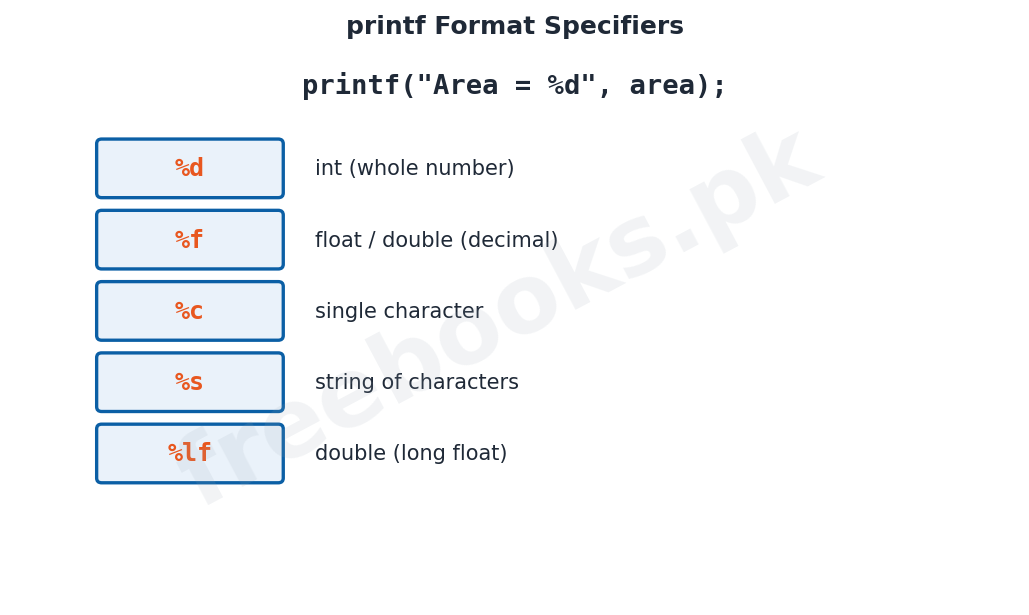
A format specifier tells printf what kind of value to display and where to place it in the output. The common specifiers are %d for an integer (int), %f for a float or double, %c for a single character, %s for a string, and %lf for a double. For example, in printf("Area = %d", area); the %d is replaced by the value of the integer variable area. The type of each specifier must match the type of the variable it displays.
Field Width and Precision
The output of printf can be formatted more neatly by controlling field width and precision. Placing a number between the % and the specifier sets the field width, that is, the minimum number of columns used to display the value; for example printf("Area = %4d", area); reserves four columns for the value. For real numbers a precision can also be given after a dot, as in %6.2f, which displays the number in six columns with two digits after the decimal point.
Escape Sequences
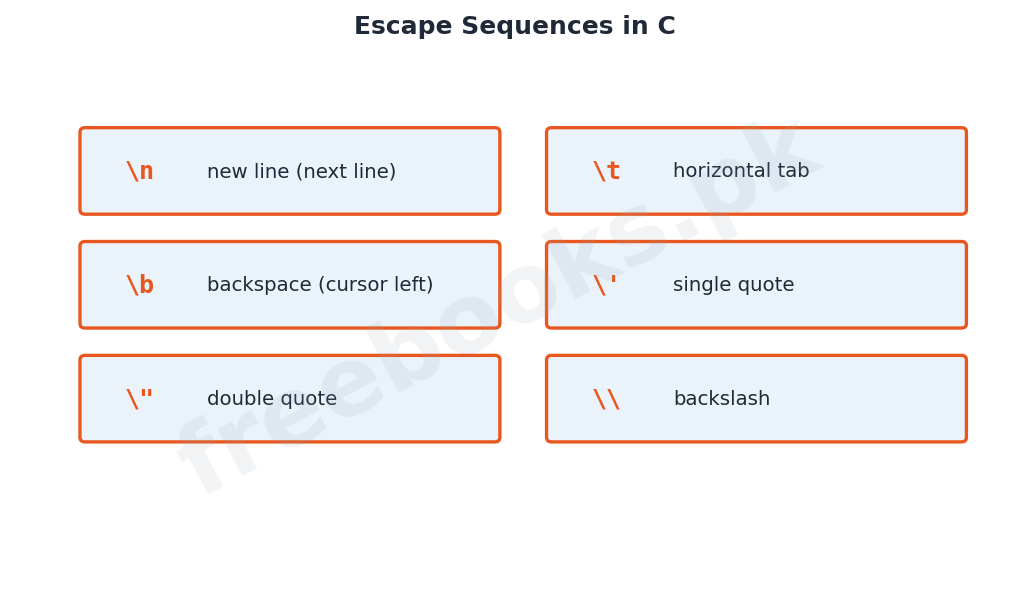
Escape sequences are special characters written in the format string using a backslash (). They cause an escape from the normal meaning of the string so that the next character is treated specially. Common escape sequences are n (new line), t (horizontal tab), b (backspace) and f (form feed). Because the format string itself is enclosed in double quotes, a single or double quote inside it must be written with a backslash as ' and ", and a backslash itself is written as .
The scanf Function
Most useful programs are interactive, meaning they take input from the user. The scanf function (pronounced scan-eff) reads input typed at the keyboard and stores it in variables. It has the form scanf(format string, &var1, &var2, …);. The format string of scanf consists only of format specifiers, no other text. When execution reaches a scanf statement the program pauses until the user enters a value and presses the Return key.
The Address Operator (&)
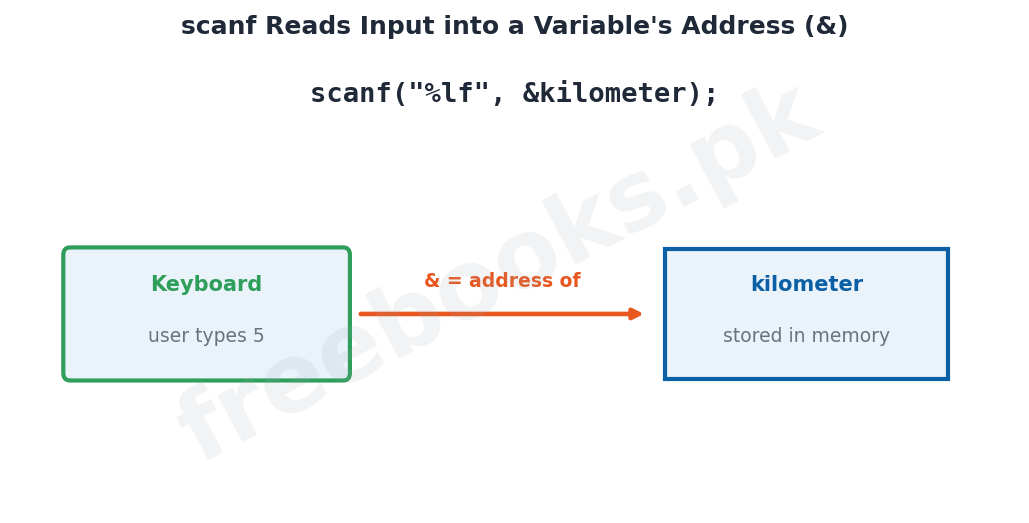
In a call to scanf, each variable name is preceded by an ampersand (&), which in C is the address of operator. The & tells scanf the address in memory where the input value should be stored, so scanf can place the value directly into that variable. If the & is omitted, scanf cannot locate the variable in memory, the value is not stored, and the variable is left holding a meaningless garbage value.
Character Input Functions
Besides scanf, C provides functions specialised for reading single characters. scanf can read a character but needs the Return key to be pressed after the input. In situations such as games where each key press must act at once, functions like getch and getche are used; getch reads a character without showing it on the screen (without echo) while getche reads and displays (echoes) it. These functions belong to the conio (console input output) library.
Important Definitions
Standard input/output
Input from the keyboard and output to the monitor.
stdio.h
The standard input/output header file that defines printf and scanf.
printf
A standard function used to display formatted output on the screen.
scanf
A standard function used to read input from the keyboard into variables.
Format string
The string of text and format specifiers given to printf or scanf.
Format specifier
A symbol (e.g. %d, %f) that states the type of value to display or read.
Escape sequence
A backslash character combination (e.g. new line, tab) with a special meaning.
Address operator (&)
The operator that gives the memory address of a variable.
Key Facts & Rules
| Item | Detail |
|---|---|
| Include the library | #include <stdio.h> |
| Output | printf("format string", var1, var2, …); |
| Input | scanf("format string", &var1, &var2, …); |
| Common specifiers | %d int, %f float, %c char, %s string, %lf double |
| Field width | printf("%4d", area); (four columns) |
| Precision | printf("%6.2f", height); (2 decimal places) |
| New line | backslash-n starts a new line in the output |
Diagrams & Illustrations
printf format specifiers: the common printf format specifiers (%d, %f, %c, %s, %lf) and the type each one displays.
scanf and the & operator: how scanf reads a value from the keyboard and stores it at a variable's address using the & operator.
Escape sequences: the common escape sequences in C such as new line, tab, backspace and quotes.
Solved Examples & Practice
Display an integer
printf("Area = %d", area); shows the text Area = followed by the value stored in the integer variable area.
Read a number
scanf("%lf", &kilometer); waits for the user to type a number and stores it in the double variable kilometer.
Field width
printf("Area = %4d", area); prints the value of area in a field four columns wide.
Escape sequence
printf("Name (tab) Roll_No"); prints Name, then a tab space, then Roll_No on the same line.
Short Questions & Answers
What are standard input and output in C?
Input from the keyboard and output to the monitor, handled through the stdio.h library.
What is the use of the printf function?
It displays formatted output on the screen according to its format string.
What is a format specifier?
A symbol such as %d or %f that tells printf/scanf the type of value to display or read.
Why is the & used in scanf?
& is the address operator; it gives scanf the memory address where the input value should be stored.
What happens if & is omitted in scanf?
scanf cannot find the variable in memory, so the value is not stored and the variable holds garbage.
What is an escape sequence? Give one example.
A backslash combination with a special meaning, for example new line which moves to a new line.
Long Questions & Answers
Q1: Explain the printf function with its format string, format specifiers, field width and precision.
The printf function, whose name is pronounced print-eff, is the standard library function used in C for formatted output, that is, for displaying results on the screen. It becomes available when the standard input/output library stdio.h is included in the program. A call to printf has the general form printf(format string, var1, var2, …); where the first argument is always a string enclosed in double quotes. This string is called the format string and it may contain two kinds of things: ordinary text, which is printed exactly as written, and format specifiers, which are replaced by the values of the variables listed after the string. A format specifier begins with a percent sign and states the type of value to be displayed: %d is used for an integer, %f for a float or double, %c for a single character, %s for a string of characters and %lf for a double. The specifiers must appear in the same order as the variables they display, and their types must match. For example, the statement printf("Area of Square = %d", area); prints the text Area of Square = and then the value stored in the integer variable area in place of %d. The appearance of the output can be improved by controlling the field width and the precision. Writing a number between the percent sign and the specifier sets the field width, the minimum number of columns used for the value; thus printf("Area = %4d", area); displays the value in a field four columns wide. For real numbers a precision may also be given after a dot, as in %6.2f, which prints the number in six columns with two digits after the decimal point. In this way printf gives the programmer full control over how results are shown.
Q2: Explain the scanf function and the role of the address operator (&) in taking input.
Most useful programs are interactive, which means that they take input from the user while they run. The scanf function, pronounced scan-eff, is the standard C function used to read input typed at the keyboard and to store it in variables; it is versatile because it can read numbers, characters and strings. A call to scanf has the form scanf(format string, &var1, &var2, …);. Unlike the format string of printf, the format string of scanf consists only of format specifiers and contains no other text, because its only job is to tell scanf what kind of data to read into each variable. When the flow of execution reaches a scanf statement, the program stops and waits until the user enters a value and presses the Return key, after which the value is stored and execution continues. A very important feature of scanf is that each variable name in the list is preceded by an ampersand, the symbol &, which in C is the address of operator. The ampersand gives scanf the address in memory of the variable, so that scanf knows exactly where to place the value it reads. If the programmer forgets the &, scanf is unable to locate the variable in memory; the value is therefore not stored and the variable is left holding a meaningless garbage value, which is a common source of program errors. For reading single characters without waiting for the Return key, C also provides special functions such as getch and getche from the conio library; getch reads a character without echoing it on the screen, while getche reads and displays it.
Q3: What are escape sequences? Describe the common escape sequences used in C with examples.
Escape sequences are special characters that are written inside the format string of a printf statement using a backslash. The backslash causes an escape from the normal interpretation of the string, so that the character following it is recognised as having a special meaning rather than being printed literally. They are needed because certain effects, such as moving to a new line, and certain characters, such as the double quote, cannot be placed directly in a format string. The most commonly used escape sequence is the newline character, which moves the cursor to the beginning of the next line. The horizontal tab moves the cursor to the next tab position and is useful for arranging output in neat columns. The backspace moves the cursor one space to the left, and the form feed moves to the next page on a printer. Some characters need an escape sequence because of the way strings are written: since the format string is enclosed in double quotes, a double quote inside it would be mistaken for the closing quote, so it must be written with a preceding backslash; similarly a single quote and a backslash itself are written with a backslash. Escape sequences therefore give the programmer control over the layout of output and allow special characters to be displayed.
MCQs with Answers
Standard input and output in C mean the: (a) mouse and printer (b) keyboard and monitor (c) disk and CD (d) scanner and speaker
Correct Answer: (b) keyboard and monitor.
The library needed for printf and scanf is: (a) math.h (b) conio.h (c) stdio.h (d) string.h
Correct Answer: (c) stdio.h.
The function used for formatted output is: (a) scanf (b) printf (c) getch (d) main
Correct Answer: (b) printf.
The function used to read input from the keyboard is: (a) printf (b) scanf (c) puts (d) clrscr
Correct Answer: (b) scanf.
The format specifier for an integer is: (a) %f (b) %c (c) %d (d) %s
Correct Answer: (c) %d.
The format specifier for a single character is: (a) %d (b) %c (c) %f (d) %s
Correct Answer: (b) %c.
The & in scanf is the: (a) and operator (b) address operator (c) logical operator (d) assignment operator
Correct Answer: (b) address operator.
The escape sequence for a new line is: (a) tab (b) backspace (c) newline (d) form feed
Correct Answer: (c) newline.
The tab escape sequence moves the cursor to: (a) a new line (b) the next tab position (c) one space left (d) a new page
Correct Answer: (b) the next tab position.
getch and getche belong to the library: (a) stdio.h (b) conio.h (c) math.h (d) stdlib.h
Correct Answer: (b) conio.h.
Quick Revision Summary
- Standard I/O = keyboard (input) and monitor (output); use #include <stdio.h>.
- printf(format string, vars…) shows formatted output; scanf(format string, &vars…) reads input.
- Specifiers: %d int, %f float/double, %c char, %s string, %lf double.
- Field width %4d and precision %6.2f control the layout of output.
- scanf needs & (address operator) before each variable; missing & gives garbage values.
- Escape sequences: new line, tab, backspace, and backslash forms for quotes/backslash. Notes by freebooks.pk.
Exam Tips
- State the two standard I/O functions and the library they need.
- Explain printf with an example and list the format specifiers.
- Explain field width and precision with examples.
- Explain scanf and why the & operator is required.
- Define escape sequence and give at least four examples.
- Remember getch/getche read characters without pressing Return.