This chapter covers File Handling in C from the 2nd Year (ICS Part-II) Computer Science syllabus of the Punjab Curriculum and Textbook Board (PTB/PCTB). It explains why files are needed, the concept of a stream, text and binary streams, the newline and EOF markers, opening and closing files, file opening modes, the file pointer, and reading and writing characters. These notes are prepared by freebooks.pk.
Programs so far worked with temporary data that had to be re-entered each time. To store data permanently we use files. A file is a set of related records saved on secondary storage such as a disk.
Learning Objectives
- Explain the need for files and define a file.
- Explain the concept of a stream and its two types.
- Describe the newline and EOF markers in a text file.
- Open and close files using fopen() and fclose().
- State the file opening modes.
- Explain the file pointer and read/write characters with getc() and putc().
Key Concepts
The Need for Files
The programs studied so far worked only with temporary data, so the user had to enter the data every time the program ran, and no data or results could be kept permanently. To store data permanently it is saved on secondary storage in the form of files. A file is a set of related records. File handling gives a C program the ability to save its data to a file and to read the data back later, so that information is not lost when the program ends.
The Stream
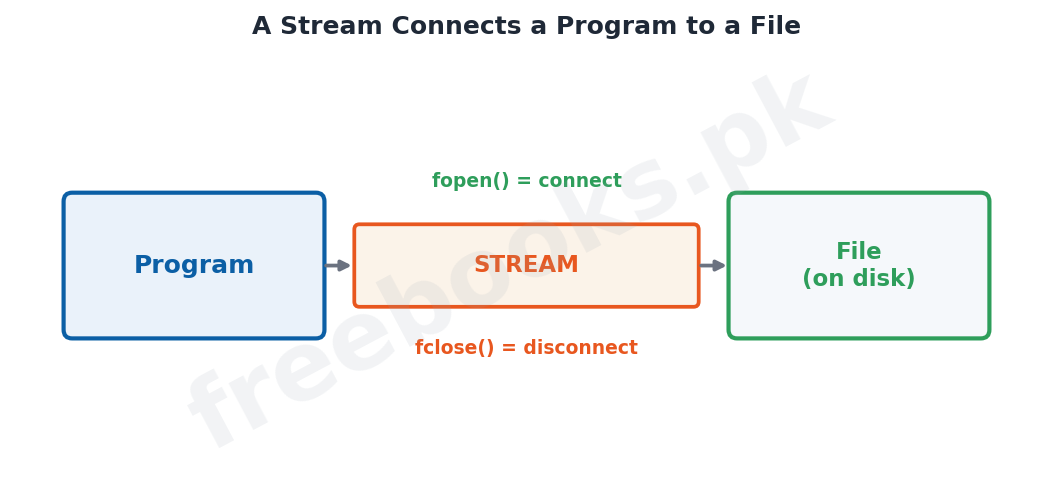
C has no built-in method of performing file input/output, but the C standard library stdio provides a rich set of I/O functions for the purpose. A very important concept is the stream, which is a logical interface to a file. A stream is associated with a file by an open operation and disassociated from it by a close operation. Using streams lets C treat many different devices, such as a disk file, the screen, the keyboard or a port, in a uniform way.
Text and Binary Streams
There are two types of streams. A text stream is a sequence of characters in which certain translations may occur, for example a newline may be converted to a carriage-return/line-feed pair, so there may not be a one-to-one match between the characters written and those stored on the device. A binary stream is a sequence of bytes that correspond one-to-one with the bytes on the external device, with no translation, so the number of bytes read or written is the same as the number on the device.
Newline and EOF Marker
A text file is a named collection of characters saved in secondary storage and has no fixed size. To mark the end of a text file a special end-of-file character, denoted by EOF in C, is placed after the last character. When a text file is created with an editor such as Notepad, pressing the Enter key places a newline character (written as backslash-n in C) at the end of each line, and an EOF marker is placed at the very end of the file.
Opening a File
Before reading from or writing to a file it must be opened. All standard file handling functions are declared in stdio.h, so this header is included in almost every such program. The fopen() function opens a file and associates it with a stream; its prototype is FILE* fopen(const char* filename, const char* mode). Its first argument is the file name (with the absolute path, using a double backslash for each backslash, if the file is not in the current directory) and its second argument is the mode written as a string in double quotes. If fopen() fails, for example because the file does not exist, it returns the NULL pointer, so the result should always be checked.
File Opening Modes
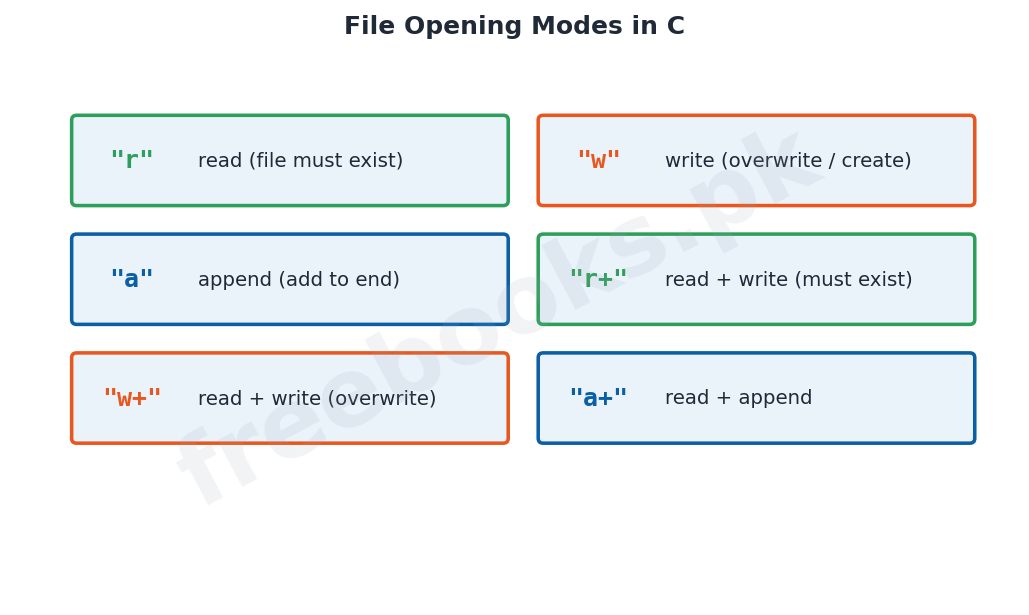
A file can be opened in several modes. The mode "r" opens a text file for reading and the file must already exist; "w" opens a file for writing, overwriting an existing file or creating a new one; and "a" opens a file for appending, adding data to the end of an existing file or creating it. The combined modes "r+", "w+" and "a+" open a file for both reading and writing, differing in whether the file must exist and whether its existing contents are kept or overwritten.
The File Pointer
A file pointer is a variable of type FILE, defined in stdio.h, and is declared as FILE* fp. Here the symbol * does not mean multiplication; used with a type it means a pointer to a variable of that type, so int* is a pointer to an integer and FILE* is a pointer to a FILE. A pointer is a memory cell whose content is the address of another memory cell. The file pointer points to the file information that defines the file's properties, including its name, status and current position, and fopen() returns this pointer.
Closing and Reading/Writing Characters
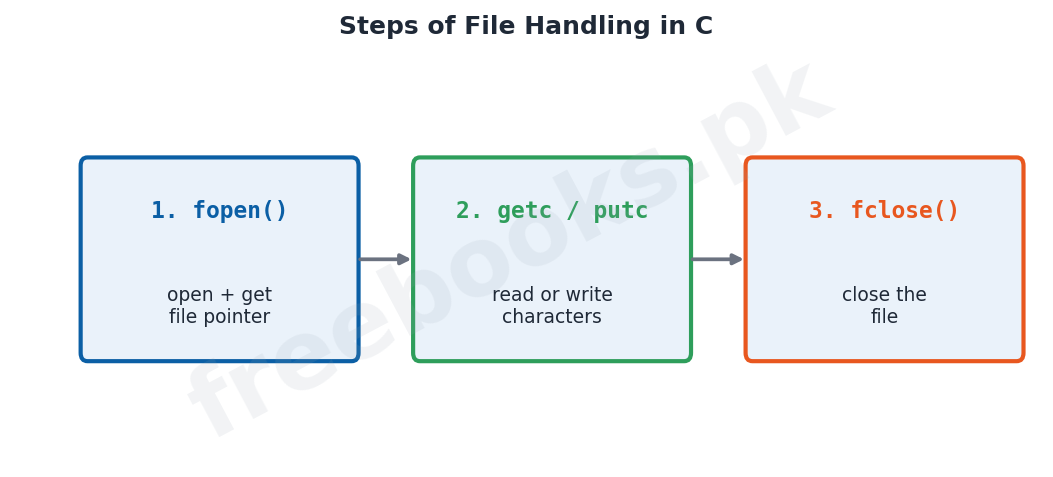
When a program no longer needs a file it should close it with fclose(), whose prototype is int fclose(FILE* fp); this disassociates the stream from the file and frees the information stored about it, returning 0 on success or EOF on error. Once a file is open, a character can be read with getc(FILE* fp), which returns the next character as an integer or EOF at end of file or on error, and a character can be written with putc(int ch, FILE* fp), which writes the character and returns it, or EOF if an error occurs.
Important Definitions
File
A set of related records saved on secondary storage.
Stream
A logical interface between a program and a file.
Text stream
A sequence of characters, with possible character translations.
Binary stream
A sequence of bytes matching the device one-to-one, with no translation.
EOF
The end-of-file marker placed after the last character of a file.
fopen()
A function that opens a file and returns a file pointer.
File pointer
A variable of type FILE* that points to a file's information.
fclose()
A function that closes a file and disassociates its stream.
Key Facts & Rules
| Item | Detail |
|---|---|
| Include header | #include <stdio.h> |
| Open a file | FILE* fp = fopen(filename, mode); |
| Modes | "r" read, "w" write, "a" append, "r+" "w+" "a+" |
| Check failure | if (fp == NULL) then error |
| Close a file | fclose(fp); (returns 0 or EOF) |
| Read a character | ch = getc(fp); |
| Write a character | putc(ch, fp); |
Diagrams & Illustrations
A stream connects a program to a file: how a stream links a program to a file, opened with fopen() and closed with fclose().
File opening modes: the file opening modes in C, r, w, a, r+, w+ and a+, and what each does.
Steps of file handling: the three steps of file handling, open with fopen(), read/write with getc()/putc(), then close with fclose().
Solved Examples & Practice
Open for reading
fp = fopen("myfile.txt", "r"); opens an existing text file for reading.
Check the open
if (fp == NULL) printf("Error opening file"); reports failure when fopen returns NULL.
Read a character
ch = getc(fp); reads the next character from the file; it returns EOF at the end.
Write and close
putc('A', fp); writes the character A to the file, then fclose(fp); closes it.
Short Questions & Answers
Why are files needed?
To store data and results permanently so they are not lost when the program ends.
What is a stream?
A logical interface between a program and a file.
Name the two types of streams.
Text stream and binary stream.
What does EOF mark?
The end of a file; it is placed after the last character.
What is the use of the fopen() function?
It opens a file, associates it with a stream and returns a file pointer.
What does fopen() return if it fails?
The NULL pointer.
Long Questions & Answers
Q1: Explain the concept of a stream and describe text and binary streams.
The programs studied in earlier chapters worked only with temporary data, which the user had to enter each time the program ran, because they could not store data permanently; permanent storage of data is achieved by saving it on secondary storage in the form of files, where a file is a set of related records. C itself has no built-in method of performing file input and output, but its standard library, stdio, provides a rich, powerful and flexible set of I/O functions for the purpose, and the key concept behind them is the stream. A stream is a logical interface to a file: it is the channel through which data flows between the program and the file. A stream is associated with a file by an open operation and is disassociated from it by a close operation, and because C works through streams it can treat many different things, such as a disk file, the screen, the keyboard, a port or a file on tape, in the same uniform way. There are two types of streams. A text stream is a sequence of characters in which certain character translations may take place; for example, a newline character may be converted into a carriage-return and line-feed pair, which means there may not be a one-to-one relationship between the characters written by the program and the characters actually stored on the external device. A binary stream, on the other hand, is a sequence of bytes that correspond one-to-one with the bytes on the external device, with no translation at all, so that the number of bytes read or written is exactly the same as the number of bytes on the device, although an implementation may append a few extra bytes to pad the data to fill a disk sector. Text streams are convenient for human-readable data, while binary streams preserve data exactly as it is.
Q2: Explain how a file is opened and closed in C, including fopen(), the file opening modes and fclose().
Before a program can read from or write to a file, the file must first be opened, and all the standard file handling functions needed for this are declared in the header file stdio.h, which is therefore included in almost every file handling program. A file is opened, and associated with a stream, by the library function fopen(), whose prototype is FILE* fopen(const char* filename, const char* mode). The first argument is the name of the file; if the file is not in the current directory its absolute path must be given, and because a single backslash has a special meaning in C strings each backslash in the path must be written as a double backslash. The second argument is the opening mode, which must be written as a string in double quotes rather than as a single character. The mode determines what may be done with the file: "r" opens an existing text file for reading and fails if the file does not exist; "w" opens a file for writing, creating it if necessary and overwriting its contents if it already exists; and "a" opens a file for appending, so that new data is added to the end of an existing file, again creating the file if it does not exist. In addition, the combined modes "r+", "w+" and "a+" open a file for both reading and writing, differing in whether the file must already exist and whether its current contents are preserved or overwritten. The fopen() function returns a file pointer that is used in all later operations on the file, but if it fails, most commonly because the file to be read does not exist, it returns the NULL pointer, so a program should always test the returned value against NULL before using the file. When the program has no further use for a file it should close it with the fclose() function, whose prototype is int fclose(FILE* fp); this function closes the file associated with the valid file pointer fp, disassociates the stream from the file and frees the information that was stored about the file, returning 0 if it succeeds and EOF if an error occurs.
Q3: Explain the file pointer and describe how characters are read from and written to a file.
To work with a file after opening it, C uses a file pointer, which is a variable of the type FILE that is defined in the header file stdio.h and is declared with a statement such as FILE* fp. In this declaration the symbol star does not mean arithmetic multiplication; when it is used with a data type it indicates a pointer to a variable of that type, so that int star means a pointer to an integer, float star means a pointer to a float, and FILE star means a pointer to a variable of type FILE. Conceptually a pointer is a memory cell whose content is the address of another memory cell, so a pointer does not store a value directly but rather stores the location where a value is kept. The file pointer, in particular, points to the block of file information that describes the properties of the file, including its name, its status and its current position, and this pointer is exactly what the fopen() function returns when a file is opened successfully. Once a file has been opened, single characters can be read from it or written to it, depending on the mode in which it was opened, using two library functions. The getc() function, with the prototype int getc(FILE* fp), reads the next character from the file and returns it as an integer; it returns the special value EOF when the end of the file is reached or when an error occurs, which is why its return type is int rather than char. The putc() function, with the prototype int putc(int ch, FILE* fp), writes the character stored in ch to the file associated with fp as an unsigned char; although ch is declared as an int a char may be used, and the function returns the character written if it succeeds or EOF if an error occurs. Together the file pointer and these character functions allow a program to move through a file and transfer data one character at a time.
MCQs with Answers
Data is stored permanently in the form of: (a) variables (b) files (c) arrays (d) streams
Correct Answer: (b) files.
A set of related records is called a: (a) stream (b) file (c) pointer (d) buffer
Correct Answer: (b) file.
A logical interface between a program and a file is a: (a) file (b) stream (c) pointer (d) record
Correct Answer: (b) stream.
The two types of streams are text and: (a) numeric (b) binary (c) string (d) logical
Correct Answer: (b) binary.
The end of a file is marked by: (a) newline (b) EOF (c) NULL (d) tab
Correct Answer: (b) EOF.
The function used to open a file is: (a) fclose() (b) fopen() (c) getc() (d) putc()
Correct Answer: (b) fopen().
If fopen() fails it returns: (a) 0 (b) EOF (c) the NULL pointer (d) 1
Correct Answer: (c) the NULL pointer.
The mode that appends data to a file is: (a) r (b) w (c) a (d) x
Correct Answer: (c) a.
A variable of type FILE* is a: (a) record (b) file pointer (c) stream name (d) mode
Correct Answer: (b) file pointer.
The function used to read a character from a file is: (a) putc() (b) getc() (c) fclose() (d) fopen()
Correct Answer: (b) getc().
Quick Revision Summary
- Files store data permanently; a file = a set of related records (stdio.h needed).
- A stream is a logical interface to a file; two types: text and binary.
- Text file: each line ends with a newline; the file ends with the EOF marker.
- fopen(filename, mode) opens a file and returns a FILE* (NULL if it fails).
- Modes: "r" read, "w" write (overwrite), "a" append, plus "r+" "w+" "a+".
- getc() reads a character, putc() writes one; fclose() closes the file. Notes by freebooks.pk.
Exam Tips
- Explain why files are needed and define a file.
- Define a stream and differentiate text and binary streams.
- Explain the newline and EOF markers in a text file.
- Give the fopen() prototype and list the file opening modes.
- Explain the file pointer (FILE*) as a pointer to file information.
- Describe fclose(), getc() and putc() with their return values.