This chapter covers Information Networks from the 1st Year (ICS Part-I) Computer Science syllabus of the Punjab Curriculum and Textbook Board (PTB/PCTB). It explains workgroup computing, e-mail, the Internet, the components of a network, LAN, WAN and MAN, network models, standards, topologies and the OSI model. These notes are prepared by freebooks.pk.
A network connects computers so that they can share data and resources. Networks make e-mail, the Internet and shared printers possible, and this chapter explains how they are built and organised.
Learning Objectives
- Explain workgroup computing and the benefits of e-mail.
- Describe the Internet and its usefulness.
- List the components of a network.
- Distinguish LAN, MAN and WAN.
- Describe network models, standards and topologies.
- Outline the OSI model.
Key Concepts
Workgroup Computing and E-mail
Workgroup computing means a number of people connected by a network working together on the same task, sharing files, printers and information. One of the most useful network services is electronic mail (e-mail), which lets users send and receive messages, documents and files almost instantly to anyone in the world. The benefits of e-mail include speed, low cost, the ability to send the same message to many people at once, and a written record of the communication.
The Internet
The Internet is a worldwide network of networks that connects millions of computers so that they can share information. It grew out of a research project (ARPANET) and has become a global system used for communication, research, business, entertainment and education. Through the Internet users can browse the World Wide Web, send e-mail, download files and use countless online services.
Components of a Network
A computer network is built from several components working together: the computers (servers and clients) themselves, the transmission media (cables or wireless links) that carry the data, network interface cards (NICs) that connect each computer to the media, and connecting devices such as hubs, switches and routers that direct the traffic. Network software (a network operating system) manages the communication and controls access to shared resources.
LAN, MAN and WAN
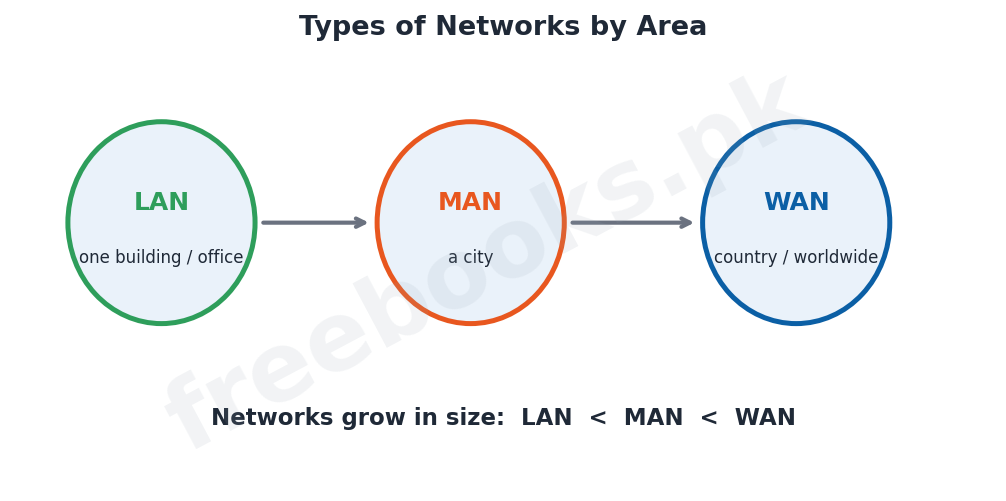
Networks are classified by the area they cover. A local area network (LAN) connects computers within a small area such as a single building, office or school. A metropolitan area network (MAN) covers a larger area such as a city. A wide area network (WAN) spans a very large area, such as a country or the whole world; the Internet is the largest WAN. As the area grows, so does the size and complexity of the network.
Network Models
There are two main ways of organising a network. In a peer-to-peer network all the computers are equal and can share their resources directly with one another, which is simple and cheap but suited only to small networks. In a client-server network one or more powerful computers, called servers, provide services and resources (files, printing, e-mail) to the other computers, called clients; this model is more secure and better for large networks.
Network Topologies
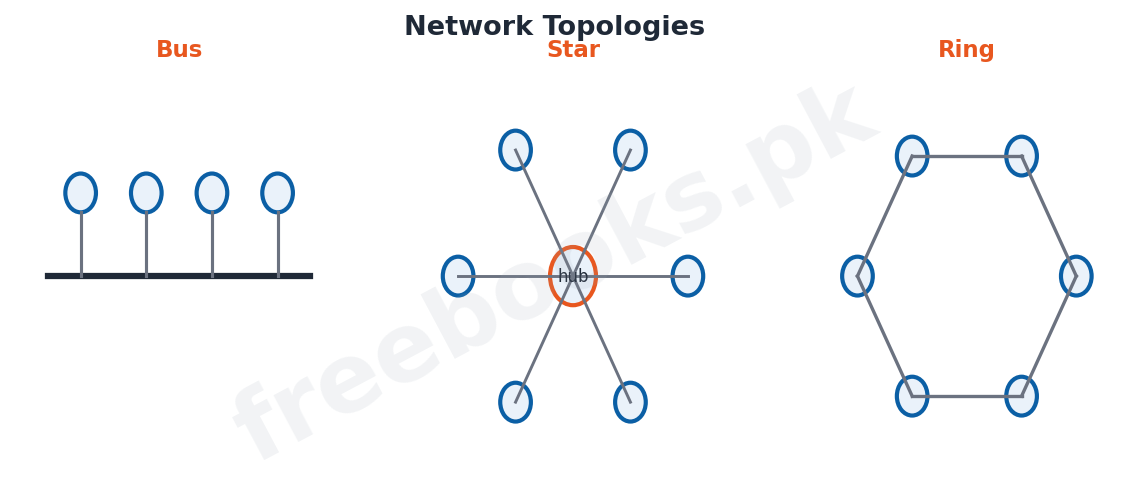
The topology of a network is the physical arrangement in which its computers are connected. In a bus topology all computers share a single central cable. In a star topology every computer is connected to a central hub or switch. In a ring topology the computers are joined in a closed loop, and data passes around the ring. In a mesh topology every computer is connected to every other. Each topology has its own advantages in cost, reliability and ease of fault-finding.
Network Standards and the OSI Model
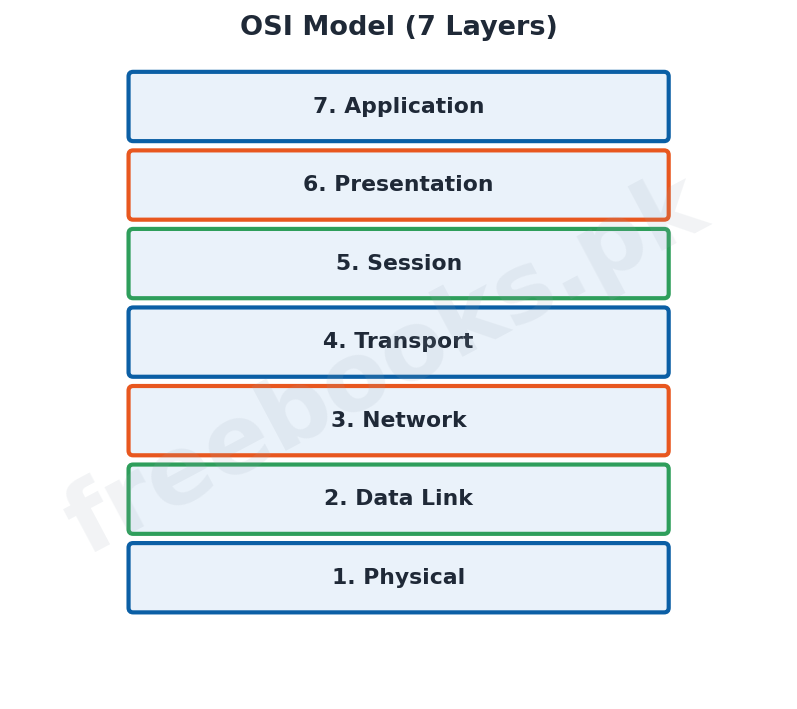
For different computers and devices to communicate, they must follow agreed rules called protocols and standards. The Open Systems Interconnection (OSI) model is a standard reference model that divides network communication into seven layers, from the physical layer (the actual cabling and signals) at the bottom, through the data link, network, transport, session and presentation layers, up to the application layer (the programs the user works with) at the top. Each layer performs a specific function and passes data to the layer above or below it, which makes networks easier to design and troubleshoot.
Important Definitions
Network
Two or more computers connected to share data and resources.
Electronic mail; sending messages and files over a network.
Internet
A worldwide network of networks connecting millions of computers.
LAN
A local area network covering a small area such as a building.
WAN
A wide area network covering a very large area such as a country.
Topology
The physical arrangement of computers in a network.
Protocol
A set of rules that governs communication between devices.
OSI model
A seven-layer reference model for network communication.
Key Facts & Rules
| Item | Detail |
|---|---|
| LAN | Small area (building / office) |
| MAN | City-sized area |
| WAN | Country or worldwide (e.g. the Internet) |
| Peer-to-peer | All computers equal; small networks |
| Client-server | Servers provide resources to clients; large networks |
| OSI layers | Physical, Data Link, Network, Transport, Session, Presentation, Application |
Diagrams & Illustrations
Network topologies: the bus, star and ring topologies showing how computers are connected by a shared cable, a central hub and a closed loop respectively.
Types of networks: LAN, MAN and WAN shown by increasing area, from a single building to a city to a country/worldwide.
OSI model: the seven layers of the OSI model from the physical layer at the bottom to the application layer at the top.
Solved Examples & Practice
Choosing a network type
A school connecting the computers in one building would use a LAN; a bank linking branches across the country would use a WAN.
Choosing a model
A home with three computers sharing a printer can use a peer-to-peer network; a company with hundreds of users needs a client-server network.
Identifying a topology
If every computer is joined to a central hub, the topology is a star; if they all share one long cable, it is a bus.
Counting OSI layers
The OSI model has 7 layers; the lowest is the physical layer and the highest is the application layer.
Short Questions & Answers
What is a computer network?
Two or more computers connected together so that they can share data and resources.
State two benefits of e-mail.
It is fast and cheap, and one message can be sent to many people at once with a written record kept.
Differentiate between LAN and WAN.
A LAN covers a small area such as a building; a WAN covers a very large area such as a country or the world.
Differentiate peer-to-peer and client-server networks.
In peer-to-peer all computers are equal and share directly; in client-server, servers provide resources to client computers.
What is a network topology?
The physical arrangement in which the computers of a network are connected (e.g. bus, star, ring).
How many layers has the OSI model and name the lowest and highest.
Seven layers; the lowest is the physical layer and the highest is the application layer.
Long Questions & Answers
Q1: Describe the components of a network and distinguish between LAN, MAN and WAN.
A computer network is made up of several components that work together to let computers communicate and share resources. First there are the computers themselves, which may act as servers (providing resources) or clients (using them). The data travels over transmission media, which may be cables such as twisted-pair, coaxial or fibre-optic, or wireless links such as radio waves. Each computer connects to the media through a network interface card (NIC). Connecting devices such as hubs, switches and routers join the parts of the network together and direct the data to the correct destination. Finally, network software, usually a network operating system, manages communication and controls who may use the shared resources. Networks are classified according to the geographical area they cover. A local area network (LAN) links computers within a small area such as one building, office or school, and is usually owned by a single organisation. A metropolitan area network (MAN) is larger, covering a city or town, and often links several LANs together. A wide area network (WAN) covers a very large area such as a country or even the whole world; it uses long-distance links, often provided by telephone and satellite companies, and the Internet is the biggest example of a WAN. Thus as we move from LAN to MAN to WAN the area covered, and usually the number of computers and the complexity, increase.
Q2: Explain the common network topologies and their advantages.
The topology of a network describes the physical layout, that is, the way in which its computers and cables are arranged and connected. In a bus topology, all the computers are attached to a single main cable called the bus; it is cheap and easy to set up and uses little cable, but if the main cable fails the whole network stops working, and it is slow when traffic is heavy. In a star topology, each computer is connected by its own cable to a central device such as a hub or switch; this makes the network reliable because a fault in one cable affects only one computer, and faults are easy to find, though it needs more cable and depends on the central device. In a ring topology, the computers are connected one after another to form a closed loop, and data passes around the ring from one computer to the next in one direction; it gives each computer a fair chance to send data but a break in the ring can stop the whole network. In a mesh topology, every computer is directly connected to every other computer, which is very reliable because there are many alternative paths, but it is expensive and complex because of the large number of connections. The choice of topology depends on the cost, the required reliability and how easy the network must be to expand and repair.
Q3: Describe the OSI model and explain why network standards are important.
For computers and devices made by different manufacturers to communicate successfully over a network, they must all obey the same agreed rules, called protocols and standards. Without such standards, equipment from different companies would be unable to work together. The most important reference standard is the Open Systems Interconnection (OSI) model, developed by the International Standards Organisation, which describes network communication as a stack of seven layers, each with a clearly defined job. From the bottom upwards these are: the physical layer, which deals with the actual cables, connectors and electrical signals; the data link layer, which organises data into frames and handles error detection between directly connected devices; the network layer, which is responsible for addressing and routing data across the network; the transport layer, which ensures reliable, complete delivery of data; the session layer, which sets up and manages connections between applications; the presentation layer, which translates, encrypts and compresses data into a form the application can use; and finally the application layer, which provides the network services that the user’s programs, such as web browsers and e-mail, actually use. When data is sent, it passes down through the layers of the sending computer and up through the layers of the receiving computer, each layer adding or removing its own control information. Dividing the task into layers in this way makes networks much easier to design, understand and troubleshoot, because each layer can be developed and repaired independently of the others.
MCQs with Answers
Electronic mail is commonly called: (a) e-post (b) e-mail (c) e-file (d) e-net
Correct Answer: (b) e-mail.
A network covering a single building is a: (a) WAN (b) MAN (c) LAN (d) Internet
Correct Answer: (c) LAN.
The largest example of a WAN is the: (a) LAN (b) hub (c) Internet (d) NIC
Correct Answer: (c) Internet.
In a client-server network, resources are provided by the: (a) client (b) server (c) hub (d) cable
Correct Answer: (b) server.
A topology where all computers connect to a central hub is: (a) bus (b) star (c) ring (d) mesh
Correct Answer: (b) star.
A topology where computers share one main cable is: (a) star (b) bus (c) ring (d) mesh
Correct Answer: (b) bus.
A card that connects a computer to the network is the: (a) CPU (b) NIC (c) ALU (d) RAM
Correct Answer: (b) NIC.
The OSI model has ___ layers: (a) five (b) six (c) seven (d) eight
Correct Answer: (c) seven.
The lowest layer of the OSI model is the: (a) application (b) physical (c) network (d) session
Correct Answer: (b) physical.
A set of rules for communication is called a: (a) topology (b) protocol (c) server (d) modem
Correct Answer: (b) protocol.
Quick Revision Summary
- Network = connected computers sharing data/resources; e-mail is fast, cheap, one-to-many.
- Internet = worldwide network of networks (largest WAN).
- Components: computers, media, NIC, hubs/switches/routers, network software.
- By area: LAN (building) < MAN (city) < WAN (country/world).
- Models: peer-to-peer (equal) vs client-server (servers provide resources).
- Topologies: bus, star, ring, mesh. OSI = 7 layers (Physical to Application). Notes by freebooks.pk.
Exam Tips
- Learn LAN/MAN/WAN by the area they cover.
- State two clear benefits of e-mail.
- Compare peer-to-peer and client-server networks.
- Draw and label the bus, star and ring topologies.
- Memorise the 7 OSI layers in order (Physical at the bottom).
- Define protocol and why standards matter.