This chapter covers the Fundamentals of the Internet from the 1st Year (ICS Part-I) Computer Science syllabus of the Punjab Curriculum and Textbook Board (PTB/PCTB). It explains the Internet and how to connect to it, the World Wide Web, web browsers, URLs, search engines and the main Internet services. These notes are prepared by freebooks.pk.
The Internet connects billions of computers around the world and has changed the way we communicate, learn and do business. This chapter explains what the Internet is and how we use it.
Learning Objectives
- Explain what the Internet is and how it is used.
- Describe how a computer connects to the Internet.
- Explain the World Wide Web, web pages and websites.
- Describe a web browser, a URL and a search engine.
- List the main services provided by the Internet.
- State the advantages and drawbacks of the Internet.
Key Concepts
The Internet
The Internet is a huge worldwide network that connects millions of computers and smaller networks together so that they can share information. No single person or organisation owns it; instead, many networks are joined together and communicate using agreed rules (protocols such as TCP/IP). Through the Internet, users all over the world can send messages, share files and access an enormous amount of information at any time.
Connecting to the Internet
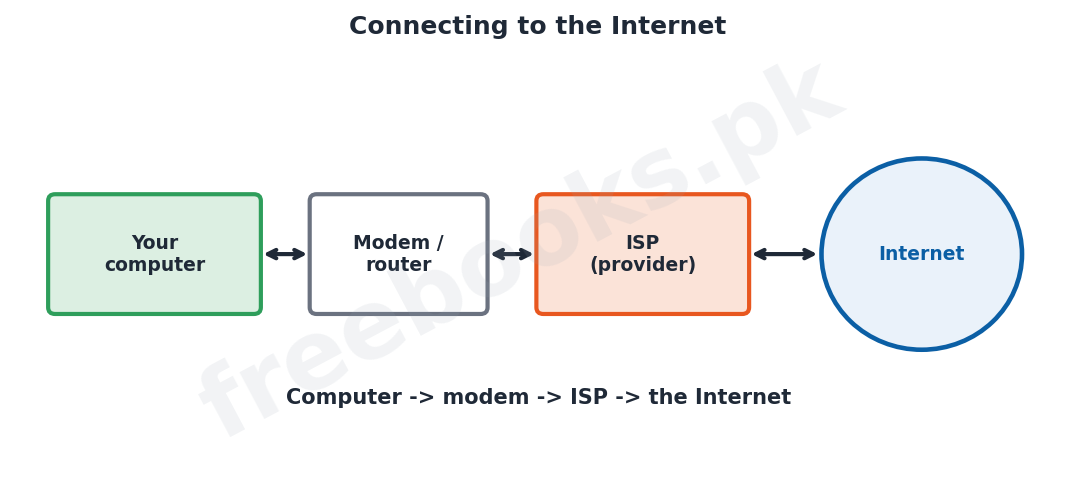
To use the Internet, a computer must connect to it through an Internet Service Provider (ISP), a company that provides Internet access. The connection is usually made through a modem or router, which links the computer to the ISP over a telephone line, cable, fibre or wireless link. The ISP then connects the user to the rest of the Internet. Each computer on the Internet is identified by a unique number called an IP address.
The World Wide Web
The World Wide Web (WWW), often just called the Web, is the huge collection of linked documents, called web pages, stored on computers all over the Internet. A group of related web pages belonging to one person or organisation is called a website. Web pages can contain text, pictures, sound and video, and they are joined to one another by hyperlinks, which the user clicks to jump from one page to another. The Web is the most popular part of the Internet.
Web Browsers and URLs
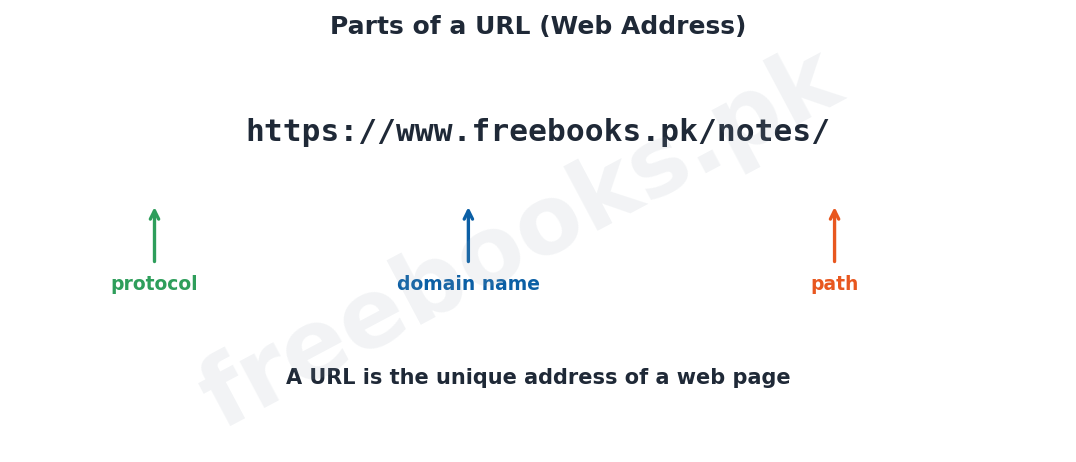
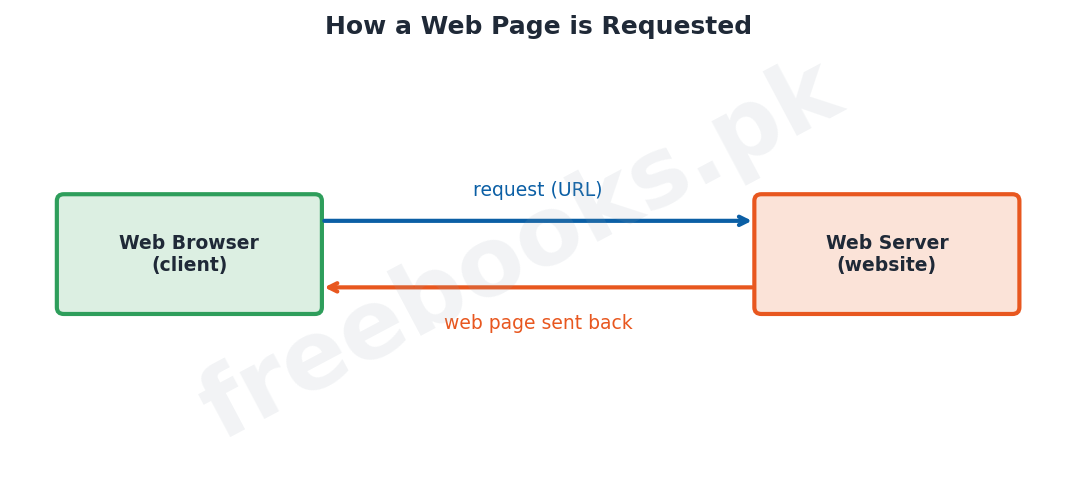
A web browser is application software used to view web pages, such as Google Chrome, Microsoft Edge or Mozilla Firefox. To visit a particular web page, the user enters its address, called a URL (Uniform Resource Locator), into the browser; a URL such as https://www.freebooks.pk/ has parts that identify the protocol, the domain name of the website and the particular page. The browser then fetches the page from the web server that stores it and displays it on the screen.
Search Engines
Because there are billions of web pages, a search engine is used to find information on the Web. A search engine, such as Google, is a website that lets the user type in keywords describing what they are looking for and then lists the web pages that match, so that the user can click on the most useful ones. Search engines make the vast amount of information on the Internet easy to find.
Internet Services
The Internet provides many useful services. Electronic mail (e-mail) allows messages and files to be sent quickly. The World Wide Web gives access to information on almost any subject. File transfer allows files to be uploaded and downloaded. Other services include online chat and video calls, social media, online shopping and banking (e-commerce), online education, and entertainment such as music and video streaming. These services have made the Internet part of everyday life.
Advantages and Drawbacks of the Internet
The Internet has many advantages: it gives fast access to a vast amount of information, allows quick and cheap communication worldwide, supports business and education, and provides entertainment. However, it also has drawbacks: it can spread viruses, expose users to unsuitable or false information, threaten privacy and security, and lead to time-wasting or addiction. Users should therefore use the Internet responsibly and safely.
Important Definitions
Internet
A worldwide network connecting millions of computers to share information.
ISP
Internet Service Provider; a company that provides Internet access.
IP address
A unique number that identifies a computer on the Internet.
World Wide Web
The collection of linked web pages stored on the Internet.
Website
A group of related web pages belonging to one person or organisation.
Web browser
Software used to view web pages (e.g. Chrome).
URL
The address of a web page (Uniform Resource Locator).
Search engine
A website that finds web pages matching keywords (e.g. Google).
Key Facts & Rules
| Item | Detail |
|---|---|
| Connection | Computer -> modem/router -> ISP -> Internet |
| IP address | Unique number identifying each computer |
| WWW | Web pages linked by hyperlinks |
| Website | A group of related web pages |
| URL | protocol + domain name + path |
| Search engine | Find pages by keywords (e.g. Google) |
Diagrams & Illustrations
Connecting to the Internet: a computer linked through a modem/router and an ISP to reach the Internet.
Parts of a URL: a URL broken into its protocol, domain name and path.
Requesting a web page: a web browser (client) sending a request to a web server, which returns the web page.
Solved Examples & Practice
Identify the service
Sending a message with a file attached to a friend uses the e-mail service of the Internet.
Find information
To find pages about the solar system, type the keywords into a search engine such as Google.
Read a URL
In https://www.freebooks.pk/notes/, ‘https’ is the protocol, ‘www.freebooks.pk’ is the domain name and ‘/notes/’ is the path.
Connect a computer
A home computer connects to the Internet through a modem/router and an Internet Service Provider (ISP).
Short Questions & Answers
What is the Internet?
A huge worldwide network that connects millions of computers so that they can share information.
What is an ISP?
An Internet Service Provider, a company that provides access to the Internet.
What is the World Wide Web?
The collection of linked web pages, stored on computers across the Internet, joined by hyperlinks.
What is a web browser?
Application software used to view web pages, such as Google Chrome or Firefox.
What is a URL?
The unique address of a web page, for example https://www.freebooks.pk/.
What is a search engine?
A website, such as Google, that finds web pages matching the keywords the user types.
Long Questions & Answers
Q1: Explain what the Internet is and describe how a computer connects to it.
The Internet is a vast, worldwide network that links millions of computers and thousands of smaller networks together so that they can communicate and share information. It is not owned or controlled by any single person or company; rather, it is made up of many independent networks that agree to connect to one another and to communicate using a common set of rules, or protocols, the most important of which is TCP/IP. Because of this, a user sitting at one computer can exchange information with computers almost anywhere in the world. To make use of the Internet, an ordinary computer must first be connected to it, and this is done through an Internet Service Provider (ISP), which is a company that sells Internet access to homes and businesses. The physical connection between the user’s computer and the ISP is usually made through a device called a modem or a router, which links the computer to the ISP over a telephone line, a cable, a fibre-optic line or a wireless link. The ISP is itself connected to the wider Internet, so once the user reaches the ISP they can reach the whole Internet. So that data can be sent to the right place, every computer connected to the Internet is given a unique identifying number called an IP address, rather like a postal address, which allows information to be delivered to exactly the right machine. In this way an individual computer becomes part of the global network.
Q2: Describe the World Wide Web, web browsers, URLs and search engines.
The World Wide Web, usually shortened to the Web, is the most widely used part of the Internet. It is the enormous collection of electronic documents, called web pages, that are stored on computers all over the world and are linked to one another. A web page may contain text, pictures, sound and video, and it contains hyperlinks, special words or images that the user can click to jump straight to another related page. A set of web pages that belong to one person or organisation and are kept together is called a website. To look at web pages, the user needs a piece of application software called a web browser; common browsers include Google Chrome, Microsoft Edge and Mozilla Firefox. Every web page has a unique address called a URL, which stands for Uniform Resource Locator; a URL such as https://www.freebooks.pk/notes/ is made up of parts that tell the browser the protocol to use, the domain name of the website, and the particular page or folder that is wanted. When the user types a URL into the browser (or clicks a hyperlink), the browser sends a request to the web server that stores that page, and the server sends the page back so that the browser can display it. Because the Web contains billions of pages, finding a particular piece of information would be impossible without help, and this is provided by a search engine such as Google, which is a special website where the user types in keywords describing what they want; the search engine then lists the web pages that best match those keywords, and the user simply clicks on the most useful ones. Together, browsers, URLs and search engines make the huge information of the Web easy to reach.
Q3: Describe the main services provided by the Internet and discuss its advantages and drawbacks.
The Internet is valuable because of the many services it provides. Electronic mail (e-mail) lets users send written messages, together with attached files such as documents and pictures, to anyone in the world within seconds. The World Wide Web gives access to a practically unlimited store of information on every imaginable subject, used for study, research and news. File transfer allows files to be downloaded from, and uploaded to, computers across the Internet. In addition, the Internet supports instant messaging, online chat and video calls that let people talk face to face across great distances; social media for keeping in touch and sharing; e-commerce, that is, online shopping and banking; online education and examinations; and entertainment such as games and the streaming of music and films. These services have made the Internet a part of daily life. The Internet brings great advantages: it provides fast and cheap communication across the world, immediate access to a vast amount of information, support for business and education, and a wide range of entertainment. However, it also has serious drawbacks that users must be aware of. It can be used to spread computer viruses and other harmful programs; it exposes users, especially children, to unsuitable, harmful or false information; it can threaten people’s privacy and the security of their personal and financial data through hacking and fraud; and spending too much time online can waste time and even become an addiction. For these reasons, while the Internet is an extremely powerful and useful tool, it should always be used carefully, responsibly and safely.
MCQs with Answers
A worldwide network of connected computers is the: (a) LAN (b) Internet (c) hub (d) modem
Correct Answer: (b) Internet.
A company that provides Internet access is an: (a) ISP (b) OS (c) IP (d) URL
Correct Answer: (a) ISP.
A unique number identifying a computer on the Internet is an: (a) IP address (b) icon (c) index (d) opcode
Correct Answer: (a) IP address.
Linked web pages across the Internet form the: (a) LAN (b) World Wide Web (c) modem (d) ISP
Correct Answer: (b) World Wide Web.
Software used to view web pages is a: (a) web browser (b) spreadsheet (c) compiler (d) modem
Correct Answer: (a) web browser.
The address of a web page is its: (a) IP (b) URL (c) ISP (d) OS
Correct Answer: (b) URL.
A group of related web pages is a: (a) website (b) cell (c) folder only (d) protocol
Correct Answer: (a) website.
Google is an example of a: (a) web browser (b) search engine (c) modem (d) spreadsheet
Correct Answer: (b) search engine.
Clickable links between web pages are: (a) hyperlinks (b) cells (c) icons (d) cookies
Correct Answer: (a) hyperlinks.
A drawback of the Internet is: (a) fast information (b) spread of viruses (c) cheap communication (d) entertainment
Correct Answer: (b) spread of viruses.
Quick Revision Summary
- Internet = worldwide network of computers sharing information (uses TCP/IP).
- Connect via modem/router + ISP; each computer has an IP address.
- WWW = linked web pages; a website = related pages; hyperlinks connect them.
- Web browser (Chrome) views pages; URL = page address; search engine (Google) finds pages.
- Services: e-mail, Web, file transfer, chat, social media, e-commerce, education.
- Advantages: fast info + communication; drawbacks: viruses, unsafe content, privacy risks. Notes by freebooks.pk.
Exam Tips
- Define the Internet and the WWW (they are not the same).
- Explain connecting via ISP and modem; mention IP address.
- Define web browser, URL and search engine.
- List the main Internet services.
- Read the parts of a URL.
- Give balanced advantages and drawbacks of the Internet.