Web development is the process of creating websites and web applications using various programming languages and tools to design, build, and maintain them. This chapter covers the three main components of web development — front-end, back-end, and full-stack development — before diving into HTML (Hyper Text Markup Language), the standard language used to structure web page content, and CSS (Cascading Style Sheets), used to style and visually enhance that content.
The chapter walks through HTML's basic document structure and tags, creating content with headings, paragraphs, links, images, lists, tables, and comments, then covers CSS styling methods (inline, internal, external), fonts, colors, backgrounds, layouts (Grid, Flexbox, positioning), and animations/transitions. It closes with an introduction to JavaScript — variables, data types, functions, event handling, and interactive elements — along with essential testing and debugging techniques for web development.
Learning Objectives
- Understand the three main components of web development: front-end, back-end, and full-stack
- Apply HTML tags appropriately to create the basic structure of a web page
- Add text, images, links, lists, and tables to a web page using HTML
- Style HTML elements using CSS, including fonts, colors, backgrounds, and layouts
- Integrate CSS into HTML using inline, internal, and external methods
- Add simple animations and transitions to a web page using CSS
- Understand JavaScript syntax, variables, data types, and functions
- Handle events and user input with JavaScript to create interactive web pages
Key Concepts
8.1 Components of Web Development
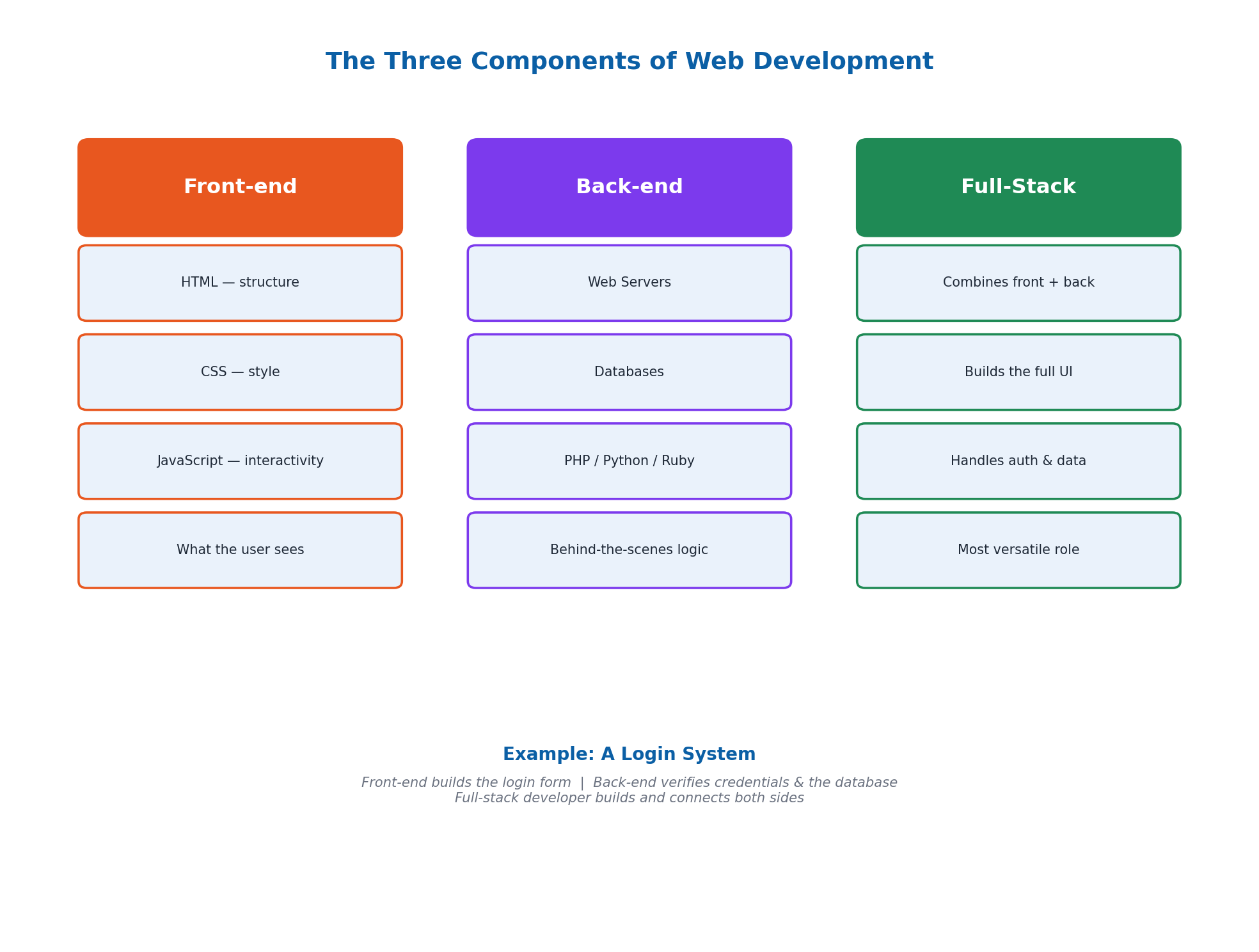
Web development is the process of creating websites and web applications, using various programming languages and tools to design, build, and maintain them. It has three main components. Front-end Development focuses on what users see and interact with on a website, built using HTML (which structures content like headings, paragraphs, images, and links), CSS (which styles content, changing colors, fonts, and layout), and JavaScript (which adds interactivity, enabling forms, animations, and games).
Back-end Development manages the behind-the-scenes functionality of a website, including web servers (computers that store and deliver web pages to users), databases (which store and manage data like user information and content), and back-end programming languages like PHP, Python, and Ruby (which handle tasks such as processing forms and managing user logins). Full-Stack Development combines both: a full-stack developer creates the user interface for the front-end and also handles authentication and database interaction for the back-end — for example, building a complete login system from start to finish. The first website was created by Tim Berners-Lee in 1991 and is still accessible today.
8.2 Getting Started with HTML
HTML (Hyper Text Markup Language) is the standard language used to create web pages — think of HTML tags as building blocks, like LEGO pieces coming together to build a structure. HTML was created by Tim Berners-Lee in 1991 and has evolved through several major versions: HTML 1.0 (1991, simple text and links), HTML 2.0 (1995, more tags), HTML 3.2 (1997, tables and applets), HTML 4.0 (1997, multimedia support), HTML 4.01 (1999, minor improvements), and HTML5 (2014, the current version with better multimedia, graphics, and interactivity).
To start creating websites, two basic tools are needed: a text editor (such as Notepad++, Sublime Text, or Visual Studio Code) to write HTML code, and a web browser (such as Google Chrome, Mozilla Firefox, or Microsoft Edge) to view and test the HTML files. A basic 'Hello, World!' HTML application is created by writing HTML code in a text editor, saving the file with a .html extension, and then opening it in a web browser to view the result.
8.3 HTML Basic Structure and Tags
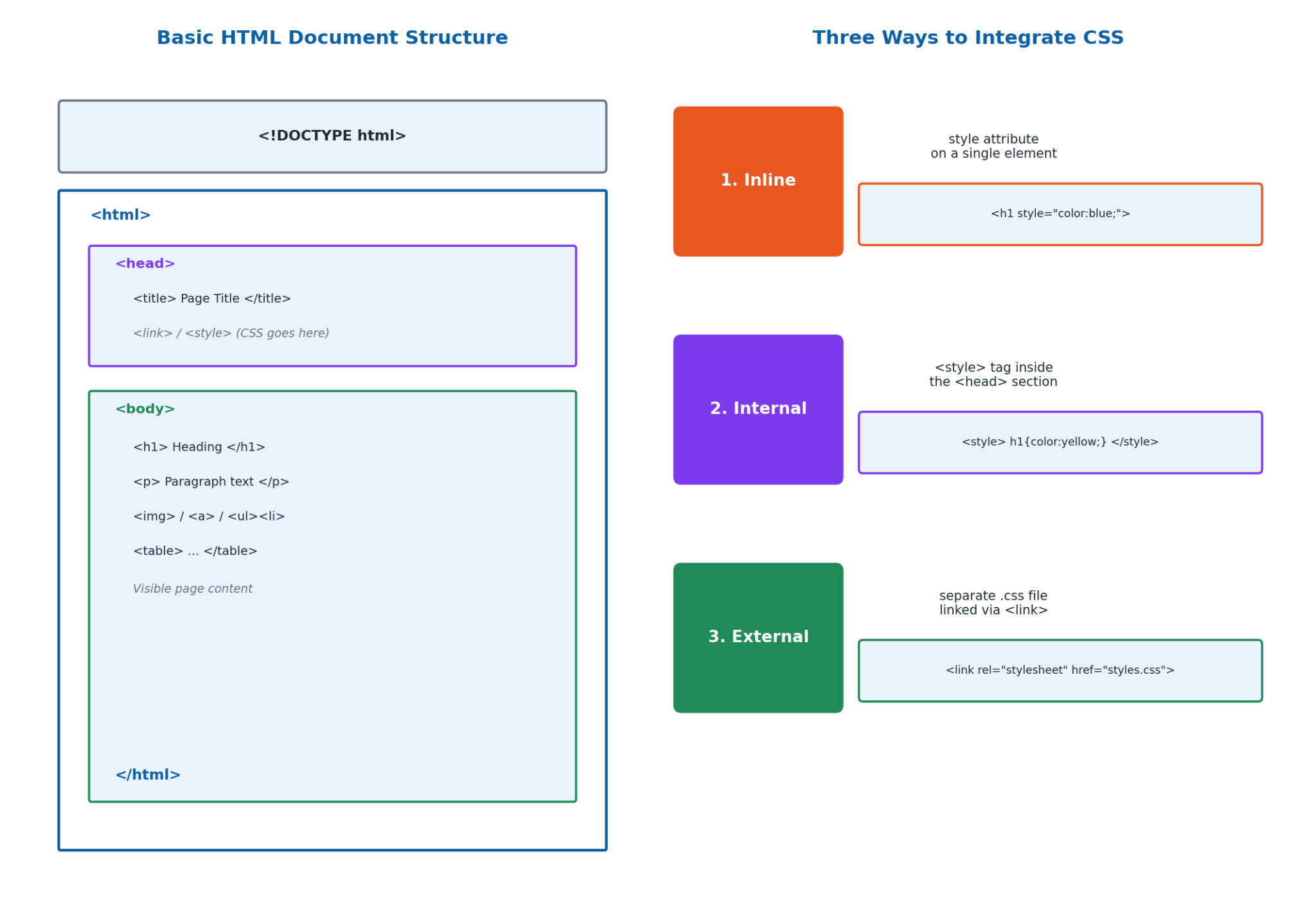
A structured HTML document uses several essential elements: <!DOCTYPE html> tells the browser this is an HTML5 document; <html> is the root element of the page; <head> contains meta-information like the title; <title> sets the title shown in the browser tab; and <body> contains the visible content of the page, including elements like <h1> for a large heading and <p> for a paragraph. Properly nested and well-organized elements help browsers interpret content correctly and ensure the page displays as intended.
The elements that make up an HTML document are called tags, and they are categorized into two types based on structure: Paired tags come in pairs, with an opening tag and a closing tag (e.g., <p>…</p>), while Unpaired tags (also called self-closing tags) do not need a closing tag, such as <img> and <br>.
8.4 Creating Content with HTML
HTML content is the main information on a web page that users read and interact with, including text, images, videos, links, and other elements. Headings (<h1> to <h6>) define the structure and hierarchy of content — <h1> is used for the main title, while <h2> to <h6> are used for subheadings in decreasing importance; proper heading use also improves Search Engine Optimization (SEO) by helping search engines understand a page's structure. Paragraphs, created with the <p> tag, organize text into readable blocks with space above and below.
Links, created with the <a> tag, connect one web page to another (including special 'mailto:' links that open an email program). Images, added using the <img> tag, make pages more attractive and require alternate text (alt) for accessibility. Lists can be Unordered (bulleted, using <ul> and <li>) or Ordered (numbered, using <ol> and <li>). Tables display data in a structured grid using <table>, and HTML Comments (written as <!– comment –>) explain code, leave reminders, or temporarily disable code without being rendered by the browser.
8.5 Styling with CSS
CSS (Cascading Style Sheets) improves the visual appearance of web pages and user experience by controlling colors, fonts, layout, and overall design, separating content from presentation. A CSS rule consists of a selector (which specifies which HTML elements the styles apply to) and one or more declarations (property-value pairs), following the format: selector { property: value; } — for example, h1 { color: red; font-size: 24px; } sets all headings to red text at 24 pixels.
CSS can be integrated into HTML in three primary ways. Inline Styles add CSS directly to an individual element using the style attribute (e.g., <h1 style='color: blue;'>), which is quick but can clutter code. Internal Styles are included in the <head> section using a <style> tag, defining styles for the entire page. External Styles — the most efficient method for larger projects — use a separate CSS file linked via a <link> tag in the <head> section (e.g., <link rel='stylesheet' href='styles.css'>), keeping HTML clean and allowing easy updates across multiple pages.
8.6 Fonts, Colors, Backgrounds, and Layouts
CSS can style fonts using properties like font-family (e.g., Arial, sans-serif), font-size, font-weight (e.g., bold), and font-style (e.g., italic). Backgrounds can be styled using background-color (solid colors), background-image (an image as background), background-repeat (tiling small images), background-position (placing the image, e.g., center), and background-size (e.g., cover, to fill the entire page).
CSS also provides several tools for creating layouts. <div> and <section> elements group content together for styling and positioning. CSS Grid arranges items into rows and columns using properties like display: grid and grid-template-columns. CSS Flexbox arranges items flexibly in a row or column using display: flex and justify-content. Positioning properties (position, top, left, right, bottom) place elements exactly where needed. Margins create space outside an element, while padding creates space inside it — together these make up the CSS box model.
8.7 CSS Animations, Transitions, and Introduction to JavaScript
CSS animations add movement and visual effects to a page. Keyframes (defined with @keyframes) specify the start and end points (and any intermediate steps) of an animation, such as changing a background color from red to yellow. The animation is then applied to an element using properties like animation-name and animation-duration, with additional control via animation-iteration-count (e.g., infinite) and animation-timing-function (e.g., linear). CSS Transitions make style changes smooth and gradual (rather than instant) by defining an initial style and then a changed style (commonly using the :hover state), specified with the transition property (e.g., transition: background-color 2s, width 2s).
JavaScript is a programming language used to make websites interactive and engaging, enabling animations, games, and responsive features that react to clicks or mouse movement — it was created in just 10 days by Brendan Eich in 1995. JavaScript code is placed inside <script> tags, for example alert('Hello!') displays a pop-up message. Variables store data using the var, let, or const keyword (e.g., var name = 'Athar';). JavaScript supports several core data types: String (text, e.g., 'Athar'), Number (integers and decimals, e.g., 15), Boolean (true or false), and Array (a collection of values, e.g., [90, 85, 88]).
8.8 JavaScript Functions, Events, and Debugging
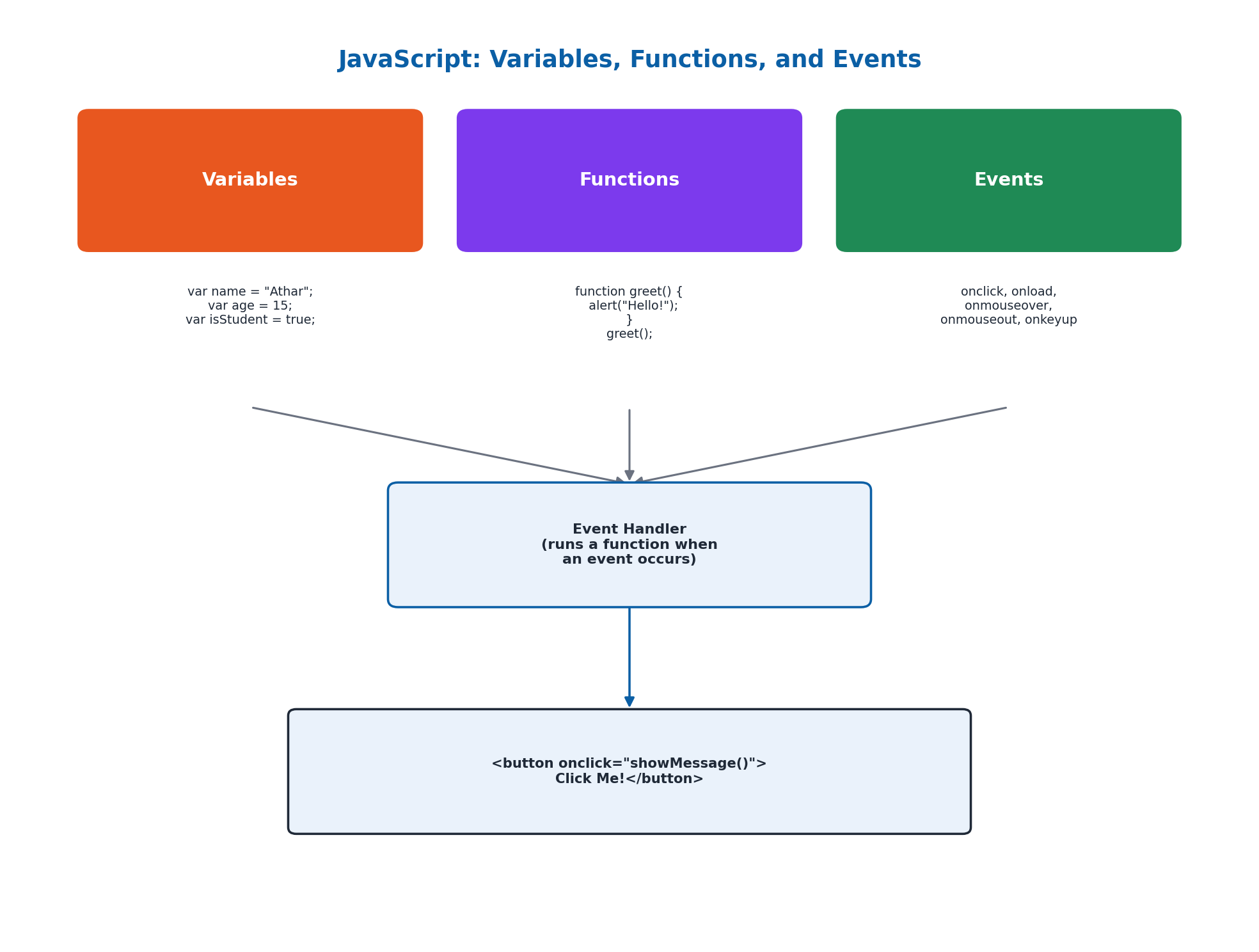
Functions allow code to be reused to perform specific tasks, like mini-programs that can be run whenever needed. A simple function is declared with function greet() { alert('Hello!'); } and then called with greet();. Functions can also take parameters — for example, function addNumbers(a, b) { var sum = a + b; alert('The sum is: ' + sum); } takes two input values and uses them inside the function. JavaScript makes pages interactive by handling events — actions that occur when a user interacts with a page. Common HTML events include onclick (element clicked), onload (page/image finished loading), onmouseover (mouse moves over an element), onmouseout (mouse moves away), and onkeyup (a key is released). An event handler is a function that runs when a specific event occurs, such as calling a function when a button is clicked using the onclick attribute.
Testing and debugging are essential steps in web development to find and fix errors. Debugging techniques include using browser developer tools (e.g., console.log() to display debug messages and set breakpoints), carefully reading error messages, and checking code line-by-line for issues like missing semicolons or unmatched braces. Common issues include broken links, incorrect HTML structure (unclosed or improperly nested tags), and CSS issues (incorrect selectors or typos). Testing strategies include cross-browser testing (checking the page in Chrome, Firefox, Edge, etc.), responsive design testing (checking how the page looks on different screen sizes), and user testing (getting feedback from real users).
Important Definitions
What is HTML?
HyperText Markup Language, the standard language used to create and structure the content of web pages using tags.
What is CSS?
Cascading Style Sheets, a language used to style and visually enhance HTML content by controlling colors, fonts, layout, and design.
What is JavaScript?
A programming language used to make websites interactive and engaging, enabling features like animations, forms, and responsive user interactions.
What is front-end development?
The part of web development focused on what users see and interact with on a website, built using HTML, CSS, and JavaScript.
What is back-end development?
The part of web development that manages a website's behind-the-scenes functionality, including web servers, databases, and application logic.
What is a CSS selector?
The part of a CSS rule that specifies which HTML elements the accompanying style declarations will apply to.
What is an HTML tag?
An element that makes up an HTML document and defines the structure and content of a web page, either paired (with opening/closing tags) or unpaired (self-closing).
What is an event in web development?
An action that occurs when a user interacts with a webpage, such as clicking a button, moving the mouse, or pressing a key, which can trigger JavaScript code.
Key Facts and Relations
| Topic | Key Fact / Relation |
|---|---|
| 3 components of web development | Front-end Development, Back-end Development, Full-Stack Development |
| 5 essential HTML structure tags | <!DOCTYPE html>, <html>, <head>, <title>, <body> |
| 2 types of HTML tags | Paired tags (e.g., <p>…</p>) and Unpaired/self-closing tags (e.g., <img>, <br>) |
| 3 ways to integrate CSS | Inline (style attribute), Internal (<style> in <head>), External (linked .css file) |
| CSS box model (outside-in) | Margin, Border, Padding, Content |
| 3 JS variable keywords | var, let, const |
| 4 core JS data types | String, Number, Boolean, Array |
| 5 common HTML events | onclick, onload, onmouseover, onmouseout, onkeyup |
Diagrams
The Three Components of Web Development: A diagram comparing front-end, back-end, and full-stack development, showing the key technologies used in each
HTML Document Structure and CSS Integration: A nested diagram of the basic HTML document structure (DOCTYPE, html, head, body) alongside the three ways to integrate CSS into HTML
JavaScript: Variables, Functions, and Events: A diagram showing how JavaScript variables, functions, and event handlers work together to make a web page interactive
Short Questions & Answers
What is the purpose of the <head> tag in HTML?
The <head> tag contains meta-information about the HTML document, such as its title, character encoding, and links to CSS files, which is not directly displayed as page content.
Explain the difference between an ordered list and an unordered list in HTML.
An ordered list (<ol>) displays items with sequential numbers, while an unordered list (<ul>) displays items with bullet points; both use the <li> tag for individual list items.
What are the three ways to apply CSS to an HTML document?
CSS can be applied using inline styles (the style attribute on an individual element), internal styles (a <style> tag in the <head> section), or external styles (a separate .css file linked with a <link> tag).
How can you include JavaScript in an HTML file?
JavaScript can be included directly within a <script> tag in the HTML document, or linked from an external file using <script src='script.js'></script>.
Describe the syntax for creating a hyperlink in HTML.
A hyperlink is created using the <a> tag with an href attribute specifying the destination, for example: <a href='https://example.com'>Visit Example.com</a>.
What is the function of the <div> tag in HTML?
The <div> tag is a generic container used to group HTML content together so it can be styled or positioned as a unit using CSS.
What is the use of the <table> tag in HTML?
The <table> tag is used to display data in a structured grid format of rows and columns, using <tr> for rows, <td> for data cells, and <th> for header cells.
Explain the box model in CSS.
The CSS box model describes how every HTML element is structured as nested boxes: the content in the center, surrounded by padding (space inside the border), then a border, and finally margin (space outside the border, between elements).
Long Questions & Answers
Discuss the fundamental differences between HTML, CSS, and JavaScript in the context of web development.
What role does HTML play in web development?
HTML, which stands for HyperText Markup Language, is primarily responsible for structuring the actual underlying content of a web page, in much the same way that a skeleton provides the basic structural framework for a human body. HTML uses a wide range of tags to define different types of content elements, including headings, paragraphs, images, links, lists, and tables. Without HTML, a web browser would have no way of knowing how the various pieces of a page's content should be structured, organized, or displayed to the end user.
What role does CSS play in web development?
CSS, which stands for Cascading Style Sheets, is primarily responsible for controlling the overall visual appearance and presentation of the underlying HTML content, in much the same way that skin, clothing, and makeup determine the outward visual appearance of a human body. CSS allows a web developer to control numerous visual aspects of a page, including colors, fonts, spacing, layout, and animations, all while keeping the underlying page content itself, as defined in HTML, kept entirely and cleanly separate from its own visual presentation.
What role does JavaScript play in web development?
JavaScript is primarily responsible for adding genuine interactivity and dynamic behavior to an otherwise static web page, in much the same way that a nervous system allows a human body to sense things and respond to them. JavaScript allows a web developer to respond to user actions, such as button clicks, form submissions, or mouse movements, and dynamically update the page's content or appearance in direct response to those actions, all without requiring the entire page to be reloaded from scratch.
How do HTML, CSS, and JavaScript work together to build a website?
Although each technology serves its own distinct purpose, HTML, CSS, and JavaScript are generally very closely and tightly integrated together in practice when building any real-world website. Together, these three core technologies allow web developers to build websites that are simultaneously well-structured (through HTML), visually appealing (through CSS), and genuinely interactive (through JavaScript) — the three essential defining qualities of any successful, well-built modern website.
Explain the process of creating a responsive web page using CSS, with the help of examples and explanations.
What does creating a responsive web page mean, and what CSS layout tools help achieve it?
Creating a responsive web page means designing it so it continues to display correctly and remain fully usable across a wide range of screen sizes and devices, from large desktop monitors down to small mobile phone screens. One important technique involves using flexible, relative layout tools such as CSS Flexbox and CSS Grid, rather than old-fashioned, rigid, fixed-pixel layouts. For example, a CSS Flexbox container set to 'display: flex' together with 'justify-content: space-between' will automatically rearrange its child elements based on the available width of the browser window, without needing separate fixed pixel widths for each screen size.
What are CSS media queries, and how are they used for responsive design?
CSS media queries allow a web developer to apply certain CSS styling rules only when certain defined conditions are true, such as whenever the available browser window width is smaller than a specific threshold value, like 600 pixels. Through a media query along these lines, a website's navigation menu, for instance, could be configured to automatically switch from a full, wide horizontal menu bar on larger desktop screens to a more compact, collapsed 'hamburger' style menu icon when viewed on a smaller mobile phone screen.
How do relative sizing units help create a responsive web page?
A third important technique for building responsive web pages involves using relative sizing units, such as percentages or the 'vw' (viewport width) and 'vh' (viewport height) units, rather than fixed absolute pixel values. Elements sized using this kind of relative unit automatically scale in direct proportion to the size of the containing screen or browser window, rather than remaining permanently fixed at one absolute pixel size regardless of the actual screen size being used.
How do these techniques combine to avoid maintaining separate versions of a web page?
By thoughtfully combining flexible layout tools such as CSS Grid or Flexbox, targeted conditional media queries, and relative proportional sizing units together, a web developer is ultimately able to create a single, unified web page that continues to look good and remain fully usable across an extremely wide range of different devices and screen sizes, entirely without ever needing to build and separately maintain multiple entirely different, fully separate versions of that same underlying web page.
Write a JavaScript function that changes the background color of a web page when a button is clicked, and explain how it works.
What three components are needed for a button click to change a page's background color?
To create a JavaScript function that changes the background color of a page when a button is clicked, a web developer needs to combine three components: an actual HTML button element the user can click on, a JavaScript function containing the code that performs the desired background color change, and some mechanism connecting that button to that function so clicking it correctly triggers the function to run.
What HTML markup connects the button to the JavaScript function?
The required HTML markup for this example would include a button element written as: <button onclick='changeColor()'>Change Background Color</button>. The 'onclick' attribute used here specifically instructs the web browser to automatically call a JavaScript function named 'changeColor' as soon as that button is ever actually clicked by the user, forming the connective link between the visible button and the function that will actually perform the color change.
How does the changeColor() JavaScript function work, line by line?
The required JavaScript function is written as: function changeColor() { document.body.style.backgroundColor = 'lightblue'; }. The 'function changeColor()' portion declares a new function named 'changeColor' that requires no input parameters. The single line inside the function body works by first accessing the 'body' element of the current HTML document through 'document.body', then accessing that element's 'style' property, which represents all the CSS styling properties associated with it, and finally setting that style object's 'backgroundColor' property to 'lightblue', which causes the visible background color of the entire page to change to light blue as soon as the function runs.
What happens in the browser when the button is actually clicked?
When the button element is clicked by the user, the web browser automatically and correctly executes the JavaScript function in direct response, and then re-renders the page with its newly updated background color, all without needing to reload the entire page from scratch. This technique of dynamically modifying element style properties directly through JavaScript in response to user-triggered events is one of the most fundamental and frequently used core techniques throughout modern interactive web development.
Multiple Choice Questions (MCQs)
Which HTML tag is used to define the root element of an HTML page? (A) <body> (B) <head> (C) <html> (D) <title>
Correct answer: (C) <html>. The <html> tag is the root element that wraps all the content of an HTML page, including the <head> and <body> sections.
What does CSS stand for? (A) Cascading Style Sheets (B) Computer Style Sheets (C) Creative Style Sheets (D) Colorful Style Sheets
Correct answer: (A) Cascading Style Sheets. CSS stands for Cascading Style Sheets, the language used to style and format HTML content.
Which of the following tags is used to create a hyperlink in HTML? (A) <link> (B) <a> (C) <href> (D) <nav>
Correct answer: (B) <a>. The <a> (anchor) tag, combined with the href attribute, is used to create a hyperlink in HTML.
Which property is used to change the background color in CSS? (A) color (B) background-color (C) bgcolor (D) background
Correct answer: (B) background-color. The background-color property is used in CSS to set the background color of an element.
Which HTML attribute is used to define inline styles? (A) class (B) style (C) font (D) styles
Correct answer: (B) style. The style attribute is used to apply CSS styling directly to an individual HTML element (inline styling).
Which of the following is the correct syntax for a CSS rule? (A) selector {property: value;} (B) selector: {property=value;} (C) selector {property=value} (D) selector: {property: value;}
Correct answer: (A) selector {property: value;}. A CSS rule follows the format: selector { property: value; } — curly braces enclose declarations, and a colon separates property from value.
In JavaScript, which markup is used for single-line comments? (A) /* */ (B) // (C) <!– –> (D) #
Correct answer: (B) //. JavaScript uses // for single-line comments and /* */ for multi-line comments.
How do you include JavaScript in an HTML document? (A) <script src='script.js'></script> (B) <java src='script.js'></java> (C) <js src='script.js'></js> (D) <code src='script.js'></code>
Correct answer: (A) <script src='script.js'></script>. JavaScript is included in an HTML document using the <script> tag, either with a src attribute pointing to an external file or with inline code.
Which HTML tag is used to create an unordered list? (A) <ol> (B) <ul> (C) <li> (D) <list>
Correct answer: (B) <ul>. The <ul> tag creates an unordered (bulleted) list, with individual items defined using <li> tags.
Which tag is used to display a horizontal line in HTML? (A) <br> (B) <hr> (C) <line> (D) <hline>
Correct answer: (B) <hr>. The <hr> tag is used to display a horizontal rule (line) that visually separates content on a web page.
Quick Revision Summary
- 3 components of web development: Front-end (HTML/CSS/JS), Back-end (server/database/language), Full-stack (both)
- HTML structure: <!DOCTYPE html>, <html>, <head>, <title>, <body>; tags are Paired (<p></p>) or Unpaired (<img>)
- HTML content: Headings (h1-h6), Paragraphs (p), Links (a), Images (img), Lists (ul/ol/li), Tables (table/tr/td/th), Comments (<!– –>)
- 3 ways to integrate CSS: Inline (style attribute), Internal (<style> in head), External (linked .css file)
- CSS box model (outside-in): Margin, Border, Padding, Content
- CSS layout tools: Grid (rows/columns), Flexbox (flexible row/column), Positioning (position/top/left)
- JavaScript basics: variables (var/let/const), 4 data types (String, Number, Boolean, Array), functions, events (onclick, onload, etc.)
- Debugging: browser dev tools + console.log(), reading error messages, checking code line-by-line
Exam Tips
- Remember the 3-layer analogy: HTML = skeleton (structure), CSS = skin/clothes (style), JavaScript = nervous system (interactivity)
- Paired vs unpaired tags: if content goes inside the tag, it needs a closing tag (<p>text</p>); if it's self-contained, it doesn't (<img>, <br>)
- For CSS integration questions, remember: Inline = fastest but messiest, External = cleanest for large sites
- CSS box model order from inside out: Content → Padding → Border → Margin
- JavaScript variables: use quotes for Strings, no quotes for Numbers and Booleans
- Common exam trap: onclick, onload, onmouseover are HTML event attributes that trigger JavaScript functions