Computers and digital devices are a big part of daily life, helping with schoolwork, staying in touch with friends, and entertainment — but with these great tools comes the need to use them safely and responsibly. This chapter explores responsible computer usage, including choosing the right hardware and software, and the safe and secure operation of digital platforms through strong passwords, regular updates, Two-Factor Authentication (2FA), and caution around public Wi-Fi, scams, and phishing.
The chapter also covers best practices for online behavior across social media, email, cloud services, and apps; legal and ethical frameworks including privacy laws and data ethics; intellectual property rights (copyright, trademarks, and patents) and software piracy; responsible internet use including safe research and preventing internet addiction and cyberbullying; and finally the broader impact of computing on society across ethical, legal, societal, and economic dimensions.
Learning Objectives
- Describe the importance of using computers safely and responsibly in daily activities
- Identify factors to consider when selecting computer hardware and software for safety, efficiency, and compatibility
- Demonstrate how to create strong passwords and explain the benefits of Two-Factor Authentication (2FA)
- Describe responsible behavior on social media, email, cloud services, and online applications
- Explain privacy laws and the principles of data ethics, including transparency, consent, and accountability
- Identify ethical and legal responsibilities related to intellectual property rights: copyright, trademarks, and patents
- Demonstrate techniques for safe and credible online research, and recognize signs of internet addiction
- Analyze the ethical, legal, societal, and economic impact of computing on society
Key Concepts
11.1 Responsible Computer Usage
Being responsible with technology means making thoughtful decisions when using computers — selecting the right hardware and software, safeguarding data, and using the internet in a way that respects others. Hardware refers to the physical parts of a computer (monitor, keyboard, CPU), while software includes the programs and applications used, such as word processors or games.
Choosing the right hardware and software matters for three reasons. Safety: using outdated or insecure hardware/software (e.g., a computer without updated antivirus software) puts you at risk of viruses and hackers. Efficiency: the right hardware and software help complete tasks quickly (e.g., an old computer struggling to run a new video game). Compatibility: hardware and software should work well together — always check a software package's system requirements against your computer's specifications.
11.2 Safe Operation of Digital Platforms
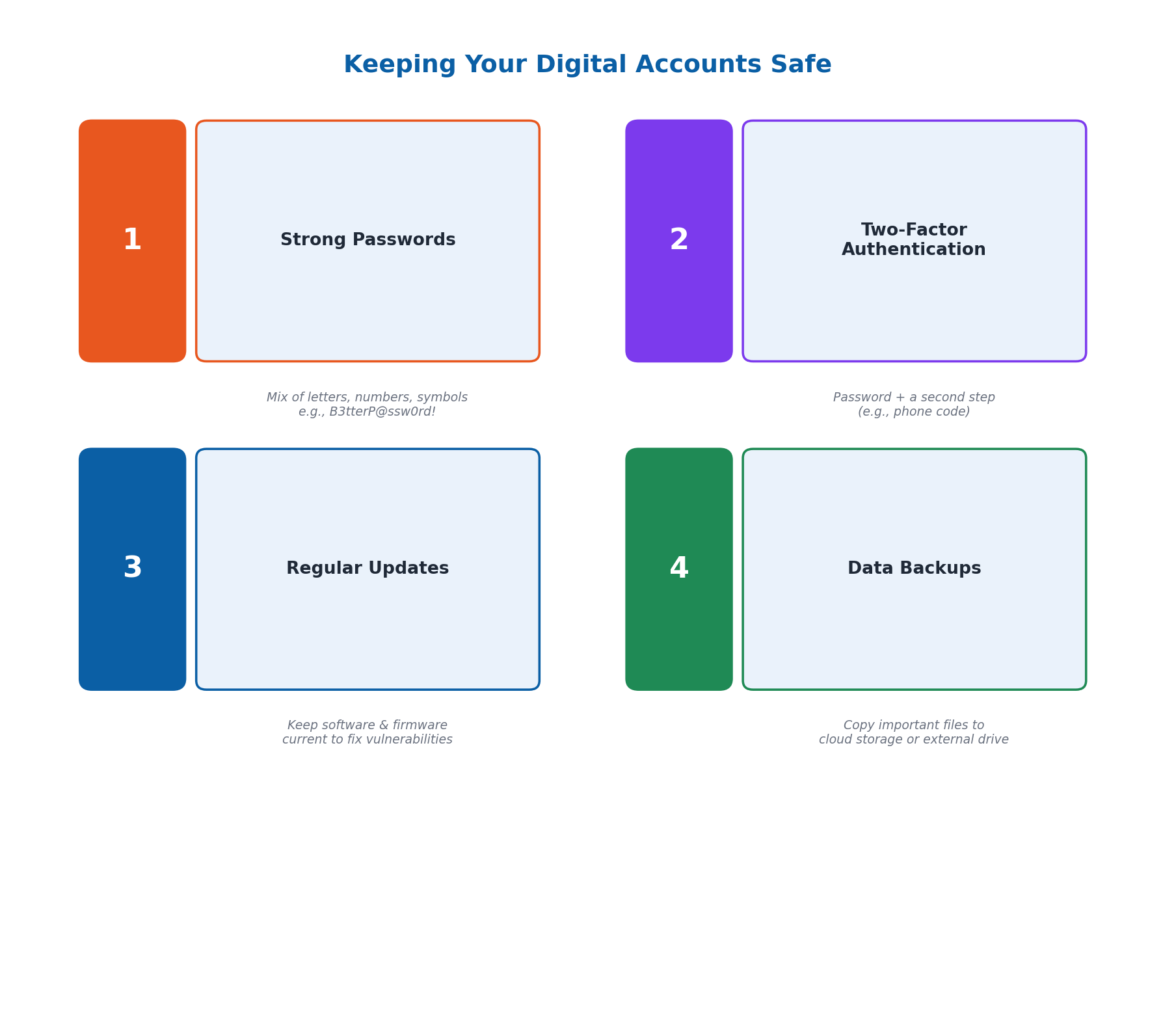
Safe operation means using digital platforms and devices in a way that protects you from harm. Key practices include: using strong, unique passwords (a mix of letters, numbers, and special characters, e.g., 'B3tterP@ssw0rd!' instead of 'password123'); regular software updates (which often include important security fixes protecting against new threats); being cautious with links and downloads (avoiding unknown links or untrusted downloads, which could contain malware); understanding and adjusting privacy settings to control who sees your information; and avoiding oversharing personal details like your home address, phone number, or school name.
Secure use goes a step further with additional protective measures. Two-Factor Authentication (2FA) adds an extra security layer, requiring a second piece of information (like a phone code) after the password. Avoid public Wi-Fi (like in cafes or libraries, which is often less secure) for sensitive transactions like online banking. Be aware of scams, especially phishing emails pretending to be from legitimate companies asking for login details. Regularly review account activity for unusual logins or transactions, and back up important data regularly to an external hard drive or cloud service like Google Drive or Dropbox.
11.3 Responsible Use of Social Media, Email, Cloud Services, and Apps
Different digital tools call for different responsible practices. On Social Media (Facebook, Instagram, Twitter), think before you post and avoid sharing personal information like your home address publicly. With Email, be careful opening messages from unknown senders, which could contain harmful links or attachments. With Cloud Services (Google Drive, Dropbox), use strong passwords and avoid sharing sensitive information like passwords or financial details through cloud storage. For Online Applications (games, learning apps, shopping platforms), download only from trusted sources like the Google Play Store or Apple App Store to avoid harmful software.
Privacy Settings let you control who sees your information (e.g., choosing whether Facebook posts are public, friends-only, or private) and should be regularly reviewed and updated. Data Security Measures like strong, unique passwords for each account (e.g., 'S3cur3!Passw0rd' rather than 'password123') are among the simplest and most effective ways to protect your information from unauthorized access.
11.4 Privacy Laws and Data Ethics
Privacy laws are rules set by governments to protect personal information, ensuring companies and organizations handle data responsibly. Unauthorized access to personal information (e.g., hacking someone's email or social media) is illegal and can lead to identity theft or fraud; privacy laws require companies to implement strong security measures like encryption, and companies that fail to protect user data can face legal penalties.
Data ethics is about doing the right thing when collecting, storing, and using information, guided by three core principles: transparency (being clear about how data is used), respect for privacy (protecting personal information), and accountability (taking responsibility if something goes wrong). Practical ethical guidelines include Informed Consent (always asking permission before collecting data), Data Minimization (only collecting what's needed), Data Security (protecting collected data with strong passwords and encryption), and Accountability (informing affected individuals and fixing problems if a data breach occurs).
11.5 Intellectual Property Rights
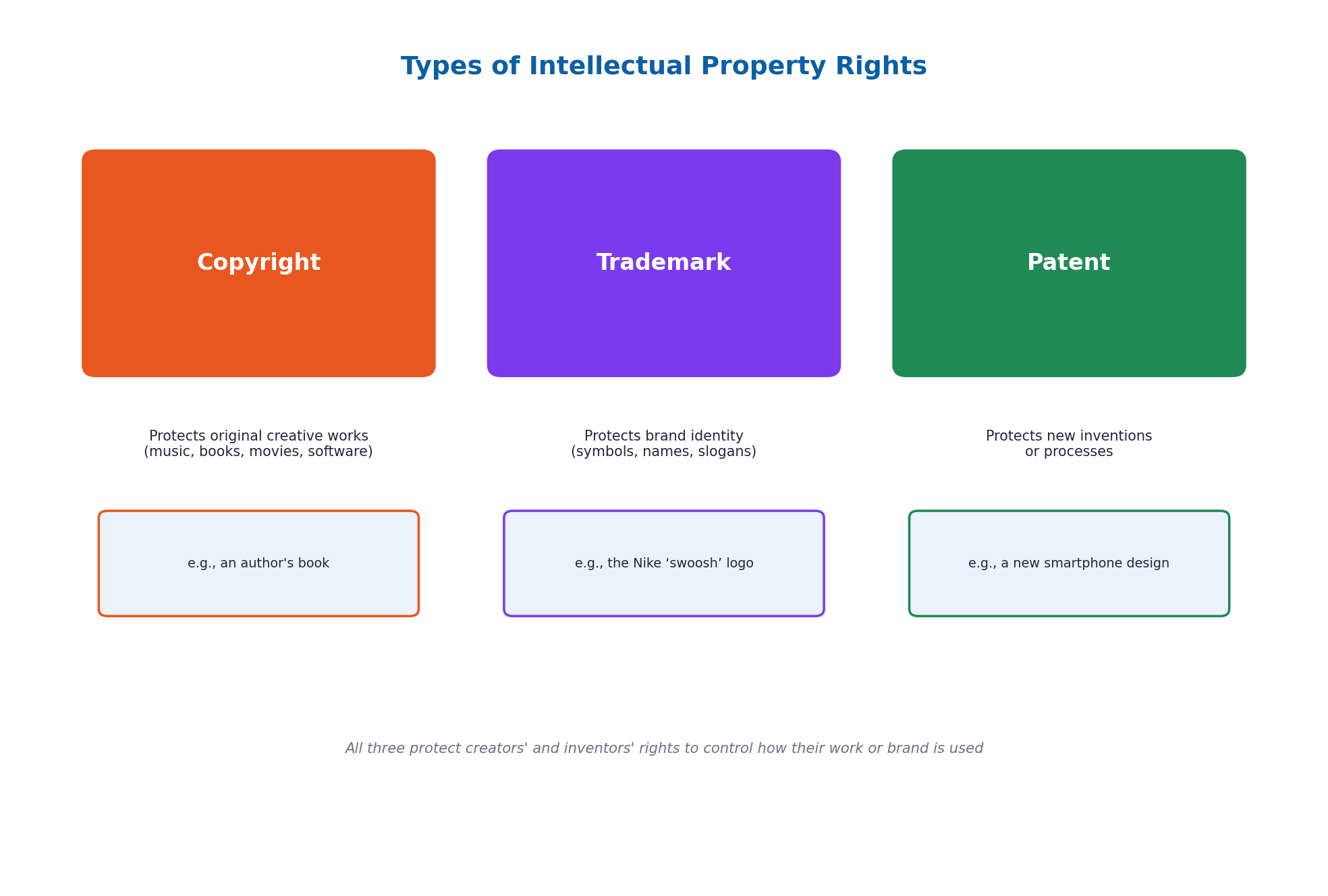
Intellectual property rights protect the creations and ideas of individuals and organizations. Copyright is a legal right giving creators control over original works like music, books, movies, and software — no one else can copy or distribute a copyrighted work without the creator's permission. Trademarks are symbols, names, or slogans (like the Nike 'swoosh') that companies use to distinguish their products, protecting brand identity so competitors cannot use confusingly similar symbols. Patents protect new inventions or processes, giving inventors exclusive rights to make, use, or sell their invention for a certain period.
Respecting intellectual property means understanding that copying, sharing, or using someone else's work without permission is both unethical and illegal — for example, downloading movies or software without paying violates copyright law. Software Piracy is the illegal copying, distribution, or use of software; when you buy software, you are buying a license to use it, not the software itself, so sharing it without a proper license is against the law and cheats developers out of the revenue needed to keep creating and improving their products (software piracy is estimated to cost the global economy over $46 billion annually).
11.6 Safe Online Research and Preventing Internet Addiction
When searching for information online, credibility matters: cross-check information across multiple trustworthy sources rather than relying on just one, and be skeptical of sensational or misleading headlines that may spread 'fake news.' To protect privacy during research, use private/incognito browsing for sensitive topics, avoid entering personal information on unfamiliar websites, and avoid clicking suspicious links that seem too good to be true.
Internet Addiction happens when someone spends so much time online that it interferes with daily life — signs include difficulty stopping internet use even at bedtime or study time, and neglecting responsibilities. Strategies to prevent it include setting time limits (e.g., no more than one hour on social media daily), finding offline activities (sports, reading, in-person time with friends), taking regular breaks, using apps that track screen time, and being mindful of how being online affects your mental health.
11.7 Social Networking Safety and Online Etiquette
Safe social networking involves adjusting privacy settings (e.g., setting an Instagram account to 'private' so only approved followers see content) and practicing good online etiquette — being respectful, using polite language, avoiding arguments, and not spreading rumors or false information, even when disagreeing with someone's post.
Cyberbullying involves using the internet to harm or harass others, such as sending mean messages, spreading rumors, or posting embarrassing photos without permission. If you experience or witness it, report it to the platform and block the person responsible; most platforms provide these tools. Supporting others who are being bullied — by reporting the behavior or offering kind words — can make a real difference, and practicing respectful interactions online (just as you would in person) helps maintain a positive digital environment.
11.8 Impact of Computing on Society
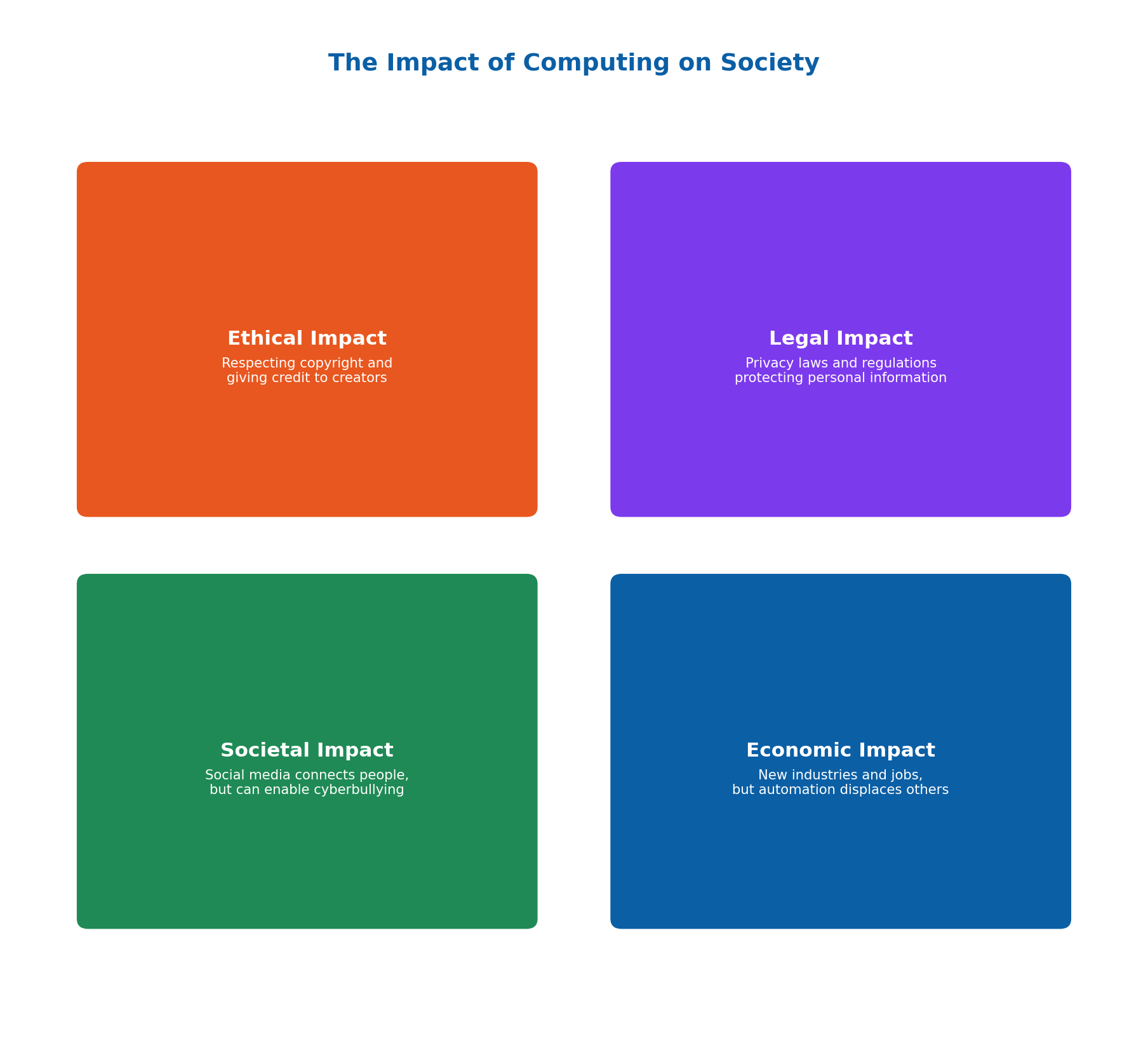
Computing affects many aspects of life. The Ethical Impact raises questions about respecting others' work and copyright. The Legal Impact involves privacy laws and internet regulations that protect personal information. The Societal Impact shows how technology changes how we interact — social media connects people globally but can also enable cyberbullying. The Economic Impact includes new industries and jobs created (like software development and digital marketing) alongside the displacement of some traditional roles through automation.
Computing has transformed global trade (online shopping platforms like Amazon and Daraz), communication (instant messaging and video calls connecting people across distances), and cultural evolution (platforms like YouTube and Instagram letting people share traditions globally). Computing advancements bring benefits (social networking keeps people connected) alongside risks (misinformation can mislead people and spread quickly). Designing computing systems also involves trade-offs: Privacy vs. Usability (strong passwords and 2FA improve security but add inconvenience) and Security vs. Usability (highly secure systems can be harder to navigate) — the goal is balancing strong protection with ease of use.
Important Definitions
What is Two-Factor Authentication (2FA)?
A security method that adds an extra layer of protection to an account by requiring a second piece of information, such as a code sent to your phone, in addition to your password.
What is phishing?
A type of online scam using deceptive emails or messages that pretend to be from legitimate companies, designed to trick people into giving away personal login details or information.
What are privacy laws?
Rules set by governments to protect personal information, ensuring companies and organizations collect, store, and handle data responsibly and securely.
What is data ethics?
A set of principles guiding the fair and responsible collection, storage, and use of information, based on transparency, respect for privacy, and accountability.
What is copyright?
A legal right that gives creators control over their original works, such as music, books, movies, and software, preventing others from copying or distributing it without permission.
What is a trademark?
A symbol, name, or slogan used by a company to distinguish its products or services from others, protecting brand identity.
What is a patent?
A legal protection for a new invention or process, giving the inventor exclusive rights to make, use, or sell the invention for a certain period.
What is software piracy?
The illegal copying, distribution, or use of software without a proper license, which is against the law since buying software only grants a license to use it, not ownership of it.
Key Facts and Relations
| Topic | Key Fact / Relation |
|---|---|
| 3 factors for choosing hardware/software | Safety, Efficiency, Compatibility |
| 3 principles of data ethics | Transparency, Respect for Privacy, Accountability |
| 4 ethical data usage guidelines | Informed Consent, Data Minimization, Data Security, Accountability |
| 3 types of intellectual property | Copyright, Trademark, Patent |
| Software piracy's global cost | Over $46 billion annually |
| 2013 Yahoo data breach | Exposed data of 3 billion accounts |
| 4 impacts of computing on society | Ethical, Legal, Societal, Economic |
| 2 key computing trade-offs | Privacy vs. Usability; Security vs. Usability |
Diagrams
Keeping Your Digital Accounts Safe: A diagram showing the key digital safety practices: strong passwords, Two-Factor Authentication, regular updates, and data backups
Types of Intellectual Property Rights: A comparison diagram of Copyright, Trademarks, and Patents, showing what each protects and a real-world example
The Impact of Computing on Society: A four-quadrant diagram showing the Ethical, Legal, Societal, and Economic impacts of computing technology
Short Questions & Answers
What is the importance of using computers safely and responsibly?
Using computers safely and responsibly protects our personal information, helps us make wise choices about hardware and software, and ensures our online behavior is respectful and ethical toward others.
Why should you create strong, unique passwords for your accounts?
Strong, unique passwords make it much harder for someone to guess your password and gain unauthorized access to your accounts, protecting your personal information from theft or misuse.
What is Two-Factor Authentication (2FA), and why is it useful?
2FA is a security method requiring a second form of verification (like a phone code) in addition to a password, making it significantly harder for someone to hack into an account even if they know the password.
Why is it a good idea to avoid using public Wi-Fi for sensitive transactions?
Public Wi-Fi networks are often less secure than private networks, making it easier for hackers to intercept sensitive data like banking information during a transaction.
What is the difference between copyright, trademarks, and patents?
Copyright protects original creative works like books, music, and software; trademarks protect brand identifiers like logos and names; and patents protect new inventions or processes, giving inventors exclusive rights for a set period.
What is software piracy, and why is it harmful?
Software piracy is the illegal copying, distribution, or use of software without a proper license; it is harmful because it cheats software developers out of the revenue they need to continue creating and improving their products.
How can you identify reliable sources when researching online?
Cross-check information across multiple reputable sources, check the author's credentials, and be skeptical of sensational or misleading headlines that may indicate unreliable or false information.
What are some signs that you might be developing an internet addiction?
Signs include finding it hard to stop using the internet even when it's time to sleep or study, and neglecting responsibilities like homework in favor of spending hours online.
Long Questions & Answers
Discuss the importance of responsible computer usage in today's digital world, explaining how selecting the right hardware and software can affect safety, efficiency, and compatibility.
What does responsible computer usage mean, and why does it matter?
Responsible computer usage has become an essential skill in today's digital world, given how deeply computers and other digital devices are now woven into virtually every aspect of everyday life, from schoolwork to staying connected with friends and family. Being responsible with technology means consistently making thoughtful decisions about how we use our computers, including carefully selecting appropriate hardware and software, safeguarding personal data, and using the internet in a way that respects other people around us.
Why does choosing the right hardware and software matter for safety?
Relying on outdated or otherwise insecure hardware or software can directly and significantly increase one's risk of falling victim to computer viruses or malicious hackers. A concrete example of this risk can be seen in a computer left running without any properly updated antivirus software actively installed, since that computer would likely become considerably easier for malicious individuals to successfully infect with harmful software or otherwise hack into.
Why does choosing the right hardware and software matter for efficiency?
Selecting the correct hardware and software for a given task can directly help a user complete that task considerably more quickly and easily overall. A concrete example of this benefit can be seen in someone attempting to run a brand new, demanding video game on a considerably older, outdated computer, since that older computer would likely struggle to run the game at an acceptable speed, making the entire gaming experience considerably more frustrating and less enjoyable.
Why does choosing the right hardware and software matter for compatibility?
A given piece of hardware and a given piece of software specifically need to be able to properly work well together in combination. To ensure this kind of compatibility, a user should always check the stated system requirements listed on any software package, and then compare and match those requirements directly against their own computer's actual technical specifications, before attempting to purchase or install that particular piece of software.
Explain the concept of data ethics and its importance in handling personal and sensitive information, discussing the principles of transparency, respect for privacy, and accountability.
What is data ethics, and why has it become more important?
Data ethics refers to the practice of properly and consistently doing the right thing whenever it comes to collecting, storing, and using various kinds of personal information and data. This concept has become considerably more important than ever before, given how much personal data is now being routinely collected by many different companies, organizations, and digital platforms on a near-constant basis. Just because an organization can technically collect a certain amount of personal data does not mean it should then be permitted to use that data in any way it wishes.
What is the transparency principle of data ethics?
Transparency means being fully clear, open, and honest with people regarding precisely how their own personal data is actually going to be used by a given organization. A concrete example of transparency in practice can be seen in a website that clearly informs its users, in advance, that it will be tracking their browsing activity for certain stated purposes, rather than simply doing so secretly and without their knowledge or consent.
What is the respect-for-privacy principle of data ethics?
Respect for privacy means actively taking the necessary practical steps to properly protect people's own personal information from being improperly accessed, used, or otherwise disclosed to any unauthorized third parties. A concrete example of this principle in practice can be seen in a hospital that carefully ensures its patients' individual medical records are kept both fully confidential and properly secure at all times.
What is the accountability principle of data ethics?
Accountability means being fully prepared and willing to properly take genuine responsibility whenever something has gone wrong with respect to an organization's own handling of personal data. A concrete example of this principle in practice can be seen in a company that has recently experienced a significant data breach, and which then promptly informs all of its affected users about that breach, while also taking clear, decisive steps to fix the underlying problem that originally caused it.
Discuss the different types of intellectual property rights (copyright, trademarks, and patents), and describe the ethical and legal responsibilities related to violating them, such as through software piracy.
What is copyright, and how does it protect creative work?
Copyright refers to a legal right that grants an original creator direct control over their own particular original creative work, such as a piece of music, a written book, a produced film, or a piece of computer software. A concrete example of copyright in practice can be seen in an author who has personally written a book, since that author alone holds the sole exclusive legal right to decide precisely how that book may subsequently be published, shared, or otherwise creatively adapted by other people.
What is a trademark, and how does it protect a company's brand?
Trademarks refer to particular symbols, names, or slogans that a given company uses in order to properly distinguish its own products or services from those of its direct competitors. A widely recognized example of a trademark is the well-known Nike 'swoosh' logo, which directly helps protect that company's own overall brand identity by preventing other rival companies from making use of any other similar, potentially confusing symbol of their own.
What is a patent, and how does it protect inventions?
Patents protect entirely new inventions or newly developed processes, by granting the original individual inventor the sole exclusive legal right to personally make, use, or sell that particular invention for one specific limited period of time. A concrete example of a patent in practice can be seen in someone who has personally invented an entirely new, genuinely novel type of smartphone device, since that inventor could then choose to properly patent that invention, specifically to prevent rival companies from being legally permitted to manufacture or sell a substantially similar competing phone without first obtaining the inventor's own direct permission.
What is software piracy, and why is it illegal?
Software piracy is specifically defined as the illegal copying, unauthorized distribution, or unauthorized general use of a piece of copyrighted software, representing one particularly clear, especially common real-world example of a serious intellectual property violation. When a person purchases a piece of computer software, what they are technically purchasing is merely a specific limited personal license granting them the legal right to use that software, rather than full legal ownership of the underlying software itself. As a result, freely copying and sharing that software with other people, without first obtaining the original developer's explicit permission, is directly against the law.
Why is software piracy also considered ethically wrong, and what does it cost?
Beyond its serious legal consequences, software piracy is also considered seriously ethically wrong, primarily because this kind of behavior effectively and directly cheats the original hardworking software developers out of the specific financial revenue they would otherwise have properly and legitimately earned — revenue which those developers would then otherwise have been able to use to continue actively creating and improving their own valuable software products over time. Software piracy of this kind is estimated to collectively cost the entire global economy well over $46 billion in lost revenue on a fully recurring annual basis.
Multiple Choice Questions (MCQs)
Why is it important to use computers safely and responsibly? (A) To ensure we can use them more frequently (B) To protect our personal information and make wise choices about hardware and software (C) To make the computer run faster (D) To avoid paying for software
Correct answer: (B) To protect our personal information and make wise choices about hardware and software. Safe and responsible computer usage protects personal information and helps us make wise choices about the hardware and software we use.
What should you check to ensure hardware and software compatibility? (A) The color of the hardware (B) The system requirements on software packages, matched to your computer's specifications (C) The price of the hardware (D) The brand of the hardware
Correct answer: (B) The system requirements on software packages, matched to your computer's specifications. Checking a software package's system requirements against your computer's specifications ensures hardware and software compatibility.
What does Two-Factor Authentication (2FA) do? (A) It makes your password easier to guess (B) It adds an extra layer of security by requiring a second form of verification (C) It removes the need for a password (D) It reduces the need for software updates
Correct answer: (B) It adds an extra layer of security by requiring a second form of verification. 2FA adds an extra layer of security by requiring a second form of verification, such as a code sent to your phone, in addition to your password.
Why should you be cautious when using public Wi-Fi for sensitive transactions? (A) Public Wi-Fi is usually faster (B) Public Wi-Fi networks are often less secure (C) Public Wi-Fi is free (D) Public Wi-Fi always provides encryption
Correct answer: (B) Public Wi-Fi networks are often less secure. Public Wi-Fi networks are often less secure than private networks, making sensitive transactions like online banking riskier to perform on them.
What is an important aspect of responsible use of social media? (A) Sharing personal information like your home address (B) Posting photos without considering privacy settings (C) Being respectful and avoiding sharing sensitive information publicly (D) Ignoring privacy settings
Correct answer: (C) Being respectful and avoiding sharing sensitive information publicly. Responsible social media use means being respectful to others and avoiding sharing sensitive personal information publicly.
What is a key aspect of data ethics? (A) Using data in any way you like (B) Transparency, respect for privacy, and accountability in data usage (C) Collecting as much data as possible (D) Ignoring data security
Correct answer: (B) Transparency, respect for privacy, and accountability in data usage. Data ethics is built on the principles of transparency, respect for privacy, and accountability in how data is collected, stored, and used.
What is software piracy? (A) Sharing software legally with friends (B) The illegal copying, distribution, or use of software (C) Buying software from an official source (D) Updating software regularly
Correct answer: (B) The illegal copying, distribution, or use of software. Software piracy is the illegal copying, distribution, or use of software without a proper license.
How can you verify the credibility of information found online? (A) By checking the number of ads on the website (B) By using multiple reputable sources and checking the author's credentials (C) By looking at the website's design (D) By the website's popularity
Correct answer: (B) By using multiple reputable sources and checking the author's credentials. Credibility is best verified by cross-checking multiple reputable sources and checking the author's credentials, rather than relying on design or popularity alone.
What is the purpose of privacy settings on digital platforms? (A) To make your posts public (B) To control who can see your information and interact with you online (C) To increase the number of followers (D) To automatically share your information
Correct answer: (B) To control who can see your information and interact with you online. Privacy settings let users control who can see their information and interact with them online.
What should you do to ensure data security? (A) Use the same password for all accounts (B) Share your passwords with friends (C) Use strong, unique passwords and enable two-factor authentication (D) Avoid using any security measures
Correct answer: (C) Use strong, unique passwords and enable two-factor authentication. Data security is best ensured by using strong, unique passwords for each account and enabling two-factor authentication where possible.
Quick Revision Summary
- 3 factors for hardware/software choice: Safety, Efficiency, Compatibility
- Digital safety: strong passwords, regular updates, caution with links/downloads, privacy settings, avoid oversharing
- Secure practices: 2FA, avoid public Wi-Fi for sensitive tasks, watch for scams/phishing, review account activity, back up data
- Data ethics: Transparency, Respect for Privacy, Accountability; guidelines: Informed Consent, Data Minimization, Data Security, Accountability
- 3 IP types: Copyright (creative works), Trademark (brand identity), Patent (inventions)
- Software piracy = illegal copying/distribution of software; costs the global economy $46B+ annually
- Preventing internet addiction: set time limits, find offline activities, take breaks, be mindful of mental health
- 4 impacts of computing: Ethical, Legal, Societal, Economic; key trade-offs: Privacy vs. Usability, Security vs. Usability
Exam Tips
- Remember the 3 C's of hardware/software choice: Compatibility, safety (Caution), and efficiency (Capability)
- 2FA = password + a second verification step (like a phone code) — always mention 'extra layer of security' in answers
- Copyright = creative works; Trademark = brand symbols/names; Patent = inventions — a common exam matching question
- Software piracy is illegal because buying software only grants a license, not ownership
- For online research credibility: cross-check sources + check author credentials, don't judge by design or popularity alone
- Computing's 4 societal impacts: Ethical, Legal, Societal, Economic — easy to remember as 'ELSE'