
Computational thinking is a problem-solving process that involves a set of skills and techniques to solve complex problems in a way that can be executed by a computer, applicable far beyond computer science itself, from biology and mathematics to everyday tasks like planning a trip. This chapter breaks computational thinking down into its four key components — decomposition, pattern recognition, abstraction, and algorithms — and its three guiding principles: problem understanding, problem simplification, and solution selection and design.
The chapter then covers two major algorithm design methods, flowcharts and pseudocode, along with worked examples (checking even/odd numbers, testing primality, validating login credentials), before introducing algorithm evaluation through time and space complexity, dry runs and simulation for testing algorithms manually, LARP (Logic of Algorithms for Resolution of Problems) as a hands-on learning tool, and finally the identification and debugging of syntax, runtime, and logical errors.
Learning Objectives
- Define computational thinking and its four key components: decomposition, pattern recognition, abstraction, and algorithms
- Explain the three principles of computational thinking: problem understanding, simplification, and solution selection/design
- Describe algorithm design methods, specifically flowcharts and pseudocode, and understand the differences between them
- Create and interpret flowcharts to represent algorithms visually using standard symbols
- Write pseudocode to outline algorithms in a structured, human-readable format
- Conduct dry runs of flowcharts and pseudocode to manually verify their correctness
- Understand the concept and importance of LARP (Logic of Algorithms for Resolution of Problems)
- Identify syntax, logical, and runtime errors in algorithms, and apply debugging techniques to fix them
Key Concepts
7.1 Computational Thinking and Its Components
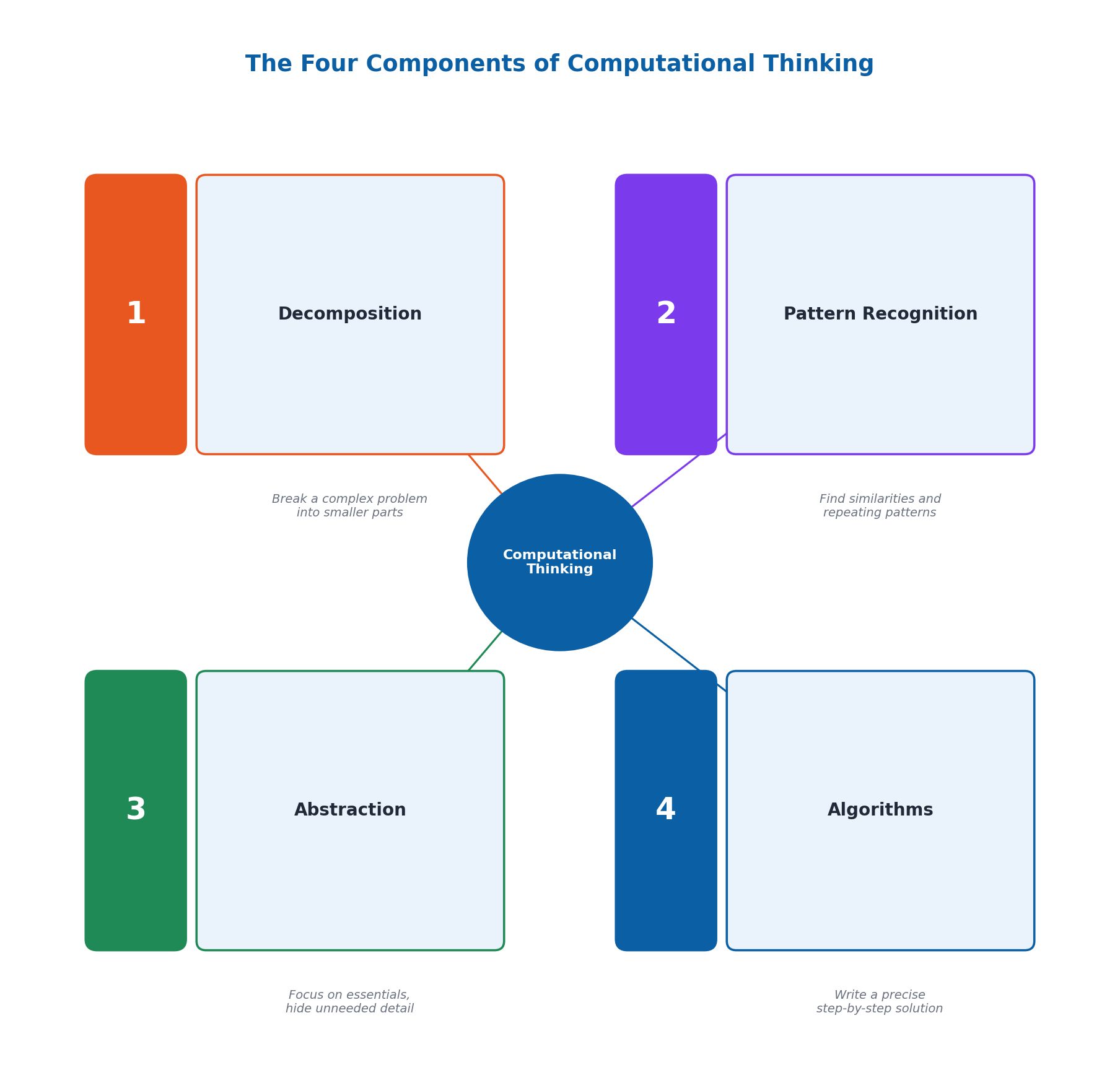
Computational Thinking (CT) is a problem-solving process that involves a set of skills and techniques to solve complex problems in a way that can be executed by a computer. This approach is used in various fields beyond computer science, such as biology, mathematics, and even daily life — from planning a trip to organizing tasks. Computational thinking breaks down into four key components: decomposition, pattern recognition, abstraction, and algorithms.
Decomposition is the method of breaking down a complicated problem into smaller, more manageable components (e.g., breaking the task of building a birdhouse into design, gathering materials, cutting wood, assembling, painting, and installing). Pattern recognition involves identifying regularities among and within problems (e.g., noticing that the area of a square equals the sum of consecutive odd numbers). Abstraction involves simplifying complex problems by focusing only on essential details while hiding unnecessary ones (e.g., describing making tea as just 'boil water, add tea, steep, pour'). An algorithm is a precise, step-by-step sequence of instructions to achieve a specific goal, similar to a recipe — for example, a clear set of steps for planting a tree.
7.2 Principles of Computational Thinking
Computational thinking involves three key guiding principles. Problem Understanding is the first and most important step — thoroughly analyzing a problem to identify its key components and requirements before attempting a solution, as reflected in Einstein's remark: 'If I had an hour to solve a problem I'd spend 55 minutes thinking about the problem and 5 minutes thinking about solutions.' Understanding the problem well gives clarity and focus, helps define clear goals, leads to more efficient solutions, and helps avoid common mistakes.
Problem Simplification involves breaking a problem down into smaller, more manageable sub-problems — for example, designing a website by separating the tasks of layout design, content creation, and functionality coding. Solution Selection and Design involves evaluating different possible approaches, selecting the most efficient one, and creating a detailed plan or algorithm to implement it.
7.3 Flowcharts
Flowcharts are visual representations of the steps in a process or system, depicted using different symbols connected by arrows, widely used in computer science, engineering, and business to model processes and communicate workflows clearly. Flowcharts provide clarity, aid communication with a wide audience, help identify bottlenecks in problem-solving, and serve as documentation. The first standardized flowchart symbols were developed in 1947 by the American National Standards Institute (ANSI).
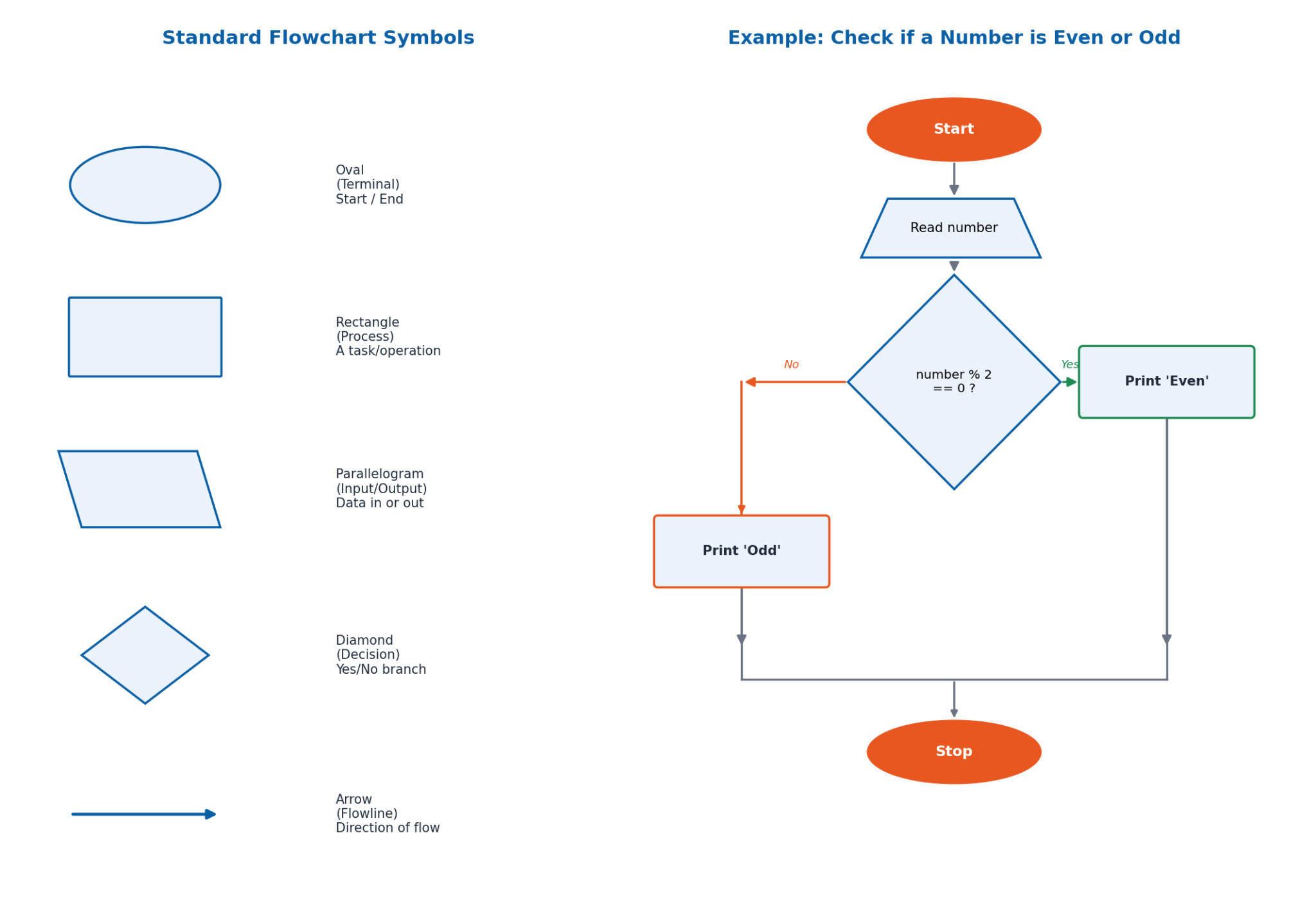
Standard flowchart symbols include: the Oval (Terminal), representing the start or end of a process; the Rectangle (Process), representing a task or operation; the Parallelogram (Input/Output), representing data input or output; the Diamond (Decision), representing a branching point based on a yes/no or true/false condition; and the Arrow (Flowline), showing the direction of flow connecting the symbols. For example, a flowchart for a shop's order process uses decisions for item availability and customer payment, updating a customer rating accordingly.
7.4 Pseudocode
Pseudocode is a method of representing an algorithm using simple, informal language that is easy to understand, combining the structure of programming with the readability of plain English. It is not actual runnable code, but a way to describe an algorithm's logic without worrying about a specific programming language's syntax. For example, pseudocode for checking whether a number is even or odd uses a procedure that checks 'if (number % 2 == 0) then print Even else print Odd.' Similarly, pseudocode for checking if a number is prime uses a loop testing divisibility from 2 up to the square root of the number.
Using pseudocode offers key benefits: clarity (understanding the logic without syntax concerns), planning (outlining thoughts and algorithm steps before coding), and communication (a universal way to convey algorithm steps to others, even across different programming languages). While pseudocode uses plain, narrative-like language read like a story, flowcharts use graphical symbols read like watching a movie — pseudocode is well-suited to detailed documentation that converts easily into real code, while flowcharts are more intuitive for visualizing the overall flow and structure at a glance.
7.5 Algorithm Evaluation: Time and Space Complexity
Time Complexity measures how fast or slow an algorithm performs, showing how its running time changes as the size of the input increases — for example, finding a name in a list of 10 names takes far less time than searching 1,000 names. Time complexity is usually expressed using Big O notation, such as O(n), O(log n), or O(n²), which helps compare different algorithms to see which is faster; fewer steps generally means a faster algorithm.
Space Complexity measures the amount of memory an algorithm uses relative to its input size, considering both the memory required for the input itself and any extra memory used during execution. Designing and evaluating algorithms involves activities like dry runs and simulations to ensure they work correctly and efficiently before being implemented in real systems.
7.6 Dry Run and Simulation
A dry run involves manually going through an algorithm with sample data to identify any errors, without using a computer. A dry run of a flowchart means walking through it step-by-step (for example, tracing a flowchart that adds two numbers: input 3, input 5, add to get 8, output 8, stop) to understand the flow of control and catch logical errors. A dry run of pseudocode means manually simulating its execution line-by-line — for example, tracing pseudocode that finds the maximum of two numbers (10 and 15): checking if 10 > 15 (false), so max = 15, then outputting 15.
Simulation is the use of computer programs to create a model of a real-world process or system, allowing ideas and algorithms to be tested without trying them out in real life. Simulation is cost-effective, safer than real experiments (e.g., testing a fire scenario), and repeatable. Common examples include weather forecasting (simulating temperature, humidity, and wind speed to predict weather changes) and traffic flow simulation (testing how changes to roads or traffic lights affect congestion).
7.7 LARP: Logic of Algorithms for Resolution of Problems
LARP stands for Logic of Algorithms for Resolution of Problems — a fun, interactive tool for learning how algorithms work by actually running them and seeing the results, like a playground for experimenting with algorithms. LARP helps learners understand how algorithms work, see the effect of different inputs on outputs, and practice writing and improving their own algorithms.
Writing algorithms in LARP uses a clear syntax that begins with a START command and ends with an END command. Within this framework, WRITE displays messages, READ inputs values, and IF…THEN…ELSE handles decision-making. For example, an algorithm to check if a number is even or odd in LARP reads: START, WRITE 'Enter a number', READ number, IF number % 2 == 0 THEN WRITE 'The number is even' ELSE WRITE 'The number is odd' ENDIF, END. LARP also allows flowcharts to be drawn visually using standard symbols and then translated into LARP syntax to be executed and verified.
7.8 Error Identification and Debugging
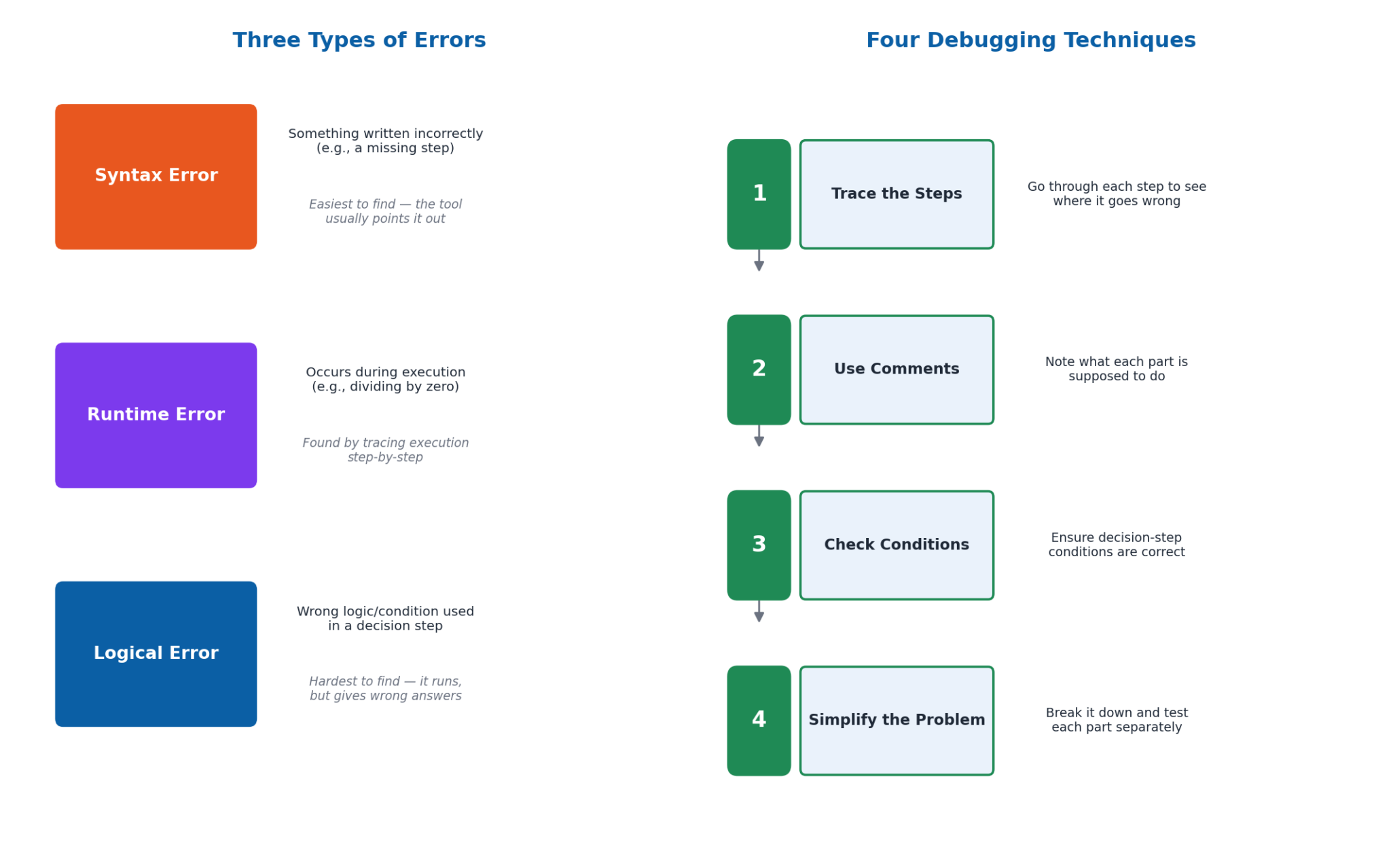
When writing algorithms or creating flowcharts, mistakes called errors or bugs can prevent programs from functioning correctly. There are three main types of errors: Syntax Errors occur when something is written incorrectly in the algorithm or flowchart (e.g., missing a step or using the wrong symbol) — these are usually the easiest to find, since the LARP tool typically points them out directly. Runtime Errors happen during execution, such as trying to perform an impossible operation like dividing by zero. Logical Errors are mistakes in the algorithm's logic that cause it to behave incorrectly, such as using the wrong condition in a decision step — these are the hardest to find, since the algorithm still runs but produces incorrect answers.
Debugging is the process of finding and fixing these errors. Key debugging techniques include: tracing the steps (going through each step to identify where it goes wrong), using comments (writing notes explaining what each part is supposed to do), checking conditions (ensuring decision-step conditions are correct), and simplifying the problem (breaking the algorithm into smaller parts and testing each separately). The term 'debugging' actually originated from a real moth found causing problems in an early computer — the moth was removed, and the process became known as 'debugging'.
Important Definitions
What is computational thinking?
A problem-solving process that involves a set of skills and techniques to solve complex problems in a way that can be executed by a computer, applicable across many fields beyond computer science.
What is decomposition?
The method of breaking down a complicated problem into smaller, more manageable components that can be handled one at a time.
What is pattern recognition?
The process of identifying and understanding regularities or patterns within a set of data or problems, which can help lead to solutions.
What is abstraction?
The process of hiding complex details while exposing only the necessary parts, allowing focus on the high-level overview without getting lost in details.
What is an algorithm?
A precise, step-by-step sequence of instructions that can be followed to achieve a specific goal, similar to a recipe or a set of directions.
What is a flowchart?
A visual representation of the steps in a process or system, depicted using standard symbols (oval, rectangle, parallelogram, diamond, arrow) connected by arrows.
What is pseudocode?
A method of representing an algorithm using simple, informal language that combines the structure of programming with the readability of plain English.
What is debugging?
The process of finding and fixing errors (syntax, runtime, or logical) in an algorithm or flowchart so that it functions correctly.
Key Facts and Relations
| Topic | Key Fact / Relation |
|---|---|
| 4 components of computational thinking | Decomposition, Pattern Recognition, Abstraction, Algorithms |
| 3 principles of computational thinking | Problem Understanding, Problem Simplification, Solution Selection & Design |
| 5 flowchart symbols | Oval (start/end), Rectangle (process), Parallelogram (I/O), Diamond (decision), Arrow (flow) |
| Time complexity notation | Expressed using Big O notation, e.g., O(n), O(log n), O(n²) |
| 3 types of errors | Syntax Errors, Runtime Errors, Logical Errors |
| LARP core commands | START, WRITE, READ, IF…THEN…ELSE, END |
| Dry run definition | Manually going through the algorithm with sample data to identify any errors |
| 4 debugging techniques | Trace the steps, Use comments, Check conditions, Simplify the problem |
Diagrams
The Four Components of Computational Thinking: A diagram showing decomposition, pattern recognition, abstraction, and algorithms as the four key components of computational thinking, each with a brief example
Flowchart Symbols and a Worked Example: The five standard flowchart symbols (oval, rectangle, parallelogram, diamond, arrow) alongside a simple even/odd number-checking flowchart built from them
Types of Errors and the Debugging Process: A comparison of syntax, runtime, and logical errors, alongside the four key debugging techniques used to identify and fix them
Short Questions & Answers
What is decomposition, and how does it help in solving a complex problem?
Decomposition is the method of breaking down a complicated problem into smaller, more manageable components, allowing each part to be handled and solved one at a time rather than tackling the whole problem at once.
Explain pattern recognition with an example.
Pattern recognition involves identifying regularities among and within problems. For example, noticing that the area of a square can be found by adding consecutive odd numbers (1, 1+3, 1+3+5, …) reveals a pattern that simplifies calculating areas.
What is the difference between a flowchart and pseudocode?
A flowchart uses graphical symbols and arrows to represent the flow of an algorithm visually, like watching a movie, while pseudocode uses plain, structured language to describe the steps narratively, like reading a story.
Why is problem understanding considered the most important step in computational thinking?
Because thoroughly understanding a problem before attempting a solution provides clarity and focus, helps define clear and achievable goals, leads to more efficient solutions, and helps avoid common mistakes and wasted effort.
What is the purpose of a dry run?
A dry run involves manually going through an algorithm or flowchart with sample data, without using a computer, to identify logical errors and verify that the algorithm produces the correct results.
Differentiate between time complexity and space complexity.
Time complexity measures how fast or slow an algorithm performs as input size increases, while space complexity measures the amount of memory an algorithm uses relative to the input size.
What is LARP and why is it useful for learning algorithms?
LARP (Logic of Algorithms for Resolution of Problems) is an interactive tool that lets learners write and run algorithms using simple commands like START, WRITE, READ, and IF…THEN…ELSE, helping them see how algorithms work and practice writing their own.
Explain the difference between a syntax error and a logical error.
A syntax error occurs when something is written incorrectly in the algorithm (like a missing step), and is usually easy to spot since the tool points it out; a logical error is a mistake in the algorithm's logic that lets it run but produces incorrect results, making it much harder to detect.
Long Questions & Answers
Define computational thinking and explain its four key components with examples for each.
What is computational thinking, and where is it applied?
Computational thinking is a systematic, structured problem-solving process that involves applying a specific set of skills and techniques to solve complex problems in a way that could, in principle, be carried out by a computer. Although the term references computers, computational thinking as a general problem-solving approach is very widely applicable across many fields well beyond computer science, including biology, mathematics, engineering, and even everyday, non-technical situations such as planning a family trip or organizing daily tasks more efficiently. It is generally understood to be composed of four key components.
What is decomposition, with an example?
Decomposition refers to the method of breaking down one complicated, difficult-to-manage problem into a number of smaller, individually more convenient and manageable component parts. A concrete example can be seen in the task of building a birdhouse, which can be broken down into the smaller sub-tasks of designing the birdhouse, gathering the necessary materials, cutting the wood, assembling the pieces, painting and decorating the finished structure, and finally installing it in a suitable location.
What is pattern recognition, with an example?
Pattern recognition refers to the process of identifying and properly understanding regularities or recurring patterns that exist within a given set of data or a given problem. A concrete example can be seen in recognizing that the area of a square can always be calculated by successively adding consecutive odd numbers together (1, then 1+3, then 1+3+5, and so on), which reveals an underlying mathematical pattern that can then be usefully applied more generally.
What is abstraction, with an example?
Abstraction refers to the process of simplifying an otherwise complex problem by focusing exclusively on the essential, relevant details of that problem while ignoring or hiding away any unnecessary, irrelevant details. A concrete example can be seen in describing the fairly complex real-world process of making a cup of tea using only a small number of essential high-level steps, namely boiling water, adding tea leaves, allowing the tea to steep for a few minutes, and then finally pouring it into a cup.
What is an algorithm, with an example?
An algorithm refers to a precise, carefully ordered, step-by-step sequence of individual instructions that can reliably be followed by someone (or something) in order to successfully achieve one particular, well-defined goal. A concrete example can be seen in a simple recipe for baking a cake, which lays out a clear, precise, and correctly ordered sequence of steps that must be followed in order to reliably produce a properly finished cake. Together, decomposition, pattern recognition, abstraction, and algorithms form the conceptual foundation of computational thinking.
Compare and contrast flowcharts and pseudocode as two different methods of algorithm design, discussing the advantages of each.
What is a flowchart?
A flowchart is a visual, graphical representation of the individual steps that together make up a given process or system. It is generally depicted using a small, standard set of graphical symbols (namely ovals, rectangles, parallelograms, and diamonds) connected together using directional arrows to unambiguously indicate the overall intended flow of the process being described. Using a flowchart has often been compared to watching a short movie, since each symbol represents one distinct action, operation, or decision, while the arrows indicate the direction and order of the algorithm's flow.
What is pseudocode?
Pseudocode uses fairly plain, ordinary, informal, natural-sounding language, combined with a generally structured format, to describe the same underlying sequence of algorithmic steps in a considerably more narrative, story-like written manner. Using pseudocode has often been compared to reading a short written story, since each step of the algorithm is simply written out in careful, correct sequential order, one after the other, using ordinary natural language rather than any special graphical symbols.
What are the respective advantages of flowcharts and pseudocode?
Flowcharts are especially useful for helping identify various bottlenecks, inefficiencies, or other structural problems that may exist within a given process, since their visual nature makes the complete overall structure very easy to grasp at a single glance. Pseudocode, meanwhile, is especially useful for clearly documenting an algorithm's precise underlying logic in a sufficiently detailed way that can then be converted relatively easily into genuinely functioning, working code, in more or less any programming language a programmer might choose to use.
How are flowcharts and pseudocode used together in practice?
In practical, real-world software development, flowcharts and pseudocode are very often used together, working in close complementary combination with one another. Flowcharts are typically used first, early on, to help correctly plan out the overall intended structure of a program at a suitably high level, and pseudocode is subsequently used afterward, in a second, later stage, to more precisely work out and properly document the finer specific logical details of that same overall program.
Explain the concept of debugging and describe the three main types of errors that can occur in an algorithm, along with appropriate debugging techniques for each.
What is debugging, and why is it important?
Debugging refers to the overall process of correctly finding and then properly fixing whatever errors, more informally often also referred to as 'bugs,' happen to exist within a given algorithm or flowchart. This activity represents an essential and unavoidable part of the wider overall process of designing, writing, and eventually fully implementing algorithms of essentially any reasonable level of complexity. There are three main distinct categories of errors that a programmer or algorithm designer might commonly encounter, each generally calling for its own particular kind of debugging approach.
What are syntax errors, and how are they identified?
Syntax errors specifically occur whenever something has been written down incorrectly within the algorithm or flowchart itself, such as accidentally omitting a necessary step, or incorrectly using the wrong type of flowchart symbol in a place where a different symbol should have been used instead. Syntax errors are generally considered the easiest type of error to find and identify, largely because specialized software tools such as LARP will typically and automatically point these kinds of errors out directly and explicitly to the user as soon as they are encountered.
What are runtime errors, and how are they identified?
Runtime errors specifically occur during the actual live execution of a given algorithm or flowchart — one commonly cited example being any attempt to carry out a technically impossible operation, such as attempting to divide a number by zero. These errors can generally be most effectively identified through the technique of carefully tracing execution step-by-step while the algorithm is actually running, in order to correctly pinpoint the precise point at which the impossible operation is first being attempted.
What are logical errors, and how are they identified?
Logical errors specifically refer to underlying mistakes that exist somewhere within the actual core logic of a given algorithm, causing it to behave in some ultimately incorrect way — one commonly cited example being the accidental use of an incorrect logical condition within a decision-making step. Logical errors are generally considered by far the hardest type of error to find and identify, since the algorithm will still run through to completion successfully without triggering any explicit visible error message, even though it is still ultimately failing to produce the specific answer that was originally intended.
What general debugging techniques can be applied to fix these errors?
Several general debugging techniques can be usefully and effectively applied to address these kinds of errors, including carefully tracing each individual step of the algorithm in turn to identify the precise point where something has gone wrong, adding clear explanatory comments throughout the algorithm to help make its intended underlying logic easier to follow and verify, carefully checking each individual condition used within every decision step to confirm it has been written correctly, and simplifying the overall problem by breaking the complete algorithm down into smaller parts and testing each one separately, in isolation from the others.
Multiple Choice Questions (MCQs)
Which of the following best defines computational thinking? (A) A method of solving problems using mathematical calculations only (B) A problem-solving approach that employs systematic, algorithmic, and logical thinking (C) A technique used exclusively in computer programming (D) An approach that ignores real-world applications
Correct answer: (B) A problem-solving approach that employs systematic, algorithmic, and logical thinking. Computational thinking is a problem-solving approach that employs systematic, algorithmic, and logical thinking, and is applicable well beyond computer programming alone.
Why is problem decomposition important in computational thinking? (A) It simplifies problems by breaking them down into smaller, more manageable parts (B) It complicates problems by adding more details (C) It eliminates the need for solving the problem (D) It is only useful for simple problems
Correct answer: (A) It simplifies problems by breaking them down into smaller, more manageable parts. Decomposition simplifies complex problems by breaking them down into smaller, more manageable component parts that can be tackled one at a time.
Pattern recognition involves: (A) Ignoring repetitive elements (B) Finding and using similarities within problems (C) Breaking problems into smaller pieces (D) Writing detailed algorithms
Correct answer: (B) Finding and using similarities within problems. Pattern recognition involves identifying and using similarities or regularities within and among problems to help find solutions.
Which term refers to the process of ignoring unnecessary details to focus on the main idea? (A) Decomposition (B) Pattern recognition (C) Abstraction (D) Algorithm design
Correct answer: (C) Abstraction. Abstraction is the process of hiding complex, unnecessary details while exposing only the essential parts needed to understand or solve a problem.
Which of the following is a principle of computational thinking? (A) Ignoring problem understanding (B) Problem simplification (C) Avoiding solution design (D) Implementing random solutions
Correct answer: (B) Problem simplification. Problem simplification, along with problem understanding and solution selection/design, is one of the three key principles of computational thinking.
Algorithms are: (A) Lists of data (B) Graphical representations (C) Step-by-step instructions for solving a problem (D) Repetitive patterns
Correct answer: (C) Step-by-step instructions for solving a problem. An algorithm is a precise, step-by-step sequence of instructions that can be followed to achieve a specific goal.
Which of the following is the first step in problem-solving according to computational thinking? (A) Writing the solution (B) Understanding the problem (C) Designing a flowchart (D) Selecting a solution
Correct answer: (B) Understanding the problem. Understanding the problem thoroughly is the first and most important step before attempting to design or select a solution.
Flowcharts are used to: (A) Code a program (B) Represent algorithms graphically (C) Solve mathematical equations (D) Identify patterns
Correct answer: (B) Represent algorithms graphically. Flowcharts use standard graphical symbols connected by arrows to represent the steps and flow of an algorithm visually.
Pseudocode is: (A) A type of flowchart (B) A high-level description of an algorithm using plain language (C) A programming language (D) A debugging tool
Correct answer: (B) A high-level description of an algorithm using plain language. Pseudocode is a high-level, informal description of an algorithm's logic written in plain, structured language rather than actual programming syntax.
Dry running a flowchart involves: (A) Writing the code in a programming language (B) Testing the flowchart with sample data (C) Converting the flowchart into pseudocode (D) Ignoring the flowchart details
Correct answer: (B) Testing the flowchart with sample data. A dry run involves manually walking through a flowchart step-by-step using sample data to verify its correctness and identify errors.
Quick Revision Summary
- 4 components of CT: Decomposition, Pattern Recognition, Abstraction, Algorithms
- 3 principles of CT: Problem Understanding, Problem Simplification, Solution Selection & Design
- 5 flowchart symbols: Oval (start/end), Rectangle (process), Parallelogram (I/O), Diamond (decision), Arrow (flow)
- Pseudocode = plain-language algorithm description; read like a story vs. flowchart = read like a movie
- Time complexity (Big O: O(n), O(log n), O(n²)) vs. Space complexity (memory used)
- Dry run = manual step-by-step walkthrough with sample data; Simulation = computer model of a real process
- LARP commands: START, WRITE, READ, IF…THEN…ELSE, END
- 3 error types: Syntax (easiest to find), Runtime (impossible operations), Logical (hardest to find)
Exam Tips
- Remember the 4 CT components with 'DPAA': Decomposition, Pattern recognition, Abstraction, Algorithms
- For flowchart symbol questions: Oval=start/end, Rectangle=process, Parallelogram=input/output, Diamond=decision
- Pseudocode vs. flowchart: pseudocode is narrative/text-based, flowchart is visual/graphical — a very common exam distinction
- Logical errors are the hardest to catch because the program still runs — always trace through with sample values to verify output
- Remember LARP's 5 core keywords: START, WRITE, READ, IF…THEN…ELSE, END
- When asked to dry-run an algorithm, always show a table of variable values at each step, not just the final answer