This chapter covers Data Basics from the 2nd Year (ICS Part-II) Computer Science syllabus of the Punjab Curriculum and Textbook Board (PTB/PCTB). It explains data and information, the traditional file system and its drawbacks, databases, and the database management system (DBMS). These notes are prepared by freebooks.pk.
Storing and managing data is one of the most important uses of computers. This chapter introduces databases, which have replaced older file systems for keeping large amounts of data organised.
Learning Objectives
- Distinguish between data and information.
- Describe the traditional file system and its drawbacks.
- Explain what a database is and its advantages.
- Define a database management system (DBMS).
- State the functions and advantages of a DBMS.
- Give examples of database use.
Key Concepts
Data and Information
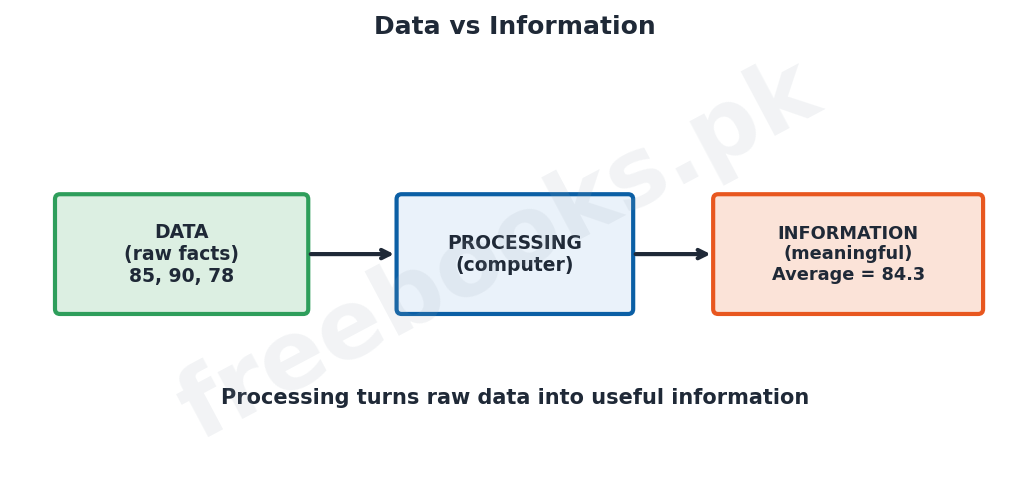
Data means raw, unorganised facts and figures, such as names, numbers or marks, which on their own may have little meaning. Information is data that has been processed, organised or presented in a meaningful and useful form, such as a total, an average or a report. The computer processes data to produce information; for example, a list of marks (data) can be processed to give the average (information). Turning data into useful information is a main purpose of computing.
The Traditional File System
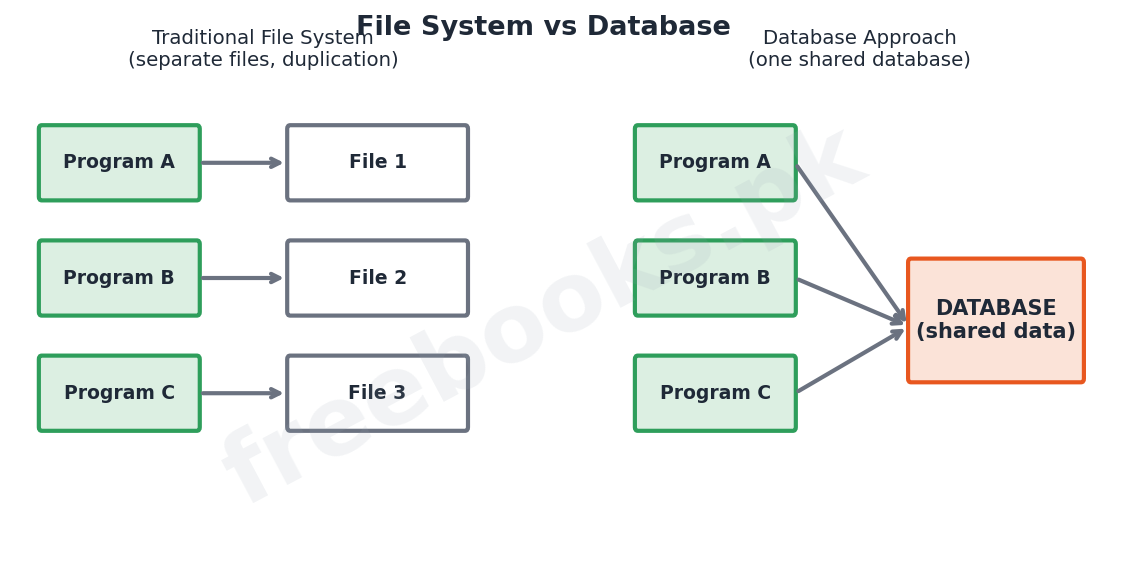
Before databases, data was kept in a traditional file system, in which each application program had its own separate data files. This approach had serious drawbacks. The same data was often stored in several files, causing data duplication (redundancy) and wasting space; the copies could disagree, causing data inconsistency; the data was tied to particular programs (data dependence); and it was hard to share data between programs. These problems made the file system difficult to manage as data grew.
What is a Database?
A database is an organised collection of related data stored together in one place so that it can be easily accessed, managed and updated. Instead of separate files for each program, all the data is kept in a single shared database that many programs and users can use. Because the data is stored once and shared, a database greatly reduces duplication and inconsistency and makes the data easier to control and to search.
The Database Management System (DBMS)
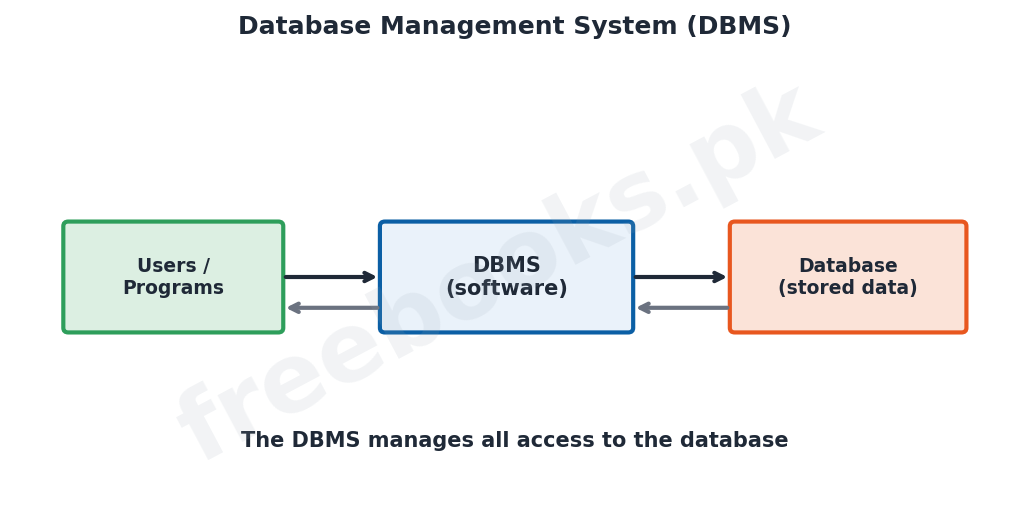
A database management system (DBMS) is the software that creates, stores, manages and controls access to a database. It sits between the users (or their programs) and the stored data, so that all access to the database goes through it. Examples of DBMS software include Microsoft Access, Oracle and MySQL. The DBMS allows users to define the data, enter and update it, and retrieve it using queries, while keeping the data secure and consistent.
Functions of a DBMS
A DBMS performs several important functions. It lets users define the structure of the data (the tables and fields). It allows data to be inserted, updated and deleted. It lets users retrieve data by asking questions called queries. It controls who may see or change the data (security), keeps the data accurate (integrity), and allows several users to use the data at the same time without conflict. It can also make backups so that data can be recovered if it is lost.
Advantages of a Database Approach
Using a database with a DBMS has many advantages over the old file system. It reduces data duplication because data is stored once and shared; it improves data consistency and accuracy; it makes data easy to search and to update; it allows data to be shared safely among many users; and it provides security and backup. These advantages are why databases are now used to store the records of banks, schools, hospitals, businesses and governments.
Uses of Databases
Databases are used wherever large amounts of related data must be stored and used. A bank uses a database to keep customers’ accounts, a school to keep students’ records and results, a hospital to keep patients’ records, an airline to keep bookings, and a shop to keep stock and sales. In each case the database, managed by a DBMS, keeps the data organised, accurate and available to those who need it.
Important Definitions
Data
Raw, unorganised facts and figures.
Information
Processed, organised data that is meaningful and useful.
File system
An older method where each program keeps its own separate data files.
Data redundancy
Unnecessary duplication of the same data in several places.
Data inconsistency
Disagreement between duplicated copies of data.
Database
An organised collection of related data stored together.
DBMS
Software that creates, manages and controls access to a database.
Query
A question used to retrieve particular data from a database.
Key Facts & Rules
| Item | Detail |
|---|---|
| Data | Raw facts (e.g. 85, 90, 78) |
| Information | Processed data (e.g. average = 84.3) |
| File system drawbacks | Redundancy, inconsistency, data dependence |
| Database | One shared, organised collection of data |
| DBMS examples | MS Access, Oracle, MySQL |
| DBMS functions | Define, insert, update, delete, query, secure, backup |
Diagrams & Illustrations
Data vs information: raw data being processed by the computer into meaningful information.
File system vs database: the traditional file system with separate files for each program compared with a single shared database.
Database management system: users and programs accessing a database only through the DBMS software.
Solved Examples & Practice
Data or information
A list of exam marks is data; the class average worked out from them is information.
Spot the drawback
If a student’s address is stored in three different files and one is updated, the others become wrong; this is data inconsistency caused by redundancy.
Identify the software
Microsoft Access is an example of a DBMS used to create and manage databases.
Choose a query
To list all students who scored above 80, the user runs a query on the database.
Short Questions & Answers
Differentiate between data and information.
Data is raw, unorganised facts; information is data that has been processed into a meaningful and useful form.
State two drawbacks of the traditional file system.
Data redundancy (the same data stored many times) and data inconsistency (copies that disagree); data is also tied to programs.
What is a database?
An organised collection of related data stored together so it can be easily accessed, managed and updated.
What is a DBMS?
Database management system, the software that creates, manages and controls access to a database (e.g. MS Access).
What is a query?
A question used to retrieve particular data from a database.
State two advantages of a database over a file system.
It reduces data duplication and improves consistency; it also makes data easier to share and secure.
Long Questions & Answers
Q1: Differentiate between data and information and explain the drawbacks of the traditional file system.
Although the words data and information are often used to mean the same thing, in computing they are different. Data means raw, unorganised facts and figures, such as a set of names, numbers or examination marks, which on their own may carry little meaning. Information is data that has been processed, that is, organised, summarised or presented in a form that is meaningful and useful to the person receiving it; for instance, a plain list of marks is data, but the class average or a report of pass and fail results worked out from those marks is information. The computer’s task is largely to process data into information. Before databases became common, data was kept using a traditional file system, in which every application program had its own separate set of data files. This method suffered from several serious drawbacks. First, because each program kept its own files, the same item of data, such as a customer’s address, was often stored in several different files, causing data redundancy, or unnecessary duplication, which wasted storage space. Second, when one copy of such duplicated data was changed but the others were not, the copies disagreed, producing data inconsistency, so it was no longer clear which copy was correct. Third, the data was closely tied to the particular program that used it, a problem called data dependence, so changing the data format meant changing the programs. Finally, it was difficult to share data between different programs. These weaknesses made the file system hard to manage as the amount of data grew, and led to the development of the database approach.
Q2: Explain what a database and a database management system (DBMS) are, and state the functions of a DBMS.
A database is an organised collection of related data that is stored together in one place so that it can be easily stored, accessed, managed and updated. Instead of keeping a separate set of files for every program, as the old file system did, the database approach keeps all the related data in a single, shared collection that many programs and users can use at the same time. Because each item of data is normally stored only once and then shared, a database greatly reduces the duplication and inconsistency that troubled file systems, and it makes the data much easier to control, search and keep accurate. A database, however, does not work on its own; it is created and controlled by a piece of software called a database management system, or DBMS. The DBMS sits between the users, or their application programs, and the actual stored data, so that every request to read or change the data passes through it; well-known examples of DBMS software are Microsoft Access, Oracle and MySQL. The DBMS carries out a number of important functions. It allows the user to define the structure of the database, that is, the tables and the fields they contain. It allows data to be inserted, updated and deleted. It allows users to retrieve exactly the data they want by asking questions called queries. It enforces security by controlling who is allowed to see or change the data, and it protects the integrity, or accuracy, of the data. It also allows many users to work with the data at the same time without their actions conflicting, and it can make backup copies so that the data can be recovered if it is lost. Through these functions the DBMS makes a shared database safe, reliable and easy to use.
Q3: Describe the advantages of the database approach and give examples of where databases are used.
The database approach, in which data is stored in a single shared database managed by a DBMS, has many advantages over the older traditional file system, and these advantages explain why it is now used almost everywhere. The first advantage is a great reduction in data redundancy: because each piece of data is stored once and shared, the wasteful duplication of the file system is largely removed, saving storage and effort. This in turn brings improved data consistency and accuracy, because there are no longer several copies of the same data that might disagree. A database also makes data much easier to search and to update, since the DBMS provides queries and tools to find and change data quickly. It allows data to be shared safely among many users and programs at the same time, while the DBMS controls exactly who may see or alter each part of the data, giving strong security; the DBMS can also keep backup copies so that data is not lost. Because of these benefits, databases managed by a DBMS are used to hold the important records of almost every large organisation. A bank uses a database to keep the accounts and transactions of its customers; a school keeps the records, marks and results of its students; a hospital keeps the records of its patients; an airline keeps its flight and seat bookings; a shop or company keeps its stock, sales and payroll; and governments keep records such as identity, tax and land data. In every one of these cases the database, controlled by its DBMS, keeps the large amount of related data organised, accurate, secure and available to the people who need it.
MCQs with Answers
Raw, unorganised facts are called: (a) information (b) data (c) reports (d) queries
Correct Answer: (b) data.
Processed, meaningful data is called: (a) data (b) information (c) a file (d) a byte
Correct Answer: (b) information.
Storing the same data many times is: (a) consistency (b) redundancy (c) integrity (d) security
Correct Answer: (b) redundancy.
When duplicated data disagrees, it is called: (a) redundancy (b) inconsistency (c) a query (d) a backup
Correct Answer: (b) inconsistency.
An organised collection of related data is a: (a) file only (b) database (c) folder (d) query
Correct Answer: (b) database.
The software that manages a database is a: (a) DBMS (b) OS (c) URL (d) NIC
Correct Answer: (a) DBMS.
Microsoft Access is an example of a: (a) browser (b) DBMS (c) spreadsheet only (d) modem
Correct Answer: (b) DBMS.
A question used to retrieve data is a: (a) record (b) query (c) field (d) file
Correct Answer: (b) query.
A main advantage of a database over files is: (a) more duplication (b) less redundancy (c) less security (d) no sharing
Correct Answer: (b) less redundancy.
A bank keeps customers’ accounts in a: (a) spreadsheet only (b) database (c) word processor (d) browser
Correct Answer: (b) database.
Quick Revision Summary
- Data = raw facts; information = processed, meaningful data.
- File system drawbacks: redundancy, inconsistency, data dependence, poor sharing.
- Database = organised collection of related data, shared and stored once.
- DBMS = software managing the database (MS Access, Oracle, MySQL); all access goes through it.
- DBMS functions: define, insert, update, delete, query, security, integrity, backup.
- Advantages: less redundancy, better consistency, easy search, sharing, security. Notes by freebooks.pk.
Exam Tips
- Clearly distinguish data from information with an example.
- List the drawbacks of the file system (redundancy, inconsistency).
- Define a database and a DBMS separately.
- Give examples of DBMS software.
- State the main functions of a DBMS.
- Give real examples of where databases are used.