This chapter covers the Basics of Information Technology from the 1st Year (ICS Part-I) Computer Science syllabus of the Punjab Curriculum and Textbook Board (PTB/PCTB). It introduces hardware and software, input and output devices, system and application software, the basic units of data storage and the system development life cycle. These notes are prepared by freebooks.pk.
Information technology (IT) is the use of computers to store, process and communicate information. This chapter builds the foundation by explaining what a computer is made of and how its parts work together.
Learning Objectives
- Distinguish between hardware and software.
- Identify common input and output devices.
- Differentiate system software from application software.
- State the basic units of data storage.
- Describe a system and the stages of the system development life cycle.
Key Concepts
Hardware and Software
A computer system is made up of two parts: hardware and software. Hardware is the collection of all the physical (touchable) components of the computer, such as the keyboard, mouse, monitor, processor, memory and printer. Software is the set of instructions, called programs, that tell the hardware what to do; it cannot be touched. Hardware and software depend on each other: hardware without software is like a body without life, and software cannot work without hardware to run it.
Input Devices
An input device is any hardware used to enter data and instructions into the computer. The most common are the keyboard, used to type text and commands, and the mouse, a pointing device used to select and move items on the screen. Other input devices include scanning devices such as the optical scanner, barcode reader, optical mark reader (OMR) and optical character reader (OCR), which read printed information directly, and audio/video input devices such as the microphone and digital camera, which capture sound and images.
Output Devices
An output device is any hardware that presents the results (information) produced by the computer to the user. The monitor (or visual display unit) shows output on a screen as soft copy, while the printer produces output on paper as hard copy; common printers include the dot-matrix, inkjet and laser printer. The speaker gives sound output, and the plotter is used to print large drawings and maps. Output can therefore be seen, heard or printed.
System Software and Application Software
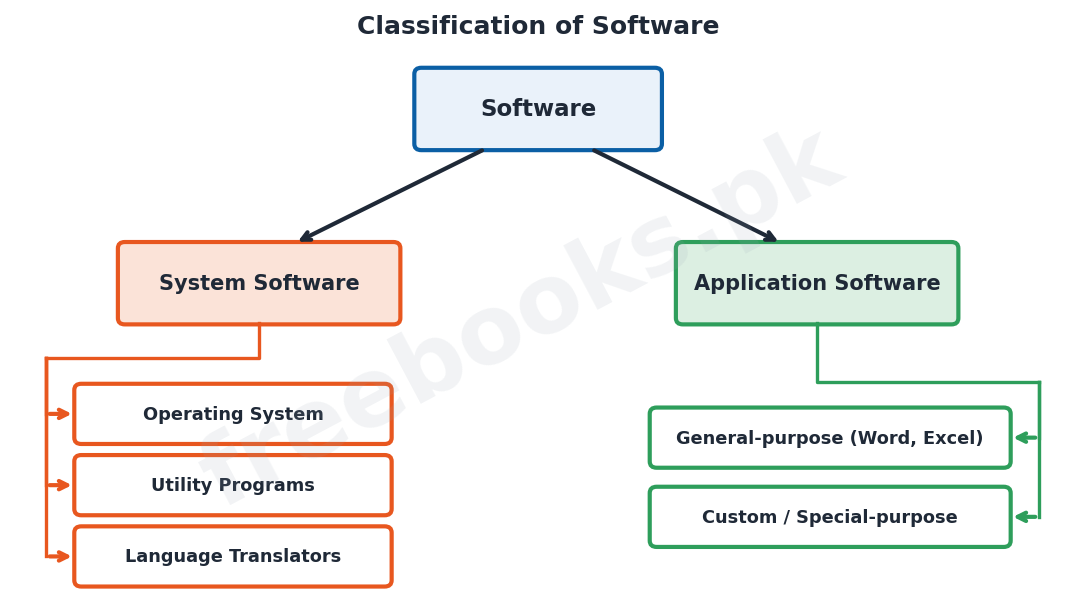
Software is broadly of two kinds. System software controls and manages the operation of the computer itself and provides a platform for other programs; it includes the operating system (such as Windows), utility programs (which perform maintenance tasks like virus scanning and disk cleanup) and language translators (which convert program code into machine language). Application software is written to help the user carry out a particular task, and may be general-purpose (such as a word processor or spreadsheet used by many people) or custom (special-purpose) software made for one organisation, such as a bank’s accounts system.
Basic Units of Data Storage
Inside a computer all data is represented using only two digits, 0 and 1, called binary digits or bits. A bit is the smallest unit of data. A group of 8 bits makes one byte, which can store a single character such as a letter or digit. Larger amounts of storage are measured in kilobytes (KB), megabytes (MB), gigabytes (GB) and terabytes (TB), where each unit is 1024 times the one before it. A word is the number of bits (such as 16, 32 or 64) that the processor can handle as a single unit at one time.
What is a System?
A system is a group of components that work together to achieve a common goal. A computer-based information system has several parts: hardware, software, data, people (users) and procedures. These components interact so that raw data given as input is processed into useful information as output. Understanding a system as a set of cooperating parts is the first step towards designing and building software for real problems.
System Development Life Cycle
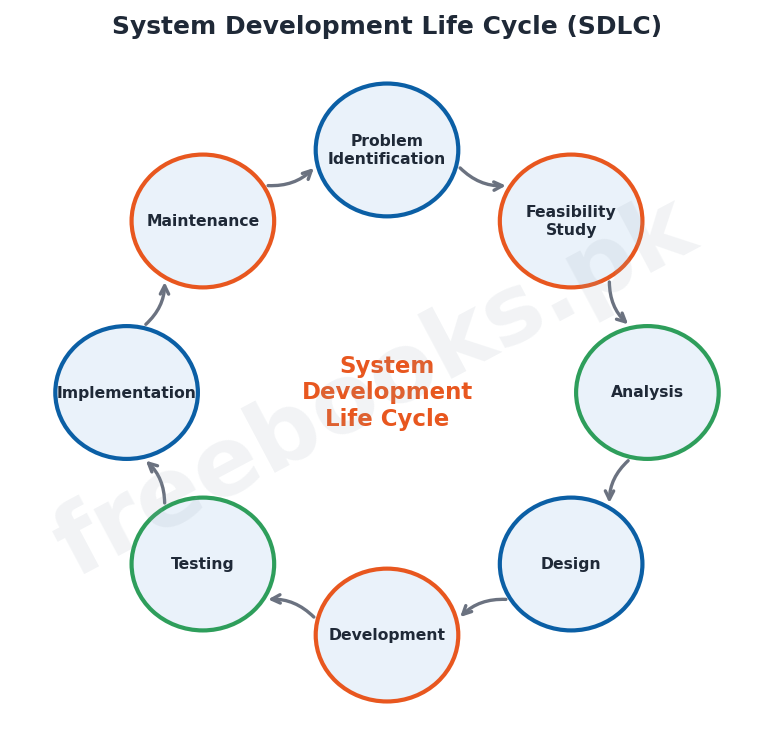
The system development life cycle (SDLC) is the step-by-step process used to plan, build and maintain an information system. Its main stages are: identifying the problem, carrying out a feasibility study, analysing the requirements, designing the system, developing (coding) it, testing it, implementing (installing) it and finally maintaining it. Following these stages in order helps ensure that the finished system is reliable, meets the users’ needs and can be improved over time.
Important Definitions
Hardware
The physical, touchable components of a computer.
Software
The set of programs (instructions) that tell the hardware what to do.
Input device
Hardware used to enter data and instructions into the computer.
Output device
Hardware that presents the computer’s results to the user.
System software
Software that controls and manages the computer (e.g. the operating system).
Application software
Software written to perform a particular task for the user.
Bit
A binary digit, 0 or 1; the smallest unit of data.
Byte
A group of 8 bits that stores one character.
Key Facts & Rules
| Item | Detail |
|---|---|
| Bit | Smallest unit of data (0 or 1) |
| 1 Byte | 8 bits (stores one character) |
| 1 Kilobyte (KB) | 1024 bytes |
| 1 Megabyte (MB) | 1024 KB |
| 1 Gigabyte (GB) | 1024 MB |
| 1 Terabyte (TB) | 1024 GB |
| Word | Bits the CPU handles at once (16/32/64-bit) |
Diagrams & Illustrations
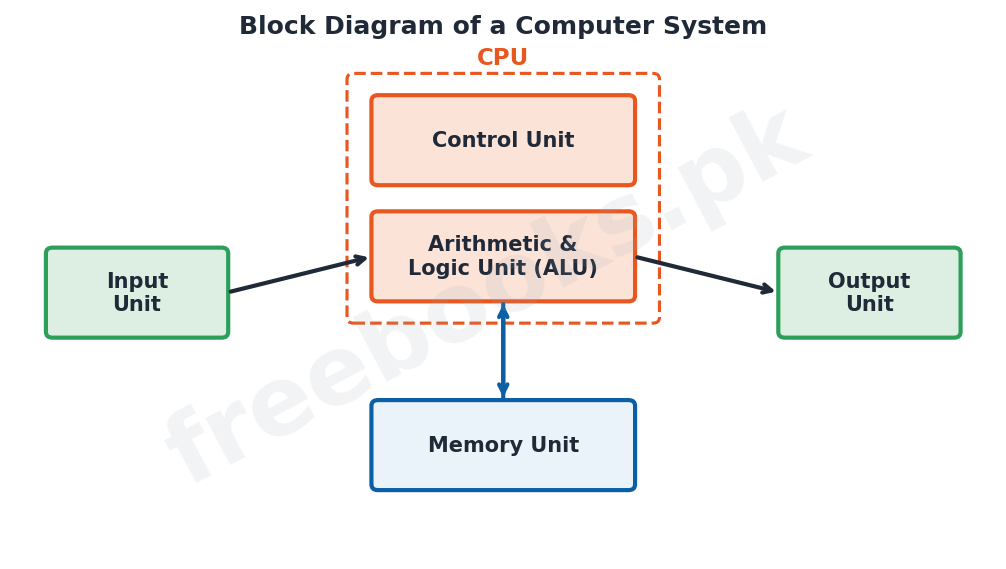
Block diagram of a computer: a computer system showing the input unit feeding the CPU (control unit + ALU) which works with the memory unit and sends results to the output unit.
Classification of software: a tree splitting software into system software (operating system, utility programs, language translators) and application software (general-purpose and custom).
System development life cycle: the SDLC shown as a cycle of stages from problem identification and feasibility through analysis, design, development, testing, implementation and maintenance.
Solved Examples & Practice
Bytes in a kilobyte
How many bytes are in 2 KB? 2 KB = 2 x 1024 = 2048 bytes.
Bits in a byte
A byte stores one character using 8 bits, so the word ‘CAT’ (3 characters) needs 3 bytes = 24 bits.
Classify a device
A laser printer is an output device (hard copy), while a barcode reader is an input (scanning) device.
Classify software
MS Word is application software (general-purpose), whereas Windows is system software (an operating system).
Short Questions & Answers
Differentiate between hardware and software.
Hardware is the physical, touchable parts of a computer; software is the set of programs (instructions) that tell the hardware what to do and cannot be touched.
What is an input device? Give two examples.
A device used to enter data and instructions into the computer; examples are the keyboard and the mouse.
What is the difference between soft copy and hard copy?
Soft copy is output shown on the monitor screen; hard copy is output printed on paper.
Differentiate system software and application software.
System software manages and runs the computer (e.g. the operating system); application software performs a specific task for the user (e.g. a word processor).
What is a byte?
A group of 8 bits, which can store a single character such as a letter or digit.
What is the system development life cycle?
The step-by-step process of planning, building, testing, implementing and maintaining an information system.
Long Questions & Answers
Q1: Define hardware and software and explain, with examples, the input and output devices of a computer.
A computer system consists of two complementary parts, hardware and software. Hardware is the term for all the physical components of the computer, that is, the parts that can be seen and touched, such as the keyboard, mouse, monitor, processor, memory chips and printer. Software, on the other hand, is the collection of programs, or sets of instructions, that direct the hardware to perform useful work; software has no physical form and cannot be touched. The two are completely dependent on one another, since hardware can do nothing without software to instruct it, and software cannot run without hardware to execute it. Among the hardware, the devices used to feed information into the computer are called input devices. The keyboard is used to type text, numbers and commands, and the mouse is a pointing device used to select, move and open items on the screen. Other input devices include scanning devices such as optical scanners, barcode readers, optical mark readers (OMR) and optical character readers (OCR), which read printed data directly, and audio/video devices such as microphones and digital cameras, which capture sound and pictures. The devices that deliver the computer’s results back to the user are called output devices. The monitor displays output on its screen as a temporary soft copy, while printers such as the dot-matrix, inkjet and laser printer produce a permanent hard copy on paper; speakers provide sound output and plotters print large drawings. Thus input devices carry data into the machine and output devices carry information out of it.
Q2: Explain the classification of software into system software and application software.
All computer software falls into two broad categories according to the purpose it serves: system software and application software. System software is the software that controls, manages and runs the computer hardware itself and provides an environment in which other programs can operate. The most important piece of system software is the operating system, such as Windows, which manages the memory, files, devices and running programs and acts as the bridge between the user and the hardware. System software also includes utility programs, which carry out housekeeping and maintenance tasks such as scanning for viruses, cleaning up the disk, and compressing files, and language translators (assemblers, compilers and interpreters), which convert the programs written by programmers into the machine language that the computer can execute. Application software, by contrast, is written to help the user perform a specific real-world task rather than to run the computer. It is itself of two kinds: general-purpose (packaged) software, such as word processors, spreadsheets and web browsers, which is produced for and used by very large numbers of people, and custom or special-purpose software, which is developed to meet the particular needs of a single organisation, for example a bank’s account-management program or an airline’s reservation system. In short, system software makes the computer work, while application software makes the computer useful for a job.
Q3: Describe what is meant by a system and explain the stages of the system development life cycle.
In computing, a system is a set of related components that work together in an organised way to achieve a common purpose. A computer-based information system is made up of hardware, software, data, people (the users) and procedures, all of which cooperate so that raw data supplied as input is processed into meaningful information delivered as output. When a new information system is needed, it is not built at random but developed through an orderly sequence of stages known as the system development life cycle (SDLC). The first stage is problem identification, in which the need or problem is recognised and defined. This is followed by a feasibility study, which checks whether the proposed system is technically and economically worthwhile. Next comes analysis, where the exact requirements of the users are gathered and studied, and then design, in which the structure of the new system, its inputs, outputs, files and processes, is planned. In the development stage the design is turned into actual programs by coding, after which the system is thoroughly tested to find and remove errors. Once it works correctly it is implemented, that is, installed and put into use, and the users are trained. Finally, in the maintenance stage the working system is monitored, corrected and improved over its lifetime as needs change. Carrying out these stages in order helps produce a reliable system that genuinely meets the users’ needs and can be enhanced later.
MCQs with Answers
The physical parts of a computer are called: (a) software (b) hardware (c) firmware (d) freeware
Correct Answer: (b) hardware.
Which of the following is an input device? (a) monitor (b) printer (c) keyboard (d) speaker
Correct Answer: (c) keyboard.
Which of the following is an output device? (a) mouse (b) scanner (c) monitor (d) microphone
Correct Answer: (c) monitor.
The smallest unit of data is the: (a) byte (b) bit (c) word (d) nibble
Correct Answer: (b) bit.
One byte is equal to: (a) 4 bits (b) 8 bits (c) 16 bits (d) 1024 bits
Correct Answer: (b) 8 bits.
1 Kilobyte equals: (a) 1000 bytes (b) 1024 bytes (c) 8 bytes (d) 1024 bits
Correct Answer: (b) 1024 bytes.
Windows is an example of: (a) application software (b) system software (c) hardware (d) a printer
Correct Answer: (b) system software.
A word processor is an example of: (a) system software (b) application software (c) an input device (d) an OS
Correct Answer: (b) application software.
A barcode reader is a type of: (a) output device (b) scanning input device (c) printer (d) memory
Correct Answer: (b) scanning input device.
The correct order of some early SDLC stages is: (a) design, analysis, problem (b) problem, analysis, design (c) testing, design, problem (d) design, problem, analysis
Correct Answer: (b) problem, analysis, design.
Quick Revision Summary
- Hardware = physical parts; software = programs (instructions); they depend on each other.
- Input devices: keyboard, mouse, scanners (OMR/OCR/barcode), mic, camera.
- Output devices: monitor (soft copy), printer (hard copy), speaker, plotter.
- System software (OS, utilities, translators) vs application software (general-purpose / custom).
- Data units: bit -> byte (8 bits) -> KB -> MB -> GB -> TB (x1024 each); word = CPU bits at once.
- System = cooperating parts; SDLC: problem, feasibility, analysis, design, development, testing, implementation, maintenance. Notes by freebooks.pk.
Exam Tips
- Clearly state hardware = touchable, software = instructions.
- Be able to classify any given device as input or output.
- Learn the storage units in order with x1024 between them.
- Give examples: OS/utility/translator (system) vs Word/Excel (application).
- Memorise the SDLC stages in the correct order.
- Use everyday examples (printer, keyboard) in answers.