The final chapter of the Statistics Part-II syllabus steps away from probability and inference to introduce the machine that now performs almost all real-world statistical computation: the computer. It covers the computer's basic capabilities and history, the physical (hardware) and logical (software) building blocks of a computer system, how data moves in and out through input and output devices, the layers of software from the operating system up to application programs and programming languages, and finally the number systems — decimal, binary, octal, and hexadecimal — that explain how a machine built from simple on/off electrical switches can represent and process any kind of data.
This chapter is conceptual and definitional rather than computational: there are no statistical formulas or worked numerical examples as in earlier chapters, and success here depends on precisely knowing terms, classifications, and the roles different hardware and software components play within a complete computer system.
Learning Objectives
- Define a computer and describe its key capabilities: speed, data storage, data processing, accuracy, and diligence
- Outline the historical milestones in the development of the computer, from Pascal's Pascaline to the modern stored-program computer
- Distinguish digital, analog, and hybrid computers
- Classify computers by size and processing power into micro, mini, mainframe, and super computers
- Distinguish hardware from software and identify the four major hardware components of a personal computer
- Describe the functions of the Control Unit and the Arithmetic Logic Unit (ALU) within the CPU
- Distinguish main memory (RAM) from secondary storage, and identify common input and output devices
- Distinguish system software from application software, and list the functions of an operating system
- Distinguish low-level from high-level programming languages, and describe assemblers, interpreters, and compilers
- Convert numbers between the decimal, binary, octal, and hexadecimal number systems, and explain why computers use binary internally
Key Concepts
17.1 Introduction to Computer
A computer is an electronic device used to store and process data to solve problems according to a set of instructions given to it; the word comes from 'compute', meaning to calculate. A modern computer's key capabilities are: Speed — the number of instructions processed per second, measured in megahertz (MHz) or gigahertz (GHz), where hertz is the number of electronic pulses generated per second by the processor's clock. Data Storage — the ability to store large amounts of data in memory and retrieve it at very high speed; data itself is a combination of characters, numbers, and symbols collected for a specified purpose. Data Processing — a series of operations (arithmetic, logical, classification, arrangement, transmission) performed on data to produce results, called output or information. Accuracy — a computer performs millions of error-free operations per second, PROVIDED the input data and program instructions given to it are themselves correct. Diligence — a computer can work for long hours without tiring, and its accuracy is unaffected by how long it has been running.
17.2 History of Computer
Blaise Pascal (France) built the first mechanical adding machine, the 'Pascaline', in 1642, capable of addition and subtraction; Gottfried Wilhelm von Leibnitz modified it in 1671, adding a 'multiplier wheel' enabling all four basic arithmetic operations. Charles Babbage (UK) designed the 'Analytical Engine' in 1833 — the first programmable computer, consisting of a storage unit, a mill (for arithmetic), and a control unit, programmed using punched cards. The 'Harvard Mark-I' was developed at Harvard University between 1937 and 1943. In 1943, J.W. Mauchly and J.P. Eckert developed ENIAC (Electronic Numerical Integrator and Calculator) at the Moore School of Engineering, USA, completed in 1946; its programs were stored externally on tape and executed sequentially. In 1944, John von Neumann proposed storing the computer's program ELECTRONICALLY INSIDE the computer itself — the final conceptual breakthrough underlying every modern computer's design.
17.3 Types of Computers
Computers are of three types based on how they process signals. A Digital Computer works only with two signals, 0 and 1, counting numbers/digits and giving output in digital form; data and instructions are stored as coded 0's and 1's; examples include digital watches and digital thermometers. An Analog Computer does not operate directly with digital signals — it measures physical quantities and gives output on a continuous scale (a graph or a dial reading); examples include a dial clock, a thermometer, and a weighing machine; its results are less accurate than a digital computer's. A Hybrid Computer combines features of both, accepting input and giving output in either analog or digital form; a modem is a common example.
17.4 Classification of Computers
By speed and memory size, computers are classified into four groups. Micro Computers (personal computers) are designed for one user at a time, commonly used in offices, homes, and schools, with processing speed measured in millions of instructions per second (MIPS); laptops and notebooks are micro computers. Mainframe Computers are very large, very high-speed computers used by large organisations (banks, insurance companies, research institutes, weather bureaus) — the largest IBM S/390 mainframe can support 50,000 users while executing over 1.6 billion instructions per second. Mini Computers, introduced in the 1960s, are smaller than mainframes but can still handle far more data than personal computers, used for large-organisation record-keeping, experimental data analysis, or factory process control; they cost from about $18,000 to $500,000. Super Computers are the most powerful computers built, capable of over 1 trillion calculations per second, used by nuclear scientists to model fission/fusion and to map the human genome; they can cost tens of millions of dollars and consume enormous amounts of electricity.
17.5-17.6 Hardware, Software, and Hardware Components
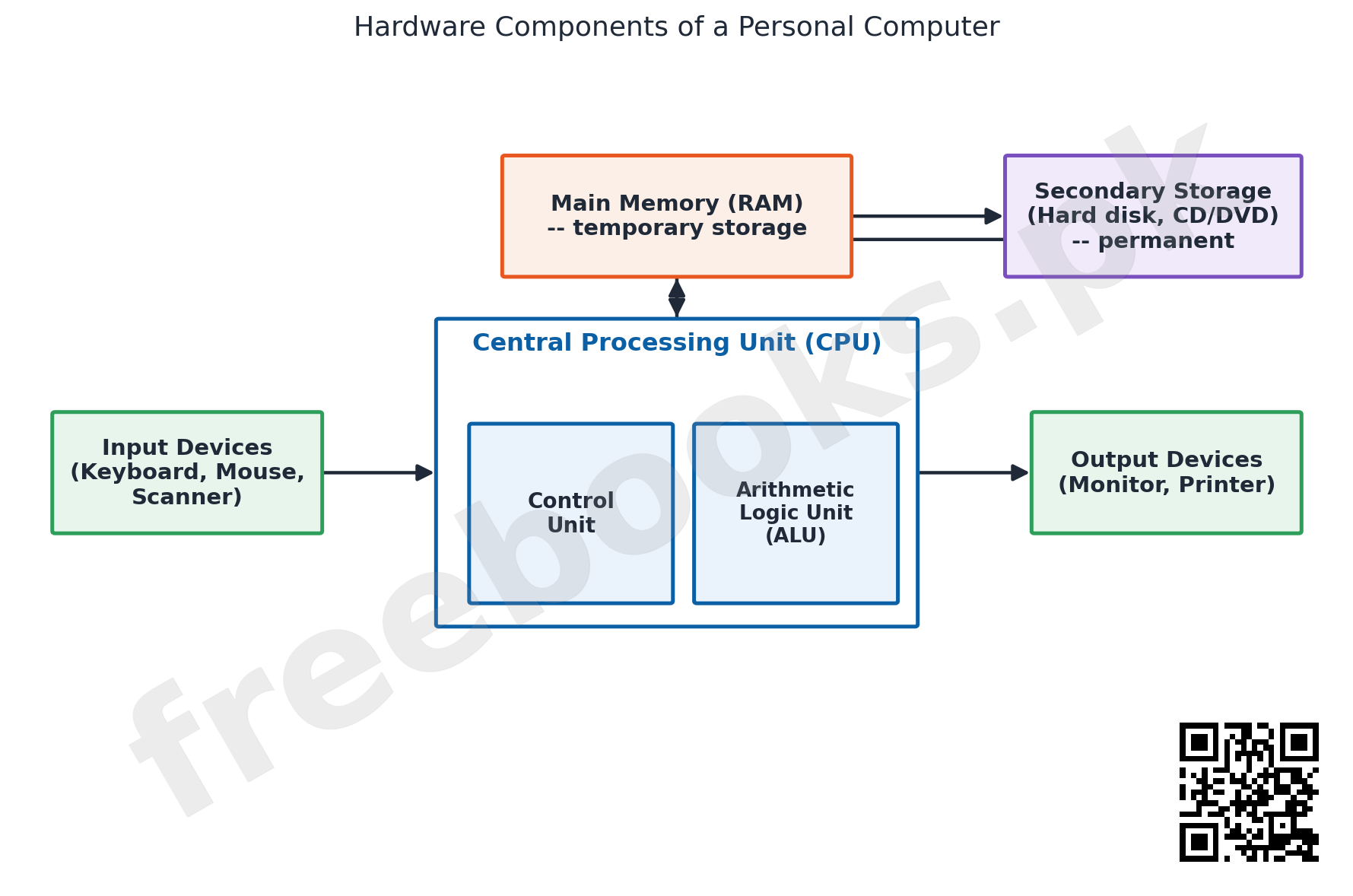
Hardware is the physical parts of a computer (CPU, monitor, mouse, keyboard, etc.); Software is the set of instructions given to a computer to solve a problem or control its operation, prepared in a programming language (e.g. Microsoft Word, Excel). A personal computer's critical hardware falls into four categories: the Central Processing Unit (CPU), Main Memory, Input/Output Devices, and Secondary Storage.
The CPU is the 'brain' of the computer, where data is manipulated, and has two basic parts. The Control Unit manages all the computer's resources — like a traffic cop directing the flow of data through the CPU and to other devices — interpreting each coded instruction (add, subtract, store) and moving data between input devices, memory, the ALU, and output devices accordingly; it is the logical hub/nervous system of the computer. The Arithmetic Logic Unit (ALU) performs all arithmetic operations (+, -, x, /, raised to a power) and logical/comparison operations (=, !=, >, <, >=, <=) on data, using high-speed registers built directly into the CPU to hold data currently being processed.
Main Memory, also called RAM (Random Access Memory) or primary storage, temporarily stores data and program instructions WHILE they are being processed; each storage location has an address, like a post-box number; reading data does not destroy it, but writing new data to a location erases whatever was there before. Memory is measured in bytes (the storage needed for one character): 1 Kilobyte (KB) = 1,024 bytes; 1 Megabyte (MB) = 1,048,576 bytes; 1 Gigabyte (GB) = 1,073,741,824 bytes; 1 Terabyte (TB) = 1,099,511,627,776 bytes. Cache memory is a small amount of very high-speed memory placed between the CPU and main memory to store the most frequently used instructions/data, speeding up processing whenever the needed item is already present in cache (a 'cache hit').
Secondary (auxiliary) storage holds programs and data when they are NOT being processed (unlike RAM, which is only temporary). Storage media are the physical materials data is stored on; storage devices read/write to that media. Two main storage technologies are used: Magnetic storage (diskettes, hard disks, high-capacity floppy disks, disk cartridges, magnetic tape) and Optical storage (CD-ROM, DVD-ROM, CD-R, CD-RW, Photo CD); read/write heads (similar to a tape recorder's) read from or write to a spinning magnetic disk.
17.7 Input Devices and Output Devices
Input devices translate people-readable data into computer-readable ('0'/'1', off/on) form, and fall into three categories: keyboards, pointing devices, and source data entry devices. A Keyboard has alphabet keys, numeric keys, and special keys (F1-F12, Alt, Ctrl, Shift, Tab, Caps Lock, Enter, etc.) — the standard keyboard has 101 keys, though 104/106/110-key versions also exist. Pointing devices control the on-screen cursor: a Mouse is rolled on a desktop to move the pointer, with functions point, click, drag, drop, and right-click; a Trackball is a stationary device rotated by the fingers/palm, well suited to portable computers; a Joystick has a vertical handle mounted on a base; a Touch pad is a small flat surface the user slides a finger across; a Light Pen is a light-sensitive stylus used directly on the display screen.
Output devices receive data from the CPU in binary code and convert it to a readable form. Output is either sent to secondary storage (for later reuse as input) or delivered to people, split into Softcopy Output (temporary, erased when the computer switches off, e.g. a screen display — delivered via monitors, PC projectors, sound systems, collectively called Visual Display Units or VDUs) and Hardcopy Output (permanent, printed on paper, e.g. via a printer or a plotter).
17.8-17.13 Software, Operating Systems, Programming Languages, and Program Development
System software consists of all programs, including the operating system, that control the computer's own equipment — starting it up, loading/executing/storing application programs, storing/retrieving files, formatting disks, sorting data, and translating instructions into machine language; it is classified into operating systems, utilities, and language translators. An Operating System (OS) is an integrated set of programs managing a computer's hardware resources, loaded into main memory every time the computer starts. Its functions include: processor management, memory management, input/output management, file management, job-priority scheduling, automatic job-to-job transition, interpreting commands, coordinating compilers/assemblers/utilities, ensuring data security and integrity, producing error/debugging aids, and maintaining a system usage log. Common operating systems include DOS, WINDOWS, OS/2, UNIX, and LINUX. DOS (Disk Operating System), the most widely used OS on early personal computers, is text-driven — the user types command lines that the computer executes; MS-DOS and PC-DOS, both originally from Microsoft (1981), are the best-known versions, with later versions adding a tree-structured directory scheme and a menu-driven 'DOS shell'.
Application software consists of programs that tell a computer how to produce information for a specific real-world task — word processing, desktop publishing, spreadsheets, databases, presentation graphics, communications, electronic mail, personal information management, and project management are the most widely used categories on personal computers.
A programming language is a means of communication between a user/programmer and the computer, used to write programs (code) that solve problems; each language's own rules for writing valid programs are called its syntax. Programming languages are of two types. Low-level languages are close to machine code: Machine Language uses binary strings of 0's and 1's directly executed by the computer (the most fundamental language); Assembly Language uses symbolic codes (mnemonics) instead of raw binary, translated into machine code by an assembler. High-level languages are close to human (English-like) language, each with its own syntax: examples include ALGOL (ALGOrithmic Language), BASIC (Beginners All-purpose Symbolic Instruction Code), COBOL (COmmon Business Oriented Language), PASCAL (named after the mathematician Pascal), FORTRAN (FORmula TRANslation), and C (a general-purpose language widely used in science and elsewhere).
A language processor (translator) converts a source program into machine code (strings of 0's and 1's). There are three types: an Assembler translates assembly language into machine code; an Interpreter translates and executes a source program ONE instruction at a time; a Compiler translates an entire program written in a high-level language (typically all at once, before execution begins).
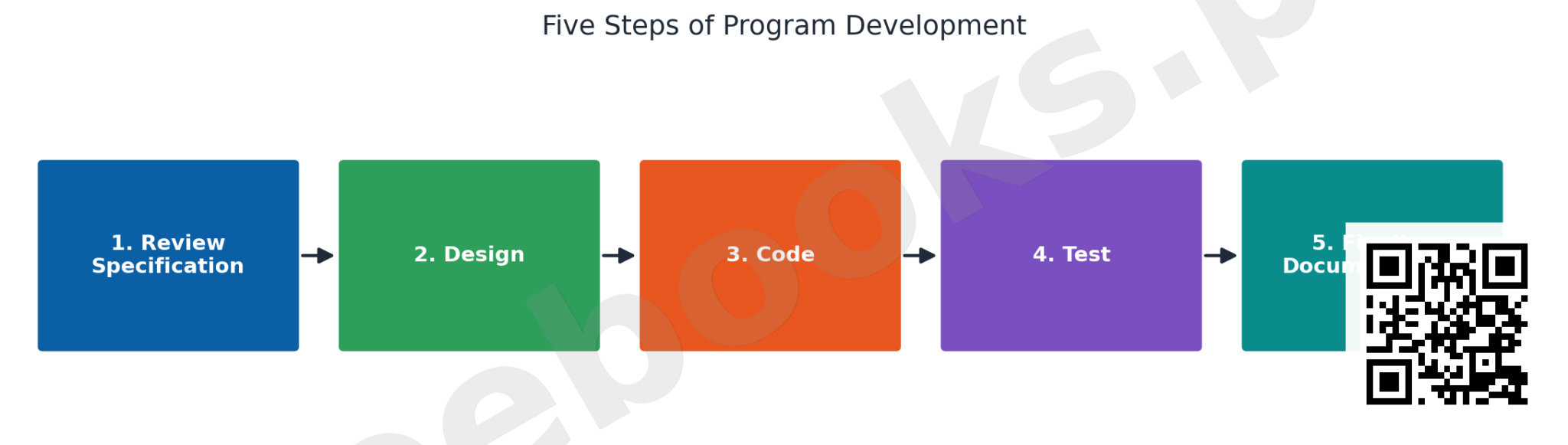
A computer program is a detailed set of instructions directing a computer to process data into information; it is also called software. Program development follows five standard steps: (1) Review specification — the programmer reviews the system analyst's specification; (2) Design — the programmer determines and documents the specific actions the computer will take; (3) Code — the programmer writes the actual program instructions; (4) Test — the written program is tested to confirm it performs as intended; (5) Finalize documentation — explanatory information about steps 1-4 is organised and completed.
17.14-17.16 Number Systems and Data Representation
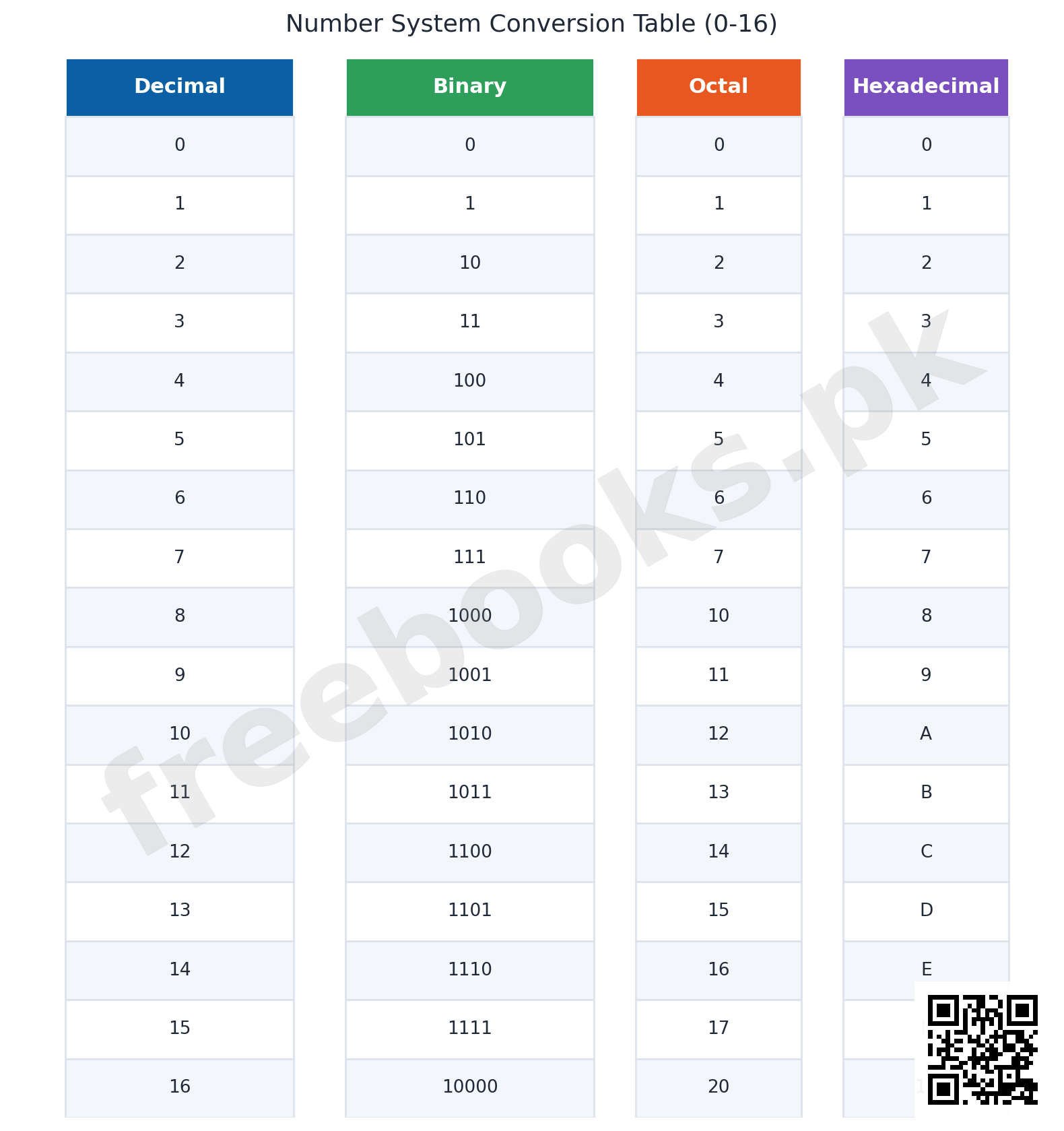
A number system is a set of digits, symbols, and rules used to express quantities, and is named after its base — the total number of distinct digits it uses. The Decimal Number System has base 10 (digits 0-9); each digit's value depends on its position (its 'weight'), e.g. 3046 = 3×10^3 + 0x10^2 + 4×10^1 + 6×10^0. The Binary Number System has base 2 (digits 0, 1 only), e.g. 1011 (binary) = 1×2^3 + 0x2^2 + 1×2^1 + 1×2^0 = 11 (decimal). The Octal Number System has base 8 (digits 0-7). The Hexadecimal Number System has base 16 (digits 0-9 plus letters A-F representing 10-15).
To a computer, everything — letters, punctuation, sounds, pictures, even the computer's own instructions — is ultimately represented as numbers, specifically as binary strings of 0's and 1's (e.g. the letter 'H' is stored as 0100 1000). Computers use the binary system because their physical electronic/electrical components (transistors, magnetic materials, wires) can naturally represent only TWO distinguishable states — on/off, conducting/non-conducting, magnetised/non-magnetised, pulse-present/pulse-absent — for which the two-digit binary system is the most natural fit; because only two digits need to be handled (versus ten for decimal), computer circuit design is simplified, yielding cheaper and more reliable circuits; and everything that can be computed in base 10 can equally be computed in binary. Octal and hexadecimal are used alongside binary because they represent binary values in a much more COMPACT form while still converting to/from binary very efficiently — an 8-digit binary number, for instance, can be represented by just a 2-digit hexadecimal number.
Important Definitions
What is a computer?
An electronic device used to store and process data to solve different problems according to a set of instructions given to it; the word comes from 'compute', meaning to calculate.
What is hardware?
The physical parts of a computer — all the physical devices or units that make up a computer system, such as the CPU, monitor, mouse, and keyboard.
What is software?
The set of instructions given to a computer to solve a problem or to control its operation, prepared in a computer programming language.
What is the Central Processing Unit (CPU)?
The 'brain' of the computer, where data is manipulated; it has two basic parts, the Control Unit and the Arithmetic Logic Unit (ALU).
What is main memory (RAM)?
Also called primary storage, the memory contained in the processor unit that TEMPORARILY stores data and program instructions while they are being processed.
What is secondary (auxiliary) storage?
Storage that holds programs and data when they are NOT being processed, unlike main memory which only holds them temporarily during processing.
What is an operating system (OS)?
An integrated set of programs that manages a computer system's hardware resources, loaded into main memory every time the computer is started, to improve performance, efficiency, and ease of use.
What is the difference between a low-level and a high-level programming language?
A low-level language (machine or assembly language) is close to machine code; a high-level language (e.g. BASIC, COBOL, FORTRAN, PASCAL, C) is close to human (English-like) language and uses its own syntax.
What is a compiler?
A translator (language processor) that converts an entire program written in a high-level language into machine code.
What is the binary number system, and why is it used in computers?
A number system with base 2, using only the digits 0 and 1; it is used in computers because their electronic components can naturally represent only two states (on/off), simplifying circuit design and making binary the most efficient representation for digital hardware.
Key Facts and Relations
| Topic | Key Fact / Relation |
|---|---|
| Computer speed units | Hertz (Hz) = pulses/vibrations per second; Megahertz (MHz) = 10^6 Hz; Gigahertz (GHz) = 1000 MHz |
| Memory/storage units (bytes) | 1 KB = 1,024 B; 1 MB = 1,048,576 B; 1 GB = 1,073,741,824 B; 1 TB = 1,099,511,627,776 B |
| Number system bases | Decimal = base 10 (0-9); Binary = base 2 (0-1); Octal = base 8 (0-7); Hexadecimal = base 16 (0-9, A-F) |
| Positional (weighted) value of a digit | N = d_n.b^n + … + d_1.b^1 + d_0.b^0 (b = base of the number system) |
| Decimal example | 3046 (base 10) = 3×10^3 + 0x10^2 + 4×10^1 + 6×10^0 |
| Binary example | 1011 (base 2) = 1×2^3 + 0x2^2 + 1×2^1 + 1×2^0 = 11 (decimal) |
| CPU = Control Unit + ALU | Control Unit manages/directs data flow; Arithmetic Logic Unit (ALU) performs arithmetic and logical operations |
| RAM vs Secondary Storage | RAM (primary storage) = temporary, holds data WHILE processing; Secondary storage (auxiliary) = holds data when NOT being processed |
| Software categories | System software (OS, utilities, language translators) + Application software (word processing, spreadsheet, database, etc.) |
| Low-level vs high-level languages | Low-level: Machine language (binary), Assembly language (mnemonics) | High-level: BASIC, COBOL, FORTRAN, PASCAL, C, ALGOL |
| Language processors | Assembler: assembly -> machine code | Interpreter: translates & executes one instruction at a time | Compiler: translates entire high-level program at once |
| Five steps of program development | Review specification -> Design -> Code -> Test -> Finalize documentation |
Diagrams
Hardware Components of a Personal Computer: A block diagram showing the four critical hardware categories — Input Devices, Central Processing Unit (with its Control Unit and Arithmetic Logic Unit shown as sub-blocks), Main Memory, and Output Devices — with Secondary Storage connected alongside, and arrows showing the flow of data between them, illustrating how data moves from input through processing and memory to output
Number System Conversion Table (0-16): A table/chart showing decimal numbers 0 through 16 alongside their binary, octal, and hexadecimal representations, visually illustrating how the same quantity is expressed differently depending on the base of the number system used
Five Steps of Program Development: A horizontal flow diagram of the five standard steps of computer program development, in order: Review Specification, Design, Code, Test, and Finalize Documentation, connected by arrows to show the sequential nature of the process
Short Questions & Answers
Define a computer and state two of its key capabilities.
A computer is an electronic device that stores and processes data to solve problems according to given instructions. Two key capabilities: Speed (millions of instructions processed per second) and Accuracy (error-free calculation, provided input data and instructions are correct).
Distinguish between hardware and software.
Hardware is the physical parts of a computer (CPU, monitor, keyboard, etc.); software is the set of instructions given to the computer to solve a problem or control its operation, prepared in a programming language.
What are the two basic parts of the CPU, and what does each do?
The Control Unit manages and directs the flow of data through the CPU and to other devices; the Arithmetic Logic Unit (ALU) performs all arithmetic and logical (comparison) operations on data.
Distinguish between main memory (RAM) and secondary storage.
Main memory (RAM/primary storage) temporarily holds data and instructions WHILE they are being processed; secondary storage (auxiliary storage) holds programs and data when they are NOT being processed, providing permanent storage.
What is the difference between an interpreter and a compiler?
An interpreter translates and executes a source program one instruction at a time; a compiler translates an entire high-level-language program into machine code, typically all at once before execution.
Why do computers use the binary number system rather than decimal?
Because their electronic components (transistors, magnetic materials, wires) can naturally represent only two distinguishable states (on/off), for which the two-digit binary system is the most natural and efficient fit, also simplifying circuit design.
Long Questions & Answers
Describe the four major hardware components of a personal computer — the CPU, main memory, input/output devices, and secondary storage — explaining the role each plays and how they work together to process data into information.
What is the CPU, and what are its two basic parts?
The Central Processing Unit is the 'brain' of the computer, where data is actually manipulated and processed — in an average microcomputer it is fabricated onto a single chip, the microprocessor. It has two parts: the Control Unit, which manages resources and directs the flow of data between devices (much like a traffic policeman), interpreting instructions such as add, subtract, or store; and the Arithmetic Logic Unit, which physically carries out arithmetic and logical/comparison operations, using high-speed registers built into the chip to hold data currently being worked on.
What is main memory (RAM), and how do read and write operations work?
Main memory, or RAM (primary storage), is housed within the processor unit and holds data and program instructions only temporarily, for as long as the CPU is actively processing them. Each storage location has its own unique address, functioning like a post-office box number. A read operation retrieves previously stored data without destroying it, while a write operation stores new data and permanently overwrites and erases whatever data previously occupied that address.
What role do input and output devices play?
Input and output devices let the computer interact with the people using it. Input devices — a keyboard, mouse, scanner, or digital camera — translate human-readable information into the 0s and 1s that the computer's circuitry can process. Output devices — a monitor, printer, or plotter — do the reverse, converting the CPU's raw binary-coded results back into a form useful to a human, whether a temporary softcopy display on screen or a permanent hardcopy printout.
What is secondary storage, and how do the four hardware components work together as a cycle?
Secondary (auxiliary) storage solves the problem that RAM only holds data temporarily and loses everything when the computer is switched off; it keeps program files and data safely and permanently using magnetic media (hard disks, diskettes, tape), optical media (CD-ROM, DVD-ROM), or a combination of both. Together, the four components form a repeating cycle: input devices bring data in, main memory holds it during active processing, the CPU's Control Unit and ALU carry out the processing, output devices deliver the results, and secondary storage preserves whatever needs to persist afterward.
Explain the classification of programming languages into low-level and high-level languages, describe the role of language processors (assemblers, interpreters, and compilers) in bridging them to machine code, and explain why high-level languages are generally preferred for most modern programming despite machine language being what a computer actually executes directly.
What is machine language, and why were programming languages organised into low-level and high-level categories?
Every instruction a computer executes must ultimately exist as binary digits, 0s and 1s — the only form its circuitry can run directly without translation — and this most basic level is called machine language. Because writing entire useful programs directly as raw binary strings is extraordinarily impractical, time-consuming, and error-prone for humans, programming languages were organised into two broad categories reflecting how close each sits to genuine machine code versus ordinary human language: low-level and high-level languages.
What is assembly language, and what are its strengths and weaknesses?
Assembly language is a low-level language that replaces cryptic, purely numeric binary codes with more memorable symbolic mnemonics — short abbreviations like ADD or SUB — standing in for particular machine operations. It stays closely tied to the specific hardware's own instruction set, giving the programmer fine-grained, precise control over each step, but at the cost of being tedious to write, difficult to understand at a glance, and not portable from one type of hardware to another.
What are high-level languages, and what is the role of an assembler versus an interpreter versus a compiler?
High-level languages — such as BASIC, COBOL, FORTRAN, PASCAL, ALGOL, and C — let programmers write using instructions and syntax that read more like structured English than raw machine code, each governed by its own set of syntax rules. Because hardware can only directly execute machine code, translator software bridges the gap: an assembler converts assembly mnemonics directly into machine code; an interpreter translates and executes a high-level program one instruction at a time; a compiler instead translates an entire high-level program into machine code all at once before the program is run.
What is the practical trade-off between using an interpreter and using a compiler?
An interpreter translates and executes a program strictly one instruction at a time, which makes interactive testing and debugging easier since an instruction's effect can be seen almost immediately — but interpreted programs generally run more slowly overall, since every instruction must be re-translated from scratch each time the program runs. A compiler instead translates the entire program at once before execution, requiring a separate up-front compilation step, but the resulting compiled program subsequently runs substantially faster, which is why compilers are favoured for large-scale, performance-critical, or commercial software.
Why are high-level languages generally preferred over low-level languages despite machine code being what the hardware actually executes?
High-level languages are dramatically easier for programmers to read, write, and maintain, since their syntax resembles structured English rather than opaque binary or cryptic mnemonics. A single high-level program can often be compiled or interpreted to run on many different types of hardware, provided a suitable compiler or interpreter exists for each — a portability advantage low-level languages, tied to one specific architecture, cannot offer in the same way. High-level languages also let programmers focus on solving the actual problem rather than managing tedious, low-level hardware details.
Multiple Choice Questions (MCQs)
A computer is best defined as: (A) A device that only performs arithmetic (B) An electronic device that stores and processes data according to given instructions (C) A type of software (D) A type of programming language
Correct answer: (B) An electronic device that stores and processes data according to given instructions. A computer is an electronic device used to store and process data to solve problems according to a set of given instructions.
Which scientist designed the 'Analytical Engine', the first programmable computer? (A) Blaise Pascal (B) Gottfried Leibnitz (C) Charles Babbage (D) John von Neumann
Correct answer: (C) Charles Babbage. Charles Babbage, a UK mathematician, designed the Analytical Engine in 1833, the first programmable computer.
A computer that operates using only two signals, 0 and 1, is called a: (A) Analog computer (B) Digital computer (C) Hybrid computer (D) Mini computer
Correct answer: (B) Digital computer. A digital computer works with digits, operating with only two signals (0 and 1), storing data and instructions as coded binary values.
The physical parts of a computer, such as the CPU, monitor, and keyboard, are collectively called: (A) Software (B) Firmware (C) Hardware (D) Application programs
Correct answer: (C) Hardware. Hardware refers to all the physical devices or units that make up a computer system.
Within the CPU, which unit performs arithmetic and logical operations on data? (A) Control Unit (B) Arithmetic Logic Unit (ALU) (C) Main Memory (D) Secondary Storage
Correct answer: (B) Arithmetic Logic Unit (ALU). The ALU is the part of the processor where all arithmetic (add, subtract, etc.) and logical (comparison) operations are actually performed.
RAM (main memory) is best described as: (A) Permanent storage that never loses data (B) Temporary storage used while data is being processed (C) A type of input device (D) A type of output device
Correct answer: (B) Temporary storage used while data is being processed. RAM, also called primary storage, temporarily stores data and program instructions ONLY while they are being processed.
1 Megabyte (MB) is equal to: (A) 1,000 bytes (B) 1,024 bytes (C) 1,048,576 bytes (D) 1,000,000,000 bytes
Correct answer: (C) 1,048,576 bytes. The actual value of 1 MB is 1,048,576 bytes (1,024 x 1,024), though it is often approximated as 1,000,000 bytes.
Which of the following is an example of a high-level programming language? (A) Machine language (B) Assembly language (C) FORTRAN (D) Binary code
Correct answer: (C) FORTRAN. FORTRAN (FORmula TRANslation) is a high-level language, close to human/English-like syntax; machine and assembly languages are low-level.
A translator that converts an entire high-level-language program into machine code before execution is called a: (A) Assembler (B) Interpreter (C) Compiler (D) Operating system
Correct answer: (C) Compiler. A compiler translates the entire program written in a high-level language into machine code, typically all at once before running it.
Computers use the binary number system primarily because: (A) Binary numbers are easier for humans to read (B) Electronic components can naturally represent only two distinguishable states (on/off) (C) Binary uses fewer digits to write large numbers (D) Decimal numbers cannot be stored electronically
Correct answer: (B) Electronic components can naturally represent only two distinguishable states (on/off). Electronic/electrical components (transistors, magnetic materials, wires) can only indicate two states (on/off), making binary the most natural and efficient fit.
Quick Revision Summary
- Computer capabilities: Speed (MHz/GHz) | Storage | Data Processing | Accuracy | Diligence
- History: Pascal's Pascaline (1642) -> Leibnitz's Multiplier Wheel (1671) -> Babbage's Analytical Engine (1833) -> Harvard Mark-I -> ENIAC (1946) -> von Neumann's stored program (1944)
- 3 types by signal: Digital (0/1) | Analog (continuous scale) | Hybrid (both)
- 4 classes by size/speed: Micro (personal) | Mini | Mainframe | Super
- Hardware = physical parts | Software = instructions (System software + Application software)
- CPU = Control Unit (manages data flow) + ALU (arithmetic/logical operations)
- RAM (primary, temporary) vs Secondary Storage (auxiliary, permanent); magnetic vs optical storage
- Input: keyboard, mouse, trackball, joystick, touch pad, light pen | Output: softcopy (screen) vs hardcopy (printer/plotter)
- OS functions: processor/memory/I-O/file management, job priority, security, error-detection aids
- Low-level: machine language, assembly language | High-level: BASIC, COBOL, FORTRAN, PASCAL, C, ALGOL
- Language processors: Assembler (assembly->machine) | Interpreter (line-by-line) | Compiler (whole program at once)
- Number systems: Decimal(10), Binary(2), Octal(8), Hexadecimal(16) — binary used because hardware has only 2 states
Exam Tips
- Don't confuse the Control Unit (directs/manages data flow) with the ALU (actually performs arithmetic/logical operations) — this distinction is frequently tested
- Remember RAM = temporary/while-processing, Secondary storage = permanent/not-currently-processing — the single biggest source of confusion in this chapter
- Memorize the byte units precisely: 1 KB=1,024 B, 1 MB=1,048,576 B, 1 GB=1,073,741,824 B — exam MCQs often test the EXACT actual value, not the rounded approximation
- For number system conversions, always write out the positional (weighted) expansion first (d_n.b^n+…+d_0.b^0) before calculating — this avoids simple arithmetic slips
- Keep language-processor roles straight: Assembler=assembly language only; Interpreter=line-by-line; Compiler=whole program at once, both for high-level languages
- Learn the five program-development steps IN ORDER: Review specification -> Design -> Code -> Test -> Finalize documentation — a common short-answer question