This chapter introduces computer networks as systems of linked devices that exchange data and work together, ranging from small Local Area Networks (LANs) to the Internet itself. It covers the fundamental components of data communication, the key networking devices (switches, routers, access points), and the four main network topologies (bus, star, ring, mesh) that determine how devices are arranged and connected.
The chapter then explores transmission modes (simplex, half-duplex, full-duplex), the 7-layer OSI networking model, IPv4 and IPv6 addressing, essential protocols and services (TCP/IP, DNS, DHCP), network security methods (firewalls, encryption, antivirus), and the different types of networks classified by size (PAN, LAN, MAN, WAN, CAN), closing with real-world applications across business, education, and healthcare.
Learning Objectives
- Explain computer networks as systems, including their objectives and components
- Identify the five fundamental components of data communication
- Describe the roles of networking devices: switches, routers, and access points
- Differentiate between the four main network topologies: bus, star, ring, and mesh
- Differentiate between simplex, half-duplex, and full-duplex transmission modes
- Describe the 7-layer OSI networking model and the function of each layer
- Differentiate between IPv4 and IPv6, and explain the roles of DNS and DHCP
- Describe network security methods (firewalls, encryption, antivirus) and common security threats
Key Concepts
6.1 Computer Networks as Systems
A computer network is a system of linked devices and computers that exchange data and operate together, ranging from small Local Area Networks (LANs) to large Wide Area Networks (WANs), including the Internet — the largest network, connecting all networks worldwide. Its primary components are nodes (connected devices like computers, smartphones, printers), links (wired or wireless connections between nodes), switches (connect multiple nodes within a network), and routers (connect different networks and direct data between them).
The primary objectives of computer networks are resource sharing (e.g., multiple computers sharing a single printer, reducing costs), data communication (enabling emails, instant messaging, video conferencing), and connectivity and collaboration (enabling remote access and real-time collaboration, e.g., a shared Google Drive document). Data communication itself has five basic components: the sender (the device sending data), the receiver (the device receiving data), the message (the data being communicated), the protocol (rules governing communication, e.g., HTTP), and the medium (the physical or wireless path data travels, e.g., Ethernet cable or Wi-Fi).
6.2 Networking Devices: Switch, Router, and Access Point
A switch connects multiple devices (computers, printers, servers) within a network, operating at the Data Link Layer (Layer 2 of the OSI model). It uses each device's MAC (Media Access Control) address to forward data only to the correct destination device, rather than broadcasting to all devices — the first time, it may broadcast, but once it learns device addresses, it sends data directly to the correct destination, making networks faster and more efficient.
A router interconnects different networks and directs data packets between them, using a routing table to find the best path for each packet to reach its destination. An Access Point (AP) allows wireless devices to connect to a wired network, receiving data from the wired network and transmitting it wirelessly (using radio waves) to devices, and vice versa — modern APs can connect hundreds of devices simultaneously, making them ideal for schools, offices, and stadiums.
6.3 Network Topologies
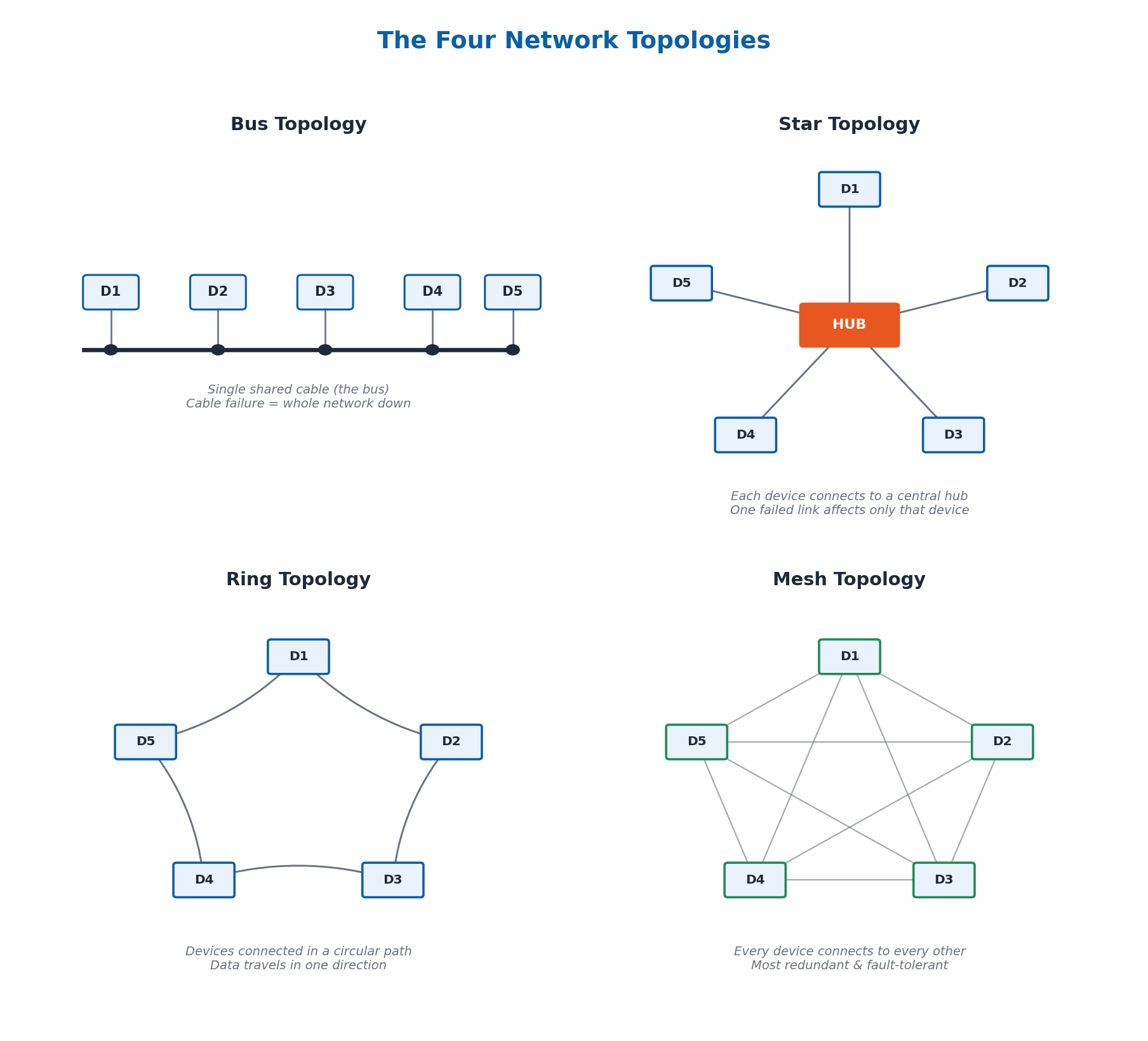
Network topologies define how devices (nodes) are arranged in a network, affecting reliability and performance. In a Bus topology, all devices share a single communication line (the bus) — easy to set up, but if the main cable fails, the whole network goes down. In a Star topology, each node communicates through a central switch or hub, which acts as a data flow repeater — if one connection fails, only that node is affected.
In a Ring topology, each device is connected in a circular pathway, with data traveling in one direction through each device — it can handle high traffic, but if one connection fails, the whole network is affected (a 2-way ring can help mitigate this). In a Mesh topology, each device is connected to every other device, providing high redundancy and reliability — if one link fails, data can be rerouted through other links, making it the most fault-tolerant topology.
6.4 Transmission Modes
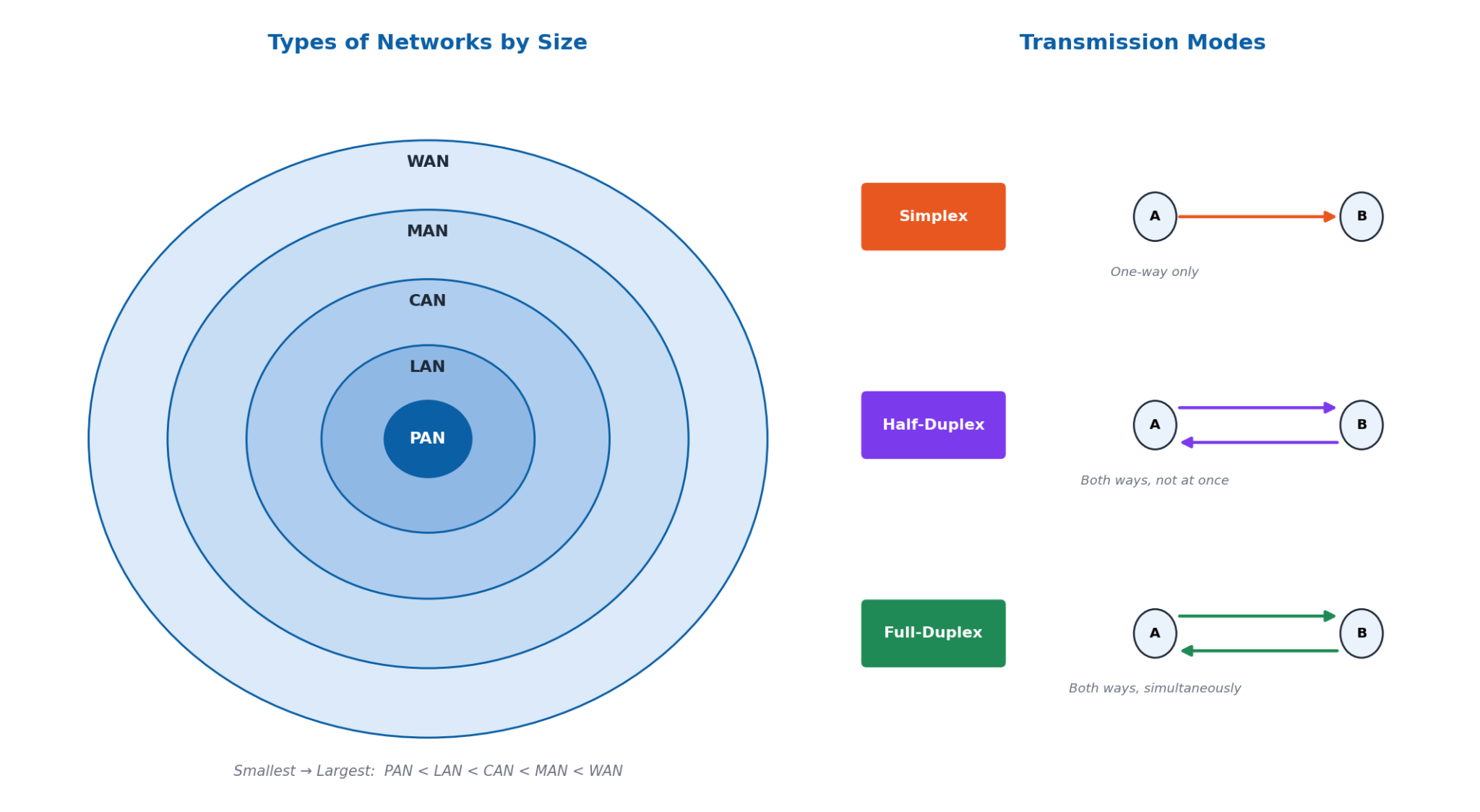
Transmission modes describe how data flows between devices. In Simplex communication, data flows in only one direction — a device can either send or receive, never both (e.g., a keyboard sending data to a computer). In Half-Duplex communication, data can flow in both directions, but not simultaneously — one device must finish transmitting before the other can start (e.g., a walkie-talkie).
In Full-Duplex communication, data can flow in both directions simultaneously — both devices can transmit and receive at the same time (e.g., a telephone conversation, where both people can talk and listen at once). Full-duplex is ideal for modern communication systems like internet browsing and video calls, since it allows for far more efficient data transmission than the older half-duplex systems used by early telephones.
6.5 The OSI 7-Layer Networking Model
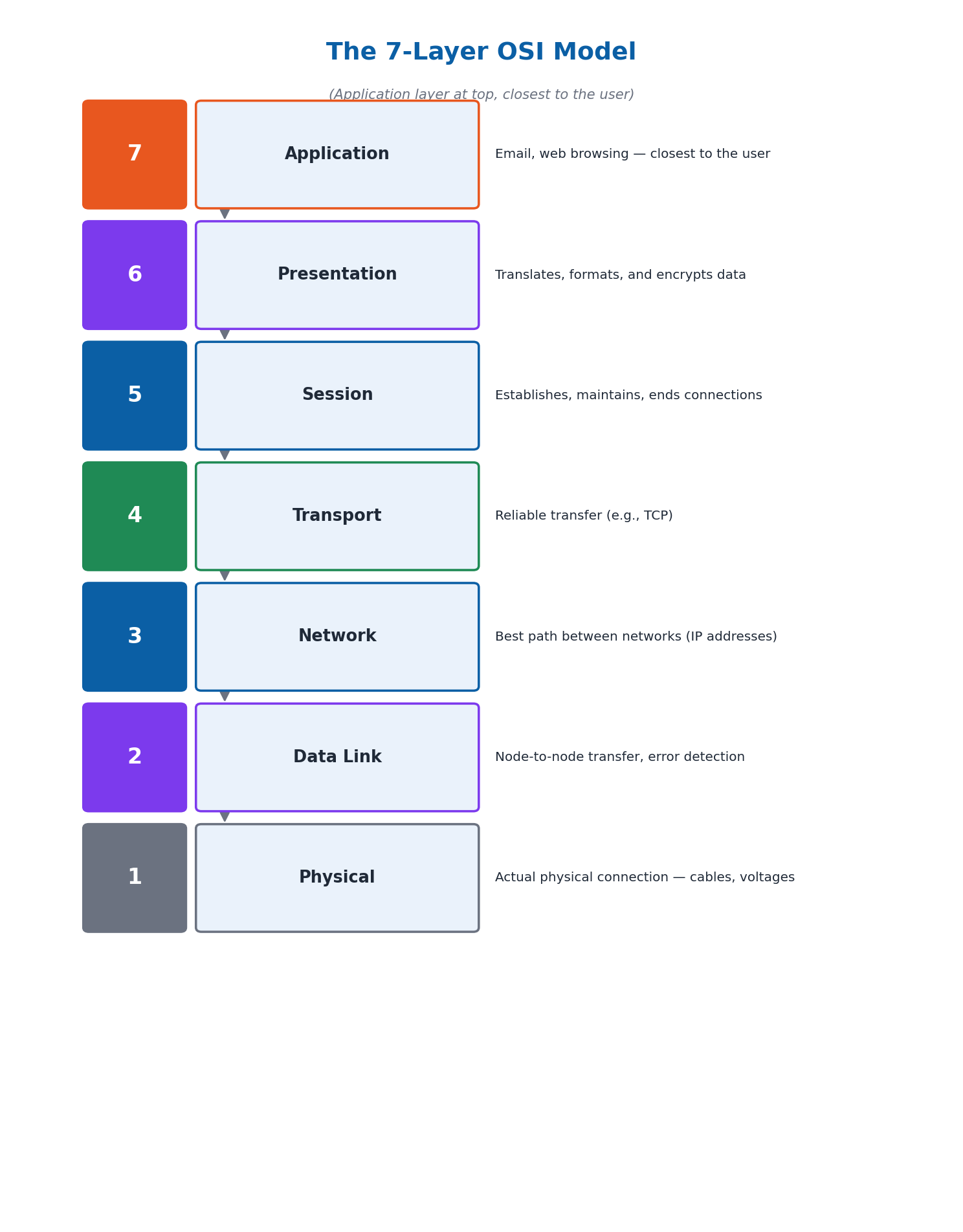
The Open Systems Interconnection (OSI) Model is a 7-layer framework for understanding how networking protocols interact. Layer 1 (Physical) handles the actual physical connection between devices — cables, connectors, and voltage levels. Layer 2 (Data Link) handles node-to-node data transport and error detection/correction, like traffic lights managing the flow of data to prevent collisions. Layer 3 (Network) determines the best path for data between different networks using IP addresses, like a GPS finding the best route. Layer 4 (Transport) ensures reliable data transfer between source and destination processes, using protocols like TCP, like a delivery service ensuring a package arrives safely.
Layer 5 (Session) establishes, maintains, and terminates connections between applications, like a phone call being set up, kept connected, and ended. Layer 6 (Presentation) translates, formats, and encrypts data between the application and the network, like a translator converting a book between languages. Layer 7 (Application) is closest to the end user, providing network services directly to applications like email and web browsing, like a waiter taking your order and bringing your food.
6.6 IPv4, IPv6, and Network Services
IP (Internet Protocol) addresses are unique identifiers assigned to devices connected to the Internet. IPv4 uses a 32-bit address scheme, allowing for 2³² = 4,294,967,296 (about 4.3 billion) unique addresses, written as four decimal numbers from 0-255 (e.g., 192.168.1.1). IPv6, designed to replace IPv4 due to address depletion, uses a 128-bit scheme, allowing for an almost limitless number of addresses, written in a longer hexadecimal format.
Protocols are sets of rules governing data communication — common examples include TCP/IP, HTTP, FTP, and SMTP. The Domain Name System (DNS) translates human-readable domain names (like www.example.com) into IP addresses that computers use to locate websites. The Dynamic Host Configuration Protocol (DHCP) automatically assigns IP addresses to devices joining a network, simplifying network management — for example, when a device connects to Wi-Fi, DHCP assigns it an IP address automatically.
6.7 Network Security
Network security protects data and prevents unauthorized access, and matters for data protection (preventing unauthorized access/alteration), preventing attacks, maintaining privacy, and ensuring availability of network resources. Firewalls are security systems that monitor and control incoming/outgoing network traffic based on predetermined rules, acting as a security checkpoint between trusted internal networks and untrusted external networks. Encryption transforms data into a secure format readable only with the correct decryption key — for example, a shift cipher shifting each letter by a fixed number of positions in the alphabet.
Common threats to network security include: Malware (viruses, worms, ransomware that damage or steal data), Phishing (deceptive emails/websites tricking users into revealing sensitive information), Denial of Service (DoS) attacks (overwhelming a network with traffic to disrupt it), and Man-in-the-Middle attacks (intercepting communication to steal or alter information). A combination of firewalls, encryption, and antivirus software provides robust, layered network security.
6.8 Types of Networks and Real-World Applications
Networks are classified by size and range: a Personal Area Network (PAN) connects personal devices over a very short range, like a few meters (e.g., Bluetooth between a phone and headset); a Local Area Network (LAN) connects devices within a limited area like a home, school, or office; a Metropolitan Area Network (MAN) spans a city or large campus, up to around 50 kilometers, connecting multiple LANs; a Wide Area Network (WAN) covers a large geographical area, connecting multiple LANs and MANs (the Internet is the largest WAN); and a Campus Area Network (CAN) connects multiple LANs within a limited area like a university campus.
Computer networks have wide-ranging real-world applications: in business, networks enable efficient communication and resource sharing (e.g., companies using intranets); in education, networks power online learning platforms and Learning Management Systems (LMS) like Blackboard or Moodle; and in healthcare, networks facilitate sharing patient information and telemedicine through Electronic Health Records (EHR) systems.
Important Definitions
What is a computer network?
A system of linked devices and computers that exchange data and operate together, ranging in scale from a small LAN to the entire Internet.
What is a protocol?
A set of rules that governs data communication between devices, such as TCP/IP, HTTP, FTP, or SMTP.
What is a router?
A networking device that interconnects different networks and directs data packets between them, using a routing table to find the best path.
What is a switch?
A networking device that connects multiple devices within a network and forwards data only to the correct destination device using MAC addresses.
What is a network topology?
The arrangement or layout of devices (nodes) and connections in a computer network, such as bus, star, ring, or mesh.
What is the OSI Model?
A 7-layer framework (Physical, Data Link, Network, Transport, Session, Presentation, Application) used to understand how different networking protocols interact.
What is DNS (Domain Name System)?
A network service that translates human-readable domain names, like www.example.com, into the numeric IP addresses computers use to locate websites.
What is encryption?
The process of transforming data into a secure format that can only be read or understood by authorized parties who have the correct decryption key.
Key Facts and Relations
| Topic | Key Fact / Relation |
|---|---|
| 5 components of data communication | Sender + Receiver + Message + Protocol + Medium |
| 4 network topologies | Bus, Star, Ring, Mesh |
| 3 transmission modes | Simplex (one-way), Half-Duplex (both ways, not at once), Full-Duplex (both ways at once) |
| OSI Model's 7 layers | Physical → Data Link → Network → Transport → Session → Presentation → Application |
| Total IPv4 addresses | 2³² = 4,294,967,296 (~4.3 billion) |
| IPv4 vs IPv6 address length | IPv4 = 32-bit; IPv6 = 128-bit |
| Key TCP/IP protocols | TCP (reliable transfer), IP (addressing/routing), UDP (faster, less reliable), DNS, DHCP |
| Networks by size (smallest to largest) | PAN < LAN < CAN < MAN < WAN (Internet) |
Diagrams
The Four Network Topologies: A comparison of bus, star, ring, and mesh network topologies, showing how devices are arranged and connected in each
The 7-Layer OSI Model: A diagram of the seven OSI layers from Physical to Application, with the function of each layer
Types of Networks by Size: A comparison of PAN, LAN, MAN, and WAN networks by their typical range and scale, alongside the three transmission modes
Short Questions & Answers
Define data communication and list its key components.
Data communication is the exchange of data between a sender and receiver through a communication medium. Its five key components are the sender, receiver, message, protocol, and medium.
Explain the role of routers in a computer network.
A router interconnects different networks and directs data packets between them, using a routing table to determine the best path for each packet to reach its destination efficiently.
What are the main functions of the Network Layer in the OSI model?
The Network Layer (Layer 3) is responsible for data transfer between different networks, determining the best path for data to travel from source to destination using IP addresses.
What is the purpose of the Dynamic Host Configuration Protocol (DHCP)?
DHCP automatically assigns IP addresses to devices when they join a network, simplifying network management by removing the need for manual IP address configuration.
Differentiate between TCP and UDP in terms of data transfer reliability.
TCP (Transmission Control Protocol) ensures reliable, ordered data transfer with error checking, while UDP (User Datagram Protocol) provides faster but less reliable data transfer without such guarantees.
Explain the importance of encryption in network security.
Encryption transforms data into a secure format that can only be read by parties with the correct decryption key, protecting sensitive information from being intercepted and read by unauthorized parties.
What are the advantages of using a star topology in a network?
In a star topology, if one connection fails, only that single node is affected rather than the whole network, and it is generally easier to manage, troubleshoot, and expand than other topologies.
How do firewalls contribute to network security?
Firewalls monitor and control incoming and outgoing network traffic based on predetermined security rules, acting as a checkpoint between trusted internal networks and untrusted external networks.
Long Questions & Answers
Discuss the objectives of computer networks and provide examples of how they facilitate resource sharing and data communication.
What is the resource-sharing objective of computer networks?
Computer networks allow multiple devices to share access to valuable hardware and software resources, such as printers, scanners, and shared storage space, reducing overall costs and improving efficiency. A concrete example is a typical office where multiple employee computers are all connected to share access to a single centrally located network printer, rather than each employee needing their own separate, dedicated printer, which would be considerably more expensive and less efficient in terms of office space and maintenance costs.
What is the data-communication objective of computer networks?
Computer networks facilitate the reliable transfer of data between different devices, enabling many forms of modern communication, including email, instant messaging, and real-time video conferencing. A concrete example is a company with employees working from several different office locations who are nevertheless able to collaborate effectively and communicate in real time using video conferencing tools such as Zoom or Microsoft Teams, entirely thanks to the underlying computer network connections that make this kind of instantaneous, long-distance communication technically possible.
What is the connectivity and collaboration objective of computer networks?
Computer networks connect together many different devices, enabling convenient remote access and effective real-time collaboration between multiple users, which improves organizational productivity and day-to-day flexibility. A concrete example is a team of colleagues working simultaneously on a single shared document using a cloud-based service such as Google Drive, with every team member's edits instantly and automatically visible to every other team member in real time, entirely thanks to the underlying network connectivity that makes this kind of live, simultaneous collaborative editing possible.
Compare and contrast the different types of network topologies: star, ring, bus, and mesh.
What is a Bus topology, and what is its main drawback?
In a Bus topology, every device connected to the network shares one single common communication line, generally referred to as 'the bus,' with each device directly connected to this one shared central cable. This topology is generally very simple, inexpensive, and quick to set up, but it suffers from one serious drawback: if the single shared central cable itself fails, the entire network goes down completely, since there is no alternative communication pathway any connected device could use instead.
What is a Star topology, and what is its main advantage?
In a Star topology, every device in the network is separately connected to one central, shared hub or switch device, which is responsible for centrally managing and directing all of the network's data flow between the connected devices. This topology offers the practical advantage that if any single connection between one device and the central hub fails, only that one specific device is affected, while every other connected device continues operating normally — although the star topology still depends heavily on the reliability of that one central hub device itself.
What is a Ring topology, and what is its main vulnerability?
In a Ring topology, each device is connected sequentially to exactly two neighbouring devices, together forming one continuous circular data pathway around which data travels sequentially, generally in one fixed direction, passing through each device in turn before reaching its destination. This topology can handle relatively high volumes of network traffic efficiently, but if even one connection within the ring fails, the entire ring network is typically seriously affected, unless a more resilient two-way (bidirectional) ring configuration is used to mitigate this vulnerability.
What is a Mesh topology, and why is it considered the most reliable?
In a Mesh topology, every device in the network is directly connected to every other device, providing an extremely high degree of built-in data redundancy and consequently excellent network reliability. It is widely considered the most inherently reliable of the four topology types, since if any one connection within the mesh fails, data can still be automatically rerouted through any number of alternative available connection paths. This comes at the cost of the mesh topology generally being considerably more complicated and expensive to fully implement compared with the other three, simpler topology types.
Describe how data is transmitted across computer networks using packet switching and circuit switching.
What is packet switching, and how does data travel using this method?
In packet switching, which is widely and predominantly used across the modern Internet, any data that needs to be transmitted is first broken down into smaller individual units called packets, each containing both a portion of the original data and addressing information indicating its intended final destination. These packets are sent out independently, and different packets belonging to the same message may travel along different network paths to reach their shared final destination, depending on which paths are least busy at that moment. Once every packet has arrived, they are automatically reassembled in the correct original order to reconstruct the complete message.
What is the air-travel analogy for packet switching?
A useful analogy for packet switching is air travel: much like individual airline passengers might be split into several smaller groups and assigned to different flights, each potentially taking a different route through various intermediate connecting airports, in order to reach one shared final destination, individual data packets can similarly take several different network paths, each passing through various intermediate network routers along the way, before finally arriving together at their own shared common final destination.
What is circuit switching, and how does it compare with packet switching?
Circuit switching works by first establishing one single dedicated, exclusive communication pathway directly between the sender and receiver, which then remains continuously reserved exclusively for that one communication session throughout its entire duration. This approach was historically used extensively by traditional analog telephone networks, where one dedicated physical circuit was temporarily reserved for a single call for as long as it remained active. Circuit switching offers a consistently steady, predictable, and guaranteed transmission rate, but packet switching is generally considered more efficient for modern networking, since it lets the same shared infrastructure be dynamically shared among many simultaneous users rather than reserving one pathway exclusively.
A network administrator needs to work with IP addressing. (a) Calculate the total number of unique IPv4 addresses possible, given that IPv4 uses a 32-bit addressing scheme. (b) If 10% of the total addresses are reserved for special purposes, how many addresses remain available? Show your working.
How many unique IPv4 addresses are possible with a 32-bit addressing scheme?
IPv4 addresses are constructed using a fixed 32-bit binary addressing scheme, meaning each complete address is made up of exactly 32 individual bits, each capable of independently holding a value of 0 or 1. Because each of these 32 bits can independently take either value, the total number of unique possible combinations is calculated as 2 raised to the power of 32, which works out to 4,294,967,296. Therefore, the complete IPv4 addressing scheme can provide a maximum of exactly 4,294,967,296 (approximately 4.3 billion) unique IP addresses in total.
If 10% of IPv4 addresses are reserved for special purposes, how many remain available?
Of the total 4,294,967,296 IPv4 addresses, 10% is specifically reserved for various special administrative purposes, such as private internal networks and multicast addressing. Calculating 10% of the total gives 4,294,967,296 x 0.10 = 429,496,729.6, which is rounded to approximately 429,496,730 addresses. Subtracting this reserved amount from the original total gives 4,294,967,296 minus 429,496,730 = approximately 3,865,470,566 addresses that genuinely remain available for regular, everyday general use.
Why isn't the IPv4 address space enough, and what standard was developed to address this?
Although approximately 3,865,470,566 IPv4 addresses remaining after reservations is a very large number in absolute terms, it has nevertheless proven entirely insufficient to sustainably meet the enormous, ever-growing global demand created by the sheer number of individual devices connected to the modern Internet. This is precisely the core underlying reason why the newer IPv6 addressing standard, offering a vastly larger total theoretical address space, was specifically developed in the first place.
Multiple Choice Questions (MCQs)
What is the primary objective of computer networks? (A) Increase computational power (B) Enable resource sharing and data communication (C) Enhance graphic capabilities (D) Improve software development
Correct answer: (B) Enable resource sharing and data communication. The primary objective of computer networks is to enable resource sharing, data communication, and connectivity/collaboration between devices.
Which device is used to connect multiple networks and direct data packets between them? (A) Switch (B) Hub (C) Router (D) Modem
Correct answer: (C) Router. A router connects different networks together and directs data packets between them using a routing table.
Which layer of the OSI model is responsible for node-to-node data transfer and error detection? (A) Physical Layer (B) Data Link Layer (C) Network Layer (D) Transport Layer
Correct answer: (B) Data Link Layer. The Data Link Layer (Layer 2) handles node-to-node data transport along with error detection and correction.
What is the function of the Domain Name System (DNS)? (A) Assign IP addresses dynamically (B) Translate domain names to IP addresses (C) Secure data communication (D) Monitor network traffic
Correct answer: (B) Translate domain names to IP addresses. DNS translates human-readable domain names (like www.example.com) into the numeric IP addresses computers use.
Which method of data transmission uses a dedicated communication path? (A) Packet Switching (B) Circuit Switching (C) Full-Duplex (D) Half-Duplex
Correct answer: (B) Circuit Switching. Circuit switching establishes one dedicated communication pathway that remains reserved for the entire duration of the communication session.
What is encapsulation in the context of network communication? (A) Converting data into a secure format (B) Wrapping data with protocol information (C) Monitoring network traffic (D) Translating domain names to IP addresses
Correct answer: (B) Wrapping data with protocol information. Encapsulation refers to wrapping data with the necessary protocol information (headers) as it passes down through the network layers.
Which protocol is used for reliable data transfer in the TCP/IP model? (A) HTTP (B) FTP (C) TCP (D) UDP
Correct answer: (C) TCP. TCP (Transmission Control Protocol) specifically ensures reliable, ordered, error-checked data transfer.
What is the main purpose of a firewall in network security? (A) Convert data into a secure format (B) Monitor and control network traffic (C) Assign IP addresses (D) Translate domain names
Correct answer: (B) Monitor and control network traffic. A firewall's main purpose is to monitor and control incoming and outgoing network traffic based on predetermined security rules.
Which network topology connects all devices to a central hub? (A) Ring (B) Mesh (C) Bus (D) Star
Correct answer: (D) Star. In a Star topology, every device connects to a central hub or switch, which manages and directs all data flow.
What is a key benefit of using computer networks in businesses? (A) Increase computational power (B) Enable resource sharing and efficient communication (C) Enhance graphic capabilities (D) Improve software development
Correct answer: (B) Enable resource sharing and efficient communication. A key benefit of computer networks in business is enabling resource sharing and efficient communication among employees and departments.
Quick Revision Summary
- 5 data communication components: Sender, Receiver, Message, Protocol, Medium
- Devices: Switch (Layer 2, uses MAC address), Router (connects networks, uses routing table), Access Point (wireless-to-wired bridge)
- 4 topologies: Bus (single shared cable), Star (central hub), Ring (circular, one direction), Mesh (every device connected to every other — most reliable)
- 3 transmission modes: Simplex (one-way), Half-Duplex (both ways, one at a time), Full-Duplex (both ways at once)
- OSI 7 layers: Physical → Data Link → Network → Transport → Session → Presentation → Application
- IPv4 = 32-bit (~4.3 billion addresses); IPv6 = 128-bit (near-limitless); DNS translates names→IPs; DHCP auto-assigns IPs
- Security: Firewalls (monitor/control traffic), Encryption (secures data), Antivirus (removes malware); Threats: Malware, Phishing, DoS, Man-in-the-Middle
- Network sizes (smallest→largest): PAN (few meters) < LAN (building) < CAN (campus) < MAN (city, ~50km) < WAN (Internet)
Exam Tips
- Memorize the OSI model layers in order (Physical, Data Link, Network, Transport, Session, Presentation, Application) — a mnemonic like 'Please Do Not Throw Sausage Pizza Away' can help
- Distinguish Switch (connects devices WITHIN a network, uses MAC) from Router (connects DIFFERENT networks, uses IP)
- Remember mesh topology = most reliable (redundant paths); bus topology = single point of failure (the shared cable)
- Simplex = one-way only; Half-Duplex = both ways but not at once; Full-Duplex = both ways at once (like a phone call) — a very common exam distinction
- For IPv4 total-address questions, always show the 2³² calculation explicitly, not just the final number
- Know your network types by size: PAN < LAN < CAN < MAN < WAN — often tested as a matching or ordering question