This chapter explores software — the collection of programs and instructions that tell a computer what to do — as the essential intermediary between users and computer hardware. It distinguishes system software, which manages hardware and provides a platform for other programs to run, from application software, which helps users perform specific tasks.
The chapter examines the operating system in detail, covering how it manages hardware resources, provides user interfaces (GUI and CLI), and runs applications, along with utility programs (disk cleanup, antivirus, backup, file compression) and device drivers. It closes by surveying common categories of application software — word processing, spreadsheets, and graphic design — with real-world examples of each.
Learning Objectives
- Identify and explain the significance of system software and application software
- Understand the role and main functions of system software, including operating systems
- Explain how operating systems manage hardware resources, provide user interfaces, and run applications
- Describe how utility software enhances system performance, security, and maintenance
- Understand how device drivers facilitate communication between hardware devices and the operating system
- Recognize the main functions of commonly used application software (word processing, spreadsheets, graphic design)
- Differentiate between system software and application software in terms of roles and functions
- Identify appropriate software tools for specific tasks based on their functions and capabilities
Key Concepts
5.1 Software and Its Two Main Types
Software is a collection of programs and instructions that tell a computer what to do and how to do it; without software, computers would be little more than useless machines. Software is broadly divided into two categories: system software and application software.
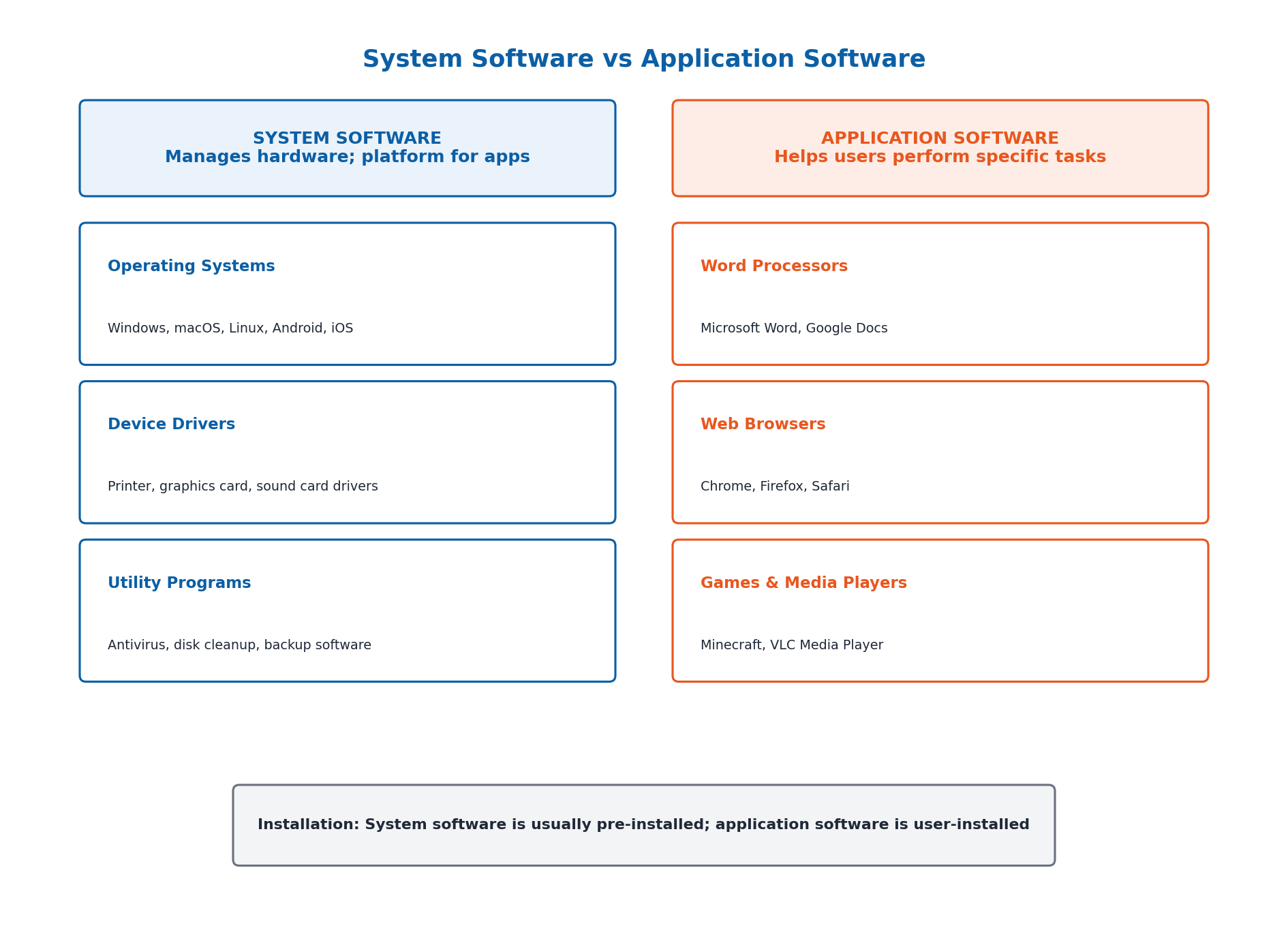
System software is designed to manage system resources and provide a platform for application software to run, acting as a bridge between hardware and user applications — examples include operating systems (Windows, macOS, Linux), device drivers (printer, graphics card, sound card drivers), and utility programs (antivirus software, disk cleanup tools, backup software). Application software is designed to help users perform specific tasks and is typically far more varied than system software — examples include word processors (Microsoft Word, Google Docs), web browsers (Chrome, Firefox), games, and media players.
5.2 The Operating System: An Overview
An Operating System (OS) is a type of system software that manages all the hardware and software on a computer, acting as an intermediary between the computer hardware and user applications. It ensures that different programs and users do not interfere with each other, and provides a stable, consistent way for applications to interact with hardware without needing to know all its technical details.
The most commonly used operating systems are: Windows (Microsoft's popular OS for personal computers, with a start menu, taskbar, and application windows), macOS (Apple's OS for Mac computers, with a dock and features like Mission Control), Linux (an open-source OS used from servers to desktops, appearance varying by distribution), Android (Google's OS for smartphones and tablets), and iOS (Apple's OS for iPhones and iPads, known for smooth performance).
5.3 Operating System Function: Managing Hardware Resources
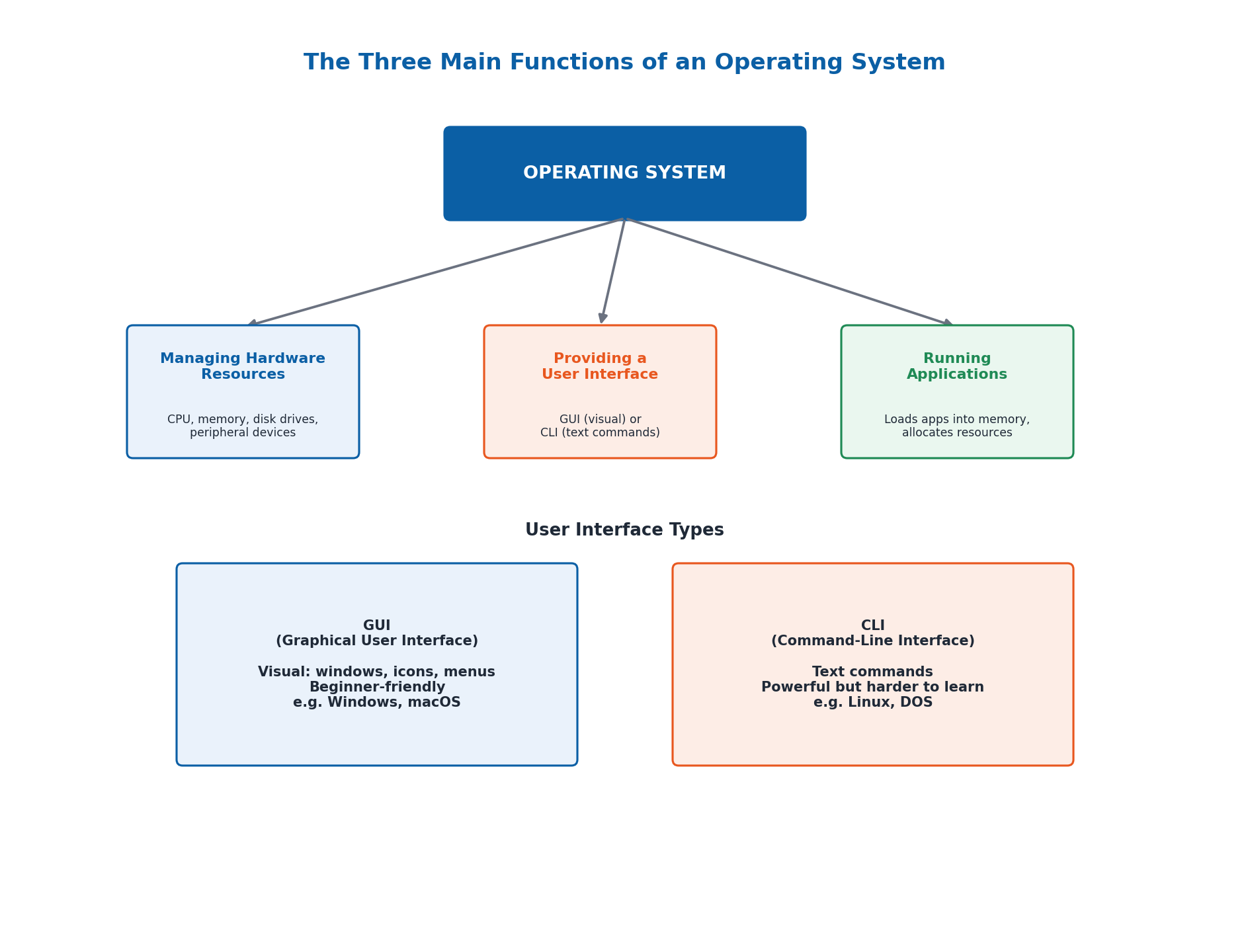
One of the primary functions of an operating system is managing the hardware resources of a computer system — including the CPU, memory, disk drives, and peripheral devices like printers and keyboards. The OS ensures each application receives the necessary resources to function correctly without interfering with other applications.
For example, when you open a web browser while listening to music, the operating system allocates CPU time and memory to both the web browser and the music player, ensuring both run smoothly by managing resources effectively — a task that becomes increasingly complex as more applications run simultaneously.
5.4 Operating System Functions: User Interfaces and Running Applications
The operating system provides a User Interface (UI) that allows users to interact with the computer, in two main forms. A Graphical User Interface (GUI) allows users to interact using visual elements like windows, icons, and menus — user-friendly and intuitive (used by Windows and macOS: click icons, drag-and-drop files, use menus). A Command-Line Interface (CLI) requires users to type text commands to perform tasks — more flexible and powerful, but harder for beginners (used by Linux and DOS: typing commands to copy files, run programs, configure settings).
The operating system is also responsible for running applications: it loads applications into memory, allocates necessary resources, and manages their execution, ensuring applications don't interfere with each other and run efficiently. For example, when you open a word processor, the OS loads it into memory and allocates CPU time; if multiple applications are open, the OS manages resource distribution so all can run simultaneously without performance issues.
5.5 Utility Programs
Utility programs are essential components of system software that enhance a computer's functionality by performing tasks that ensure smooth operation and efficient management of hardware, software, and data. Disk Cleanup scans the hard drive for temporary and cached files that can be safely deleted, reclaiming disk space and potentially improving performance. Antivirus Software scans files and incoming data for known viruses and malware, providing real-time protection against attacks.
Backup Software schedules regular backups of files and folders to external drives, cloud storage, or network locations, allowing full system or selective file backups — useful for recovering an accidentally deleted file. File Compression Tools compress one or more files into a single archive format (like ZIP or RAR) while preserving data integrity, reducing file size to make storage and transfer faster and easier, and often providing encryption and password protection.
5.6 Device Drivers
Device drivers facilitate communication between hardware devices and the operating system, ensuring devices function correctly — acting like a translator between the computer and its gadgets (printer, keyboard, mouse, graphics card, and so on). A printer driver helps the computer send the correct signals to the printer so it can print documents; a graphics card driver ensures the computer can display images and videos correctly on the screen.
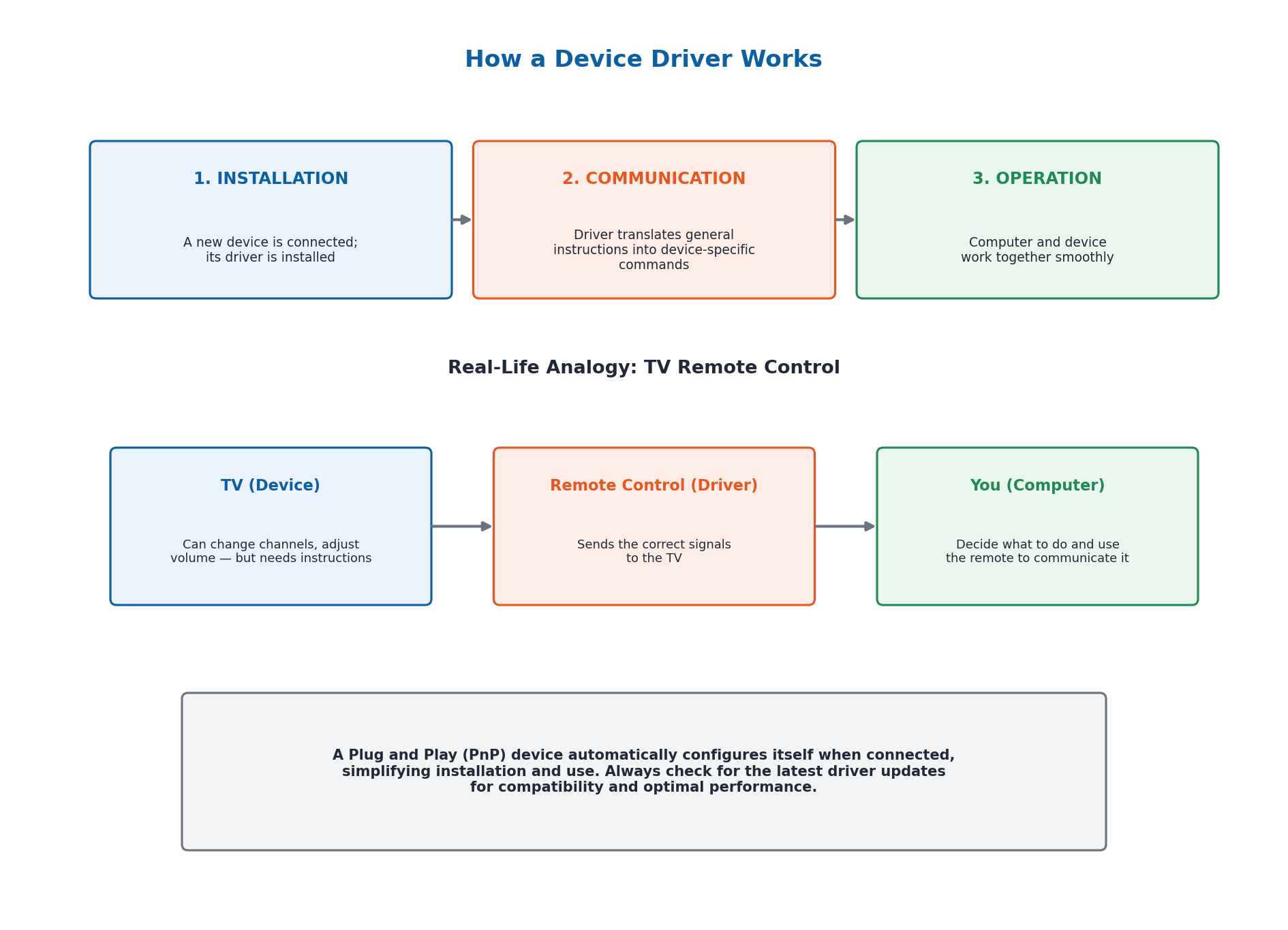
Device drivers work in three stages: Installation (when a new device is connected, its driver is often installed), Communication (the driver translates general instructions from the computer into specific instructions the device understands), and Operation (once installed, the driver helps the computer and device work together smoothly). A useful analogy is a TV remote control: the TV (device) can change channels and adjust volume but needs instructions; the remote control (driver) sends the correct signals to the TV; you (the computer) decide what to do and use the remote to communicate it. A Plug and Play (PnP) device automatically configures itself when connected, simplifying installation and use.
5.7 Application Software: Word Processing and Spreadsheets
Word processing software is used for creating, editing, formatting, and printing documents — essential for writing letters, reports, and essays. Examples include Microsoft Word (widely used, with text formatting, spell/grammar check, and image/table/chart insertion), Google Docs (web-based, real-time collaboration), Apple Pages (macOS/iOS, templates and design tools), and LibreOffice Writer (free, open-source, cross-platform).
Spreadsheet software organizes, analyzes, and stores data in tabular form, using a grid of cells arranged in rows and columns for calculations, data input, and charts — essential for budgeting, financial analysis, and statistics. Examples include Microsoft Excel (complex formulas, pivot tables, charts), Google Sheets (web-based, real-time collaboration), Apple Numbers (macOS/iOS, strong visualization tools), and LibreOffice Calc (free, open-source alternative to Excel).
5.8 Application Software: Graphic Design
Graphic design software is used for creating, editing, and managing visual content — providing tools for drawing, painting, photo editing, and illustration, essential for designers and artists across advertising, web design, publishing, and multimedia. Examples include Adobe Photoshop (photo editing and digital painting), Adobe Illustrator (vector graphics for logos and scalable illustrations), CorelDRAW (user-friendly vector graphics editor), GIMP (free, open-source alternative to Photoshop), and Canva (web-based, template-driven, beginner-friendly design tool).
AI-based tools are increasingly integrated across these application software categories: Grammarly and Microsoft Editor enhance word processing with grammar and style suggestions; Microsoft's Ideas in Excel and Google Sheets' Explore feature assist spreadsheet analysis; and Adobe Sensei automates repetitive tasks and enhances images in graphic design software.
Important Definitions
What is software?
A collection of programs and instructions that tell a computer what to do and how to do it; without software, computer hardware would be useless.
What is system software?
Software designed to manage a computer's system resources and provide a platform for application software to run, acting as a bridge between hardware and user applications.
What is application software?
Software designed to help users perform specific tasks, such as word processing, web browsing, or gaming, built to fulfil particular user needs.
What is an Operating System (OS)?
A type of system software that manages all the hardware and software on a computer, acting as an intermediary between computer hardware and user applications.
What is a Graphical User Interface (GUI)?
A user interface that allows users to interact with a computer using visual elements such as windows, icons, and menus, making it user-friendly and intuitive.
What is a Command-Line Interface (CLI)?
A user interface that requires users to type text commands to perform specific tasks; more flexible and powerful than a GUI, but harder for beginners to use.
What is a utility program?
A component of system software that performs tasks to ensure smooth operation and efficient management of hardware, software, and data, such as disk cleanup or antivirus software.
What is a device driver?
A piece of system software that facilitates communication between a hardware device and the operating system, translating general instructions into device-specific commands.
Key Facts and Relations
| Topic | Key Fact / Relation |
|---|---|
| Software's two main types | System Software (manages hardware) + Application Software (performs user tasks) |
| Examples of system software | Operating Systems, Device Drivers, Utility Programs |
| Examples of application software | Word Processors, Web Browsers, Games, Media Players |
| Two types of user interface | GUI (Graphical User Interface) and CLI (Command-Line Interface) |
| 3 main OS functions | Managing Hardware Resources + Providing a User Interface + Running Applications |
| 4 common utility programs | Disk Cleanup, Antivirus Software, Backup Software, File Compression Tools |
| How device drivers work (3 stages) | Installation → Communication → Operation |
| 5 major operating systems | Windows, macOS, Linux, Android, iOS |
Diagrams
System Software vs Application Software: A comparison of system software (operating systems, device drivers, utility programs) and application software (word processors, browsers, games) with their purposes and examples
The Three Main Functions of an Operating System: A diagram showing how an operating system manages hardware resources, provides a user interface (GUI vs CLI), and runs applications
How a Device Driver Works: A diagram of the three-stage device driver process (Installation, Communication, Operation) using the TV remote control analogy
Short Questions & Answers
Define system software and provide two examples.
System software manages a computer's hardware resources and provides a platform for application software to run. Examples include operating systems (like Windows) and device drivers (like a printer driver).
Explain the primary functions of an operating system.
An operating system's primary functions are managing hardware resources (CPU, memory, devices), providing a user interface (GUI or CLI) for user interaction, and running applications by loading them into memory and allocating resources.
What is utility software and why is it important?
Utility software performs tasks that maintain and enhance a computer's performance, security, and reliability, such as disk cleanup, antivirus scanning, backups, and file compression; it is important because it keeps a system running efficiently and protects it from threats.
Describe the role of device drivers in a computer system.
Device drivers act as translators between hardware devices and the operating system, converting general instructions from the computer into specific instructions the device can understand, allowing devices like printers and graphics cards to function correctly.
Differentiate between system software and application software with examples.
System software (e.g., Windows, device drivers) manages hardware and provides a platform for other software to run; application software (e.g., Microsoft Word, Google Chrome) helps users perform specific tasks like writing or browsing the web.
What are the main functions of spreadsheet software?
Spreadsheet software organizes, analyzes, and stores data in a grid of rows and columns, allowing users to perform calculations, create charts, and manage data for tasks like budgeting and statistical analysis.
How can graphic design software be used in the field of education?
In education, graphic design software can be used to create visual learning materials, infographics, presentation graphics, posters for school events, and illustrations that make lessons more engaging and easier to understand.
What is the difference between a GUI and a CLI?
A GUI (Graphical User Interface) lets users interact visually using windows, icons, and menus, making it beginner-friendly; a CLI (Command-Line Interface) requires typing text commands, offering more power and flexibility but a steeper learning curve.
Long Questions & Answers
Discuss the importance of system software in a computing system, explaining its main functions and why a computer cannot function without it.
Why is system software foundational to a computing system?
System software serves as the essential, continuously active intermediary layer that sits between a computer's raw physical hardware components and the application programs a user wants to run. Without this layer running in the background, a computer's hardware — its processor, memory chips, storage drives, and other physical components — would remain nothing more than a collection of disconnected electronic parts, entirely incapable of performing any genuinely useful, coordinated work. The most critical piece of system software on any computing device is its operating system, which performs three essential functions that together make the computer usable and productive.
How does the operating system manage hardware resources?
A computer's processor, memory, storage drives, and peripheral devices must be carefully and continuously allocated among the multiple application programs that often need to run simultaneously. It is the operating system's job to fairly and efficiently distribute these limited physical resources — for example, so a user can comfortably browse the web while simultaneously listening to background music, without either application completely monopolizing the computer's available processing power or memory capacity.
What user interfaces does the operating system provide?
The operating system provides a user interface, whether a visually intuitive Graphical User Interface (GUI), using icons, clickable menus, and draggable windows, or a more powerful but less beginner-friendly Command-Line Interface (CLI), requiring the user to type specific text-based commands. Without some form of properly functioning user interface provided by the operating system, an ordinary user would have no practical way to communicate their wishes to the underlying computer hardware at all.
How does the operating system run applications, and what role do utilities and drivers play?
The operating system is directly responsible for loading requested application programs into working memory, allocating the necessary processing resources to each, and managing their execution so multiple applications can run together smoothly without interfering with one another. Beyond the operating system itself, utility programs (such as antivirus software or disk cleanup tools) and device drivers (such as a printer driver) further extend the operating system's core capabilities, helping maintain system security, reliable performance, and compatibility with the wide range of hardware peripherals users commonly connect.
Describe the roles of operating systems, utility software, and device drivers, providing examples of each.
What is the operating system's role, and what are some examples?
The operating system is the single most central piece of system software on a computer, acting as the primary intermediary between the computer's physical hardware and the application programs a user runs. Its core responsibilities include managing hardware resources, providing an interactive user interface, and reliably executing application programs. Well-known examples include Microsoft Windows (popular for personal computers), Apple's macOS (for Mac computers), Linux (a flexible, open-source system used from home servers to enterprise systems), Google's Android (for smartphones and tablets), and Apple's iOS (for iPhone and iPad).
What is utility software, and what are some examples?
Utility software consists of smaller, more narrowly specialized programs, each designed to perform one particular maintenance or optimization task, enhancing a computer system's performance, security, or reliability in some specific respect. Examples include Disk Cleanup (identifies and safely removes unnecessary temporary files to free up storage space), antivirus software (detects and removes malware), backup software (creates and maintains protective copies of important files against data loss), and file compression tools (reduce file size for faster, more convenient storage and transfer).
What are device drivers, and what are some examples?
Device drivers are a category of system software narrowly focused on enabling reliable, accurate communication between one specific hardware device and the computer's operating system. A printer driver, for example, translates a computer's generic print commands into the very particular signals a specific printer model requires to properly print a document, while a graphics card driver ensures that visual images and video content are correctly rendered and displayed on a connected screen or monitor.
Explain the differences between system software and application software, covering purpose, examples, and installation.
How do system software and application software differ in purpose?
System software is narrowly designed to manage and directly operate a computer's underlying physical hardware, thereby making it possible for application software to run correctly and reliably on top of that hardware — its core purpose is to keep the computer itself operating correctly and smoothly at a basic technical level. Application software, by contrast, is designed to directly help the human user accomplish particular tasks they want to carry out, such as writing a letter, analyzing a budget, or browsing a website — its purpose is to help the user get useful work done.
What are typical examples of system software and application software?
System software includes examples such as operating systems (like Microsoft Windows or Apple's macOS) and individual device drivers (such as a specific printer driver). Application software instead includes examples such as word processing programs (like Microsoft Word), popular web browsers (like Google Chrome), and computer games (like Minecraft). Application software, as a broad category, tends to be considerably more varied, diverse, and numerous than system software, because there exists such a wide and continually expanding range of tasks users might want to accomplish using their computers.
How does installation differ between system software and application software?
System software is generally pre-installed onto a computer by its manufacturer before the computer is ever sold, since a computer cannot properly function at all without at least a basic operating system already installed and running from the moment it is switched on. Application software, however, is typically installed by the end user themselves, according to their own needs and preferences — a graphic designer might install Adobe Photoshop, while a user working in a general office context might instead install Microsoft Word and Excel.
Discuss the main functions of commonly used application software, such as word processing, spreadsheet, and graphic design applications, with specific examples of each category.
What is word processing software, and what are some examples?
Word processing software is designed for creating, editing, formatting, and printing text-based documents, making it essential for tasks such as writing formal letters, drafting professional reports, and composing academic essays. Well-known examples include Microsoft Word (offering text formatting, spell-checking, and grammar-checking), Google Docs (a web-based word processor notable for real-time collaboration, letting multiple users edit one shared document simultaneously), Apple Pages (designed for macOS and iOS), and LibreOffice Writer (a free, open-source alternative with many of the same core features as Word).
What is spreadsheet software, and what are some examples?
Spreadsheet software is designed for organizing, analyzing, and storing numerical and other data within a structured tabular grid of cells arranged into rows and columns, making it essential for tasks such as budgeting, financial analysis, and statistical data analysis. Well-known examples include Microsoft Excel (offering complex formulas and pivot tables for data summarization), Google Sheets (a web-based application supporting real-time collaborative editing), Apple Numbers (known for strong data visualization on macOS and iOS), and LibreOffice Calc (a free, open-source alternative to Excel).
What is graphic design software, and what are some examples?
Graphic design software is designed for creating, editing, and managing visual content, making it essential for designers, artists, and anyone working with visual media across industries such as advertising, web design, publishing, and multimedia production. Well-known examples include Adobe Photoshop (an industry-standard tool for professional photo editing and digital painting), Adobe Illustrator (a vector graphics editor for creating scalable logos and illustrations), and Canva (a beginner-friendly, web-based tool offering ready-made templates that make graphic design more accessible to non-specialists).
Multiple Choice Questions (MCQs)
What is the primary function of an operating system? (A) To create documents (B) To manage hardware resources and provide a user interface (C) To perform calculations (D) To design graphics
Correct answer: (B) To manage hardware resources and provide a user interface. The operating system's primary function is managing hardware resources and providing a user interface, along with running applications.
Which software is used to enhance system performance and security? (A) Operating system (B) Utility software (C) Application software (D) Device drivers
Correct answer: (B) Utility software. Utility software (like antivirus programs and disk cleanup tools) is specifically used to enhance system performance, security, and maintenance.
What role do device drivers play in a computer system? (A) Manage files (B) Facilitate communication between hardware devices and the operating system (C) Create presentations (D) Enhance graphics performance
Correct answer: (B) Facilitate communication between hardware devices and the operating system. Device drivers act as translators, facilitating communication between hardware devices and the operating system.
Which of the following is an example of application software? (A) Microsoft Word (B) BIOS (C) Disk Cleanup (D) Device Manager
Correct answer: (A) Microsoft Word. Microsoft Word is application software, designed to help users perform the specific task of word processing; the others are system software.
What is the main purpose of spreadsheet software? (A) To edit text documents (B) To organize and analyze data (C) To create visual content (D) To enhance system security
Correct answer: (B) To organize and analyze data. Spreadsheet software's main purpose is to organize, analyze, and store data in a tabular grid of rows and columns.
How does utility software differ from application software? (A) Utility software manages hardware, while application software performs specific tasks for users. (B) Utility software creates documents, while application software manages hardware. (C) Utility software performs specific tasks for users, while application software manages hardware. (D) Utility software is free, while application software is paid.
Correct answer: (A) Utility software manages hardware, while application software performs specific tasks for users.. Utility software (part of system software) helps manage and maintain hardware/system performance, while application software performs specific tasks for the user.
Which type of software would you use to design a logo? (A) Operating system (B) Spreadsheet software (C) Graphic design software (D) Utility software
Correct answer: (C) Graphic design software. Graphic design software (such as Adobe Illustrator) is specifically used for creating logos and other scalable graphics.
What is the function of system software? (A) To facilitate communication between hardware and software (B) To perform specific tasks for the user (C) To create visual content (D) To organize and analyze data
Correct answer: (A) To facilitate communication between hardware and software. System software's core function is to manage hardware and facilitate communication between hardware and other software, including applications.
Why are operating system updates important? (A) They increase screen brightness (B) They add more fonts (C) They enhance security and fix bugs (D) They improve battery life
Correct answer: (C) They enhance security and fix bugs. OS updates are important primarily because they enhance security and fix bugs, protecting the system against newly discovered vulnerabilities.
What is a common task you can perform using word processing software? (A) Create and edit text documents (B) Manage hardware resources (C) Enhance system performance (D) Organize and analyze data
Correct answer: (A) Create and edit text documents. Word processing software is used to create, edit, format, and print text-based documents.
Quick Revision Summary
- Software = System Software (manages hardware, e.g. OS, drivers, utilities) + Application Software (performs user tasks, e.g. Word, browsers, games)
- 5 major OSes: Windows, macOS, Linux, Android, iOS
- OS has 3 main functions: manage hardware resources, provide user interface (GUI/CLI), run applications
- GUI = visual (icons, windows, menus, beginner-friendly); CLI = text commands (flexible, powerful, harder for beginners)
- Utility programs: Disk Cleanup, Antivirus, Backup Software, File Compression Tools
- Device drivers = translators between hardware and OS; work in 3 stages: Installation → Communication → Operation
- Word processors: MS Word, Google Docs, Apple Pages, LibreOffice Writer
- Spreadsheets: Excel, Google Sheets, Apple Numbers, LibreOffice Calc; Graphic design: Photoshop, Illustrator, CorelDRAW, GIMP, Canva
Exam Tips
- Remember the 3 core OS functions in order: manage hardware resources → provide user interface → run applications
- GUI vs CLI: GUI = visual/beginner-friendly; CLI = text-based/powerful — a frequently tested distinction
- System software is usually pre-installed; application software is usually installed by the user — a key differentiator often tested
- Memorize at least 2 examples for each utility program type (disk cleanup, antivirus, backup, file compression)
- The device driver 'TV remote control' analogy (TV=device, remote=driver, you=computer) is a great way to explain and remember this concept
- For application software questions, always be ready to name at least 2 examples per category: word processing, spreadsheet, graphic design