This chapter explores how computers represent, store, and process all forms of data using number systems. It begins with the decimal, binary, octal, and hexadecimal number systems, and how to convert between them, before explaining how whole numbers, signed integers, and negative values (via two's complement) are stored in computer memory.
The chapter then covers how real (floating-point) numbers are represented using single and double precision, how binary arithmetic operations (addition, subtraction, multiplication, division) are performed, and how text is encoded using ASCII and Unicode (UTF-8, UTF-16, UTF-32). Finally, it explains how images, audio, and video are digitally stored as binary data.
Learning Objectives
- Describe the decimal, binary, octal, and hexadecimal number systems and convert between them
- Explain how whole numbers and signed integers are represented and stored in computer memory
- Calculate the negative of a binary number using two's complement
- Explain how real (floating-point) numbers are represented using single precision (32-bit) and double precision (64-bit)
- Perform binary arithmetic operations: addition, subtraction, multiplication, and division
- Explain the ASCII text encoding scheme and how characters are assigned numeric codes
- Differentiate between ASCII and Unicode (UTF-8, UTF-16, UTF-32) encoding schemes
- Describe how images, audio, and video files are digitally stored as binary data
Key Concepts
2.1 Numbering Systems: Decimal, Binary, Octal and Hexadecimal
Numbering systems are essential in computing because they form the basis for representing, storing, and processing data. The decimal system is a base-10 system using digits 0-9, where each digit represents a power of 10 (e.g., 523 = 5×10² + 2×10¹ + 3×10⁰). The binary system is a base-2 system using only 0 and 1, where each position represents a power of 2 (e.g., 1011₂ = 1×2³+0×2²+1×2¹+1×2⁰ = 11₁₀). Computers use binary because digital circuits have exactly two states — ON and OFF — represented by 1 and 0.
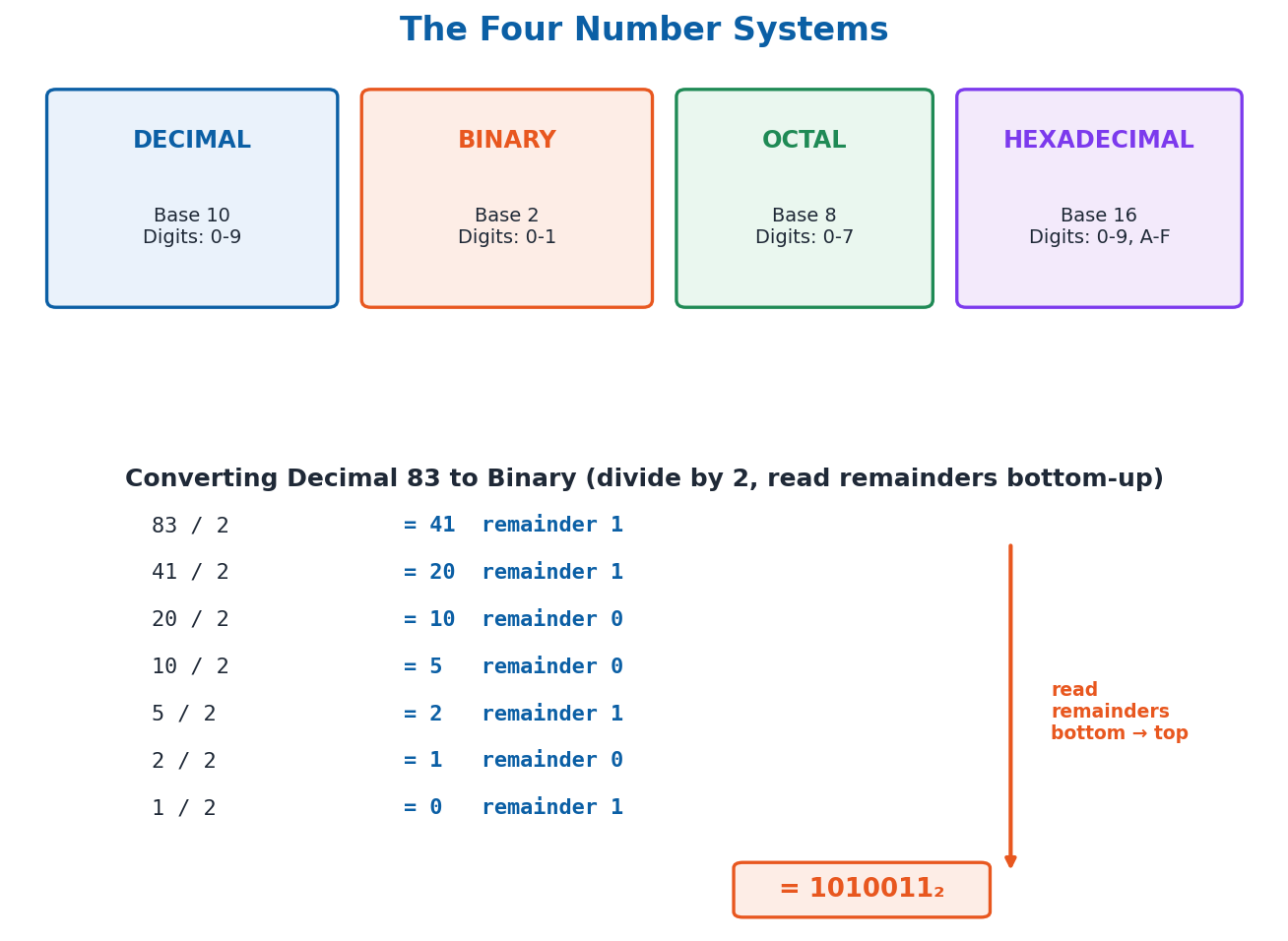
The octal system is base-8, using digits 0-7, where each octal digit corresponds to exactly 3 binary bits (since 8 = 2³). The hexadecimal system is base-16, using digits 0-9 and letters A-F (representing 10-15), where each hex digit corresponds to exactly 4 binary bits (since 16 = 2⁴) — making it a compact way to write large binary numbers. To convert a decimal number to binary, octal, or hexadecimal, repeatedly divide the number by 2, 8, or 16 respectively, recording the remainder each time; the answer is the remainders read from bottom to top (e.g., 83 in decimal converts to 1010011 in binary, 123 in octal, and 53 in hexadecimal).
2.2 Binary Encoding of Whole Numbers and Signed Integers
Whole numbers (W) are non-negative integers {0, 1, 2, 3, …} used to represent quantities that cannot be negative. An n-bit unsigned (whole) number can represent a maximum value of 2ⁿ − 1: an 8-bit (1-byte) value can range from 0 to 255, a 16-bit (2-byte) value from 0 to 65,535, and a 32-bit (4-byte) value from 0 to 4,294,967,295.
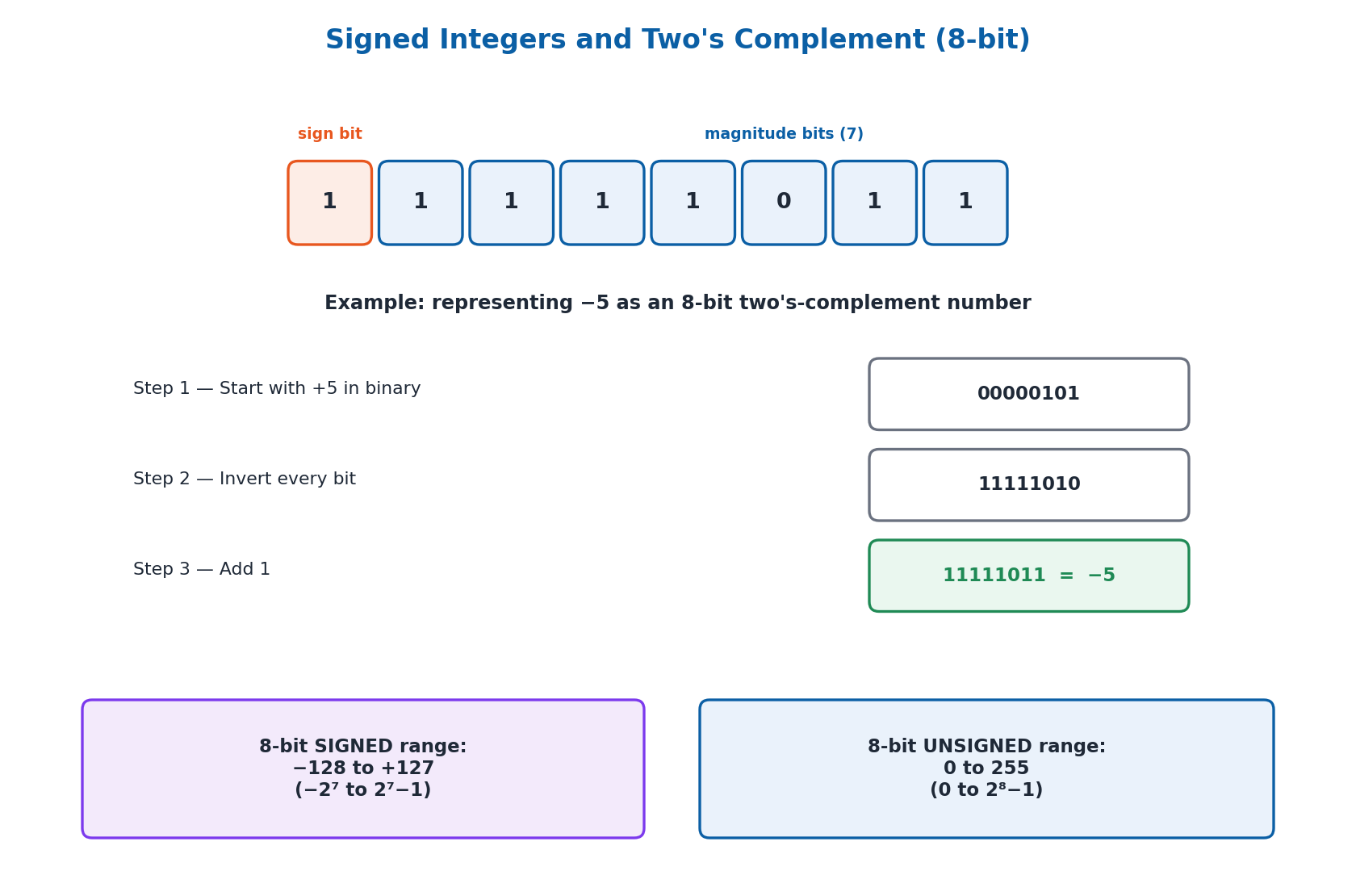
Integers (Z), also called signed integers, extend whole numbers to include negatives {…, -2, -1, 0, 1, 2, …}. To store both positive and negative values, one bit — the most significant bit — is reserved as the sign bit: 0 means positive, 1 means negative. With n bits, only n−1 bits remain for the value, so the maximum positive value is 2ⁿ⁻¹ − 1 (e.g., 127 for 1 byte) and the minimum (most negative) value is −2ⁿ⁻¹ (e.g., −128 for 1 byte, and −32,768 for 2 bytes).
2.3 Two's Complement: Representing Negative Values
Computers represent negative binary numbers using a technique called two's complement. To find the two's complement of a binary number: first invert all the bits (change every 0 to 1 and every 1 to 0), then add 1 to the result. For example, to represent −5 as an 8-bit number: start with 5 in binary (00000101), invert all bits to get 11111010, then add 1 to get 11111011 — this is −5 in 8-bit two's complement.
Two's complement is used because it allows a computer's ALU to perform subtraction using the same binary addition circuitry as addition, simply by adding the two's complement of the number being subtracted. This makes computer hardware simpler and more efficient, since no separate subtraction circuit is needed.
2.4 Storing Real Values: Floating-Point Representation
Real numbers (numbers with a fractional or decimal part) are stored in computers as floating-point numbers, represented in a form similar to scientific notation: a floating-point number = sign × mantissa × 2^exponent. To convert the fractional part of a decimal number to binary, repeatedly multiply the fractional part by 2 and record the integer part of each result, until the fractional part becomes zero or the required precision is reached (e.g., 0.375 in decimal converts to 0.011 in binary).
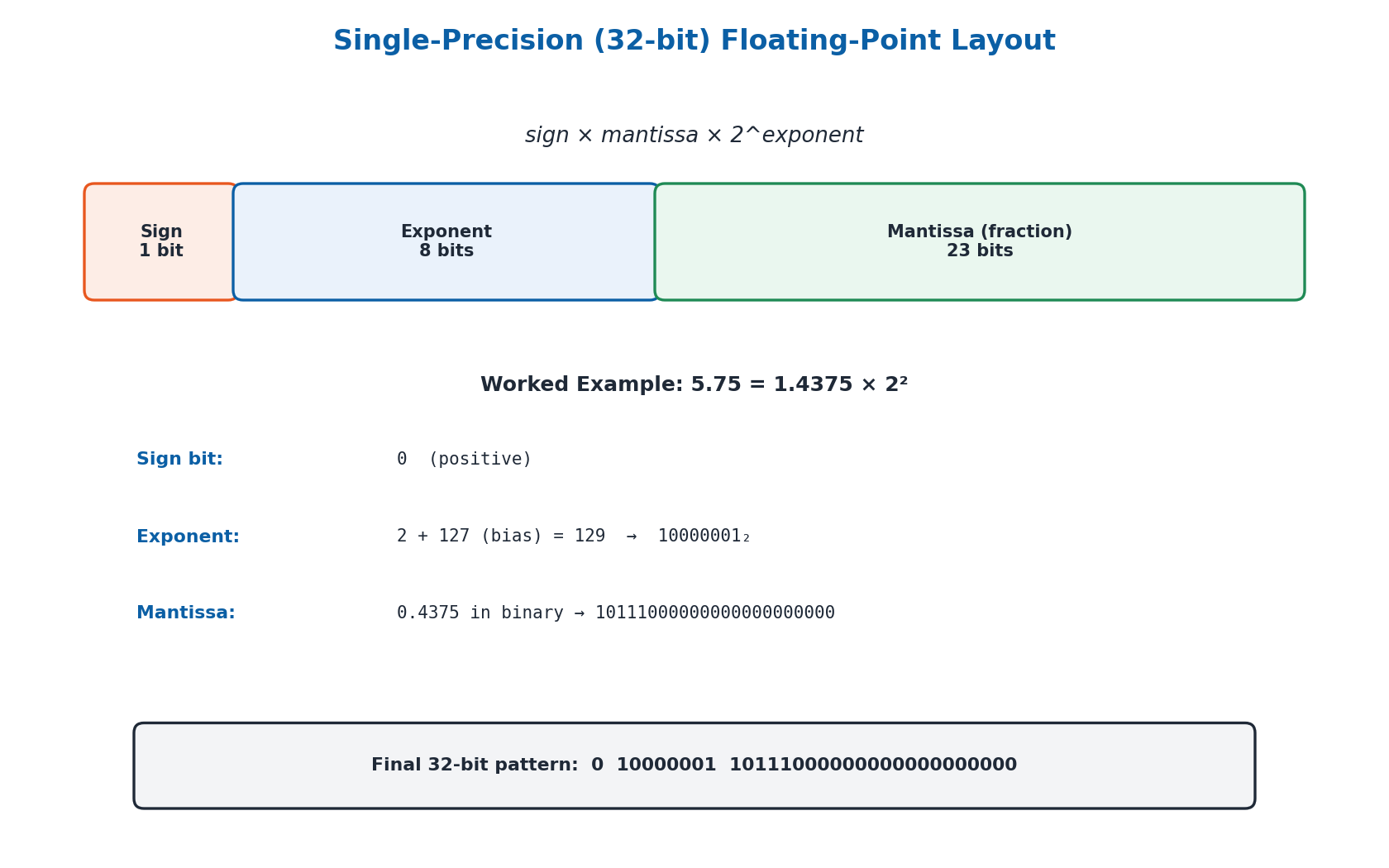
Two standards are used to store floating-point numbers: Single Precision (32-bit), which uses 1 bit for the sign, 8 bits for the exponent, and 23 bits for the mantissa, covering an approximate range from 1.4×10⁻⁴⁵ to 3.4×10³⁸; and Double Precision (64-bit), which uses 1 bit for the sign, 11 bits for the exponent (with a bias of 1023, giving an exponent range from −1022 to +1023), and 52 bits for the mantissa, allowing for much greater range and precision than single precision.
2.5 Binary Arithmetic: Addition, Subtraction, Multiplication and Division
Binary addition follows four simple rules: 0+0=0, 0+1=1, 1+0=1, and 1+1=0 with a carry of 1 to the next higher bit. Binary subtraction is performed by adding the two's complement of the number being subtracted (the subtrahend) to the other number (the minuend), then discarding any final carry bit — for example, 9−6 in binary is computed as 1001 + (two's complement of 0110, which is 1010) = 10011, and discarding the leading carry gives 0011 = 3.
Binary multiplication follows the same long-multiplication method used in decimal: each bit of one number is multiplied by each bit of the other, with partial results shifted left for each new row and then summed (e.g., 101₂ × 11₂ = 1111₂). Binary division follows the same compare-subtract-shift process as long division in decimal (e.g., 1100₂ ÷ 10₂ = 110₂).
2.6 Text Encoding: ASCII
ASCII (American Standard Code for Information Interchange) is a character encoding standard that assigns every letter, digit, and symbol a unique numeric code between 0 and 127, using 7 bits. For example, the ASCII code for uppercase 'P' is 80, for lowercase 'a' is 97, and for the digit character '0' is 48. ASCII allows different computers and devices to reliably exchange text information using a shared, standardized code.
While the standard ASCII table defines 128 characters, an Extended ASCII version uses all 8 bits to define 256 characters, adding accented letters and additional symbols beyond the original 128. However, the original 128 characters remain the most commonly used and form the foundation of text representation on computers.
2.7 Text Encoding: Unicode (UTF-8, UTF-16, UTF-32)
Unicode is a character encoding standard designed to represent every character used in every writing system in the world — over a million characters — unlike ASCII, which is limited to just 128 characters. Unicode is implemented through several encoding forms, known as UTF (Unicode Transformation Format): UTF-8, UTF-16, and UTF-32.
UTF-8 is a variable-length encoding using 1 to 4 bytes per character, and is backward compatible with ASCII (any valid ASCII text is also valid UTF-8). UTF-16 is a variable-length encoding using either 2 or 4 bytes per character, but is not backward compatible with ASCII. UTF-32 is a fixed-length encoding that always uses exactly 4 bytes for every character, making it simple but comparatively space-inefficient.
2.8 Storing Images, Audio and Video
Data size is measured in bytes and their multiples: 1 Byte = 8 bits, 1 Kilobyte (KB) = 1024 Bytes, 1 Megabyte (MB) = 1024 KB, 1 Gigabyte (GB) = 1024 MB, and so on through Terabyte, Petabyte, Exabyte, Zettabyte, and Yottabyte. Images are made up of tiny dots called pixels, where each pixel's color is represented by three numbers — Red, Green, and Blue (RGB) — each ranging from 0 to 255; common image formats include JPEG (compressed, some quality loss), PNG (lossless, supports transparency), and GIF (simple animations, few colors).
Audio is digitized through sampling (recording the sound wave at regular intervals, measured as the sampling rate) and quantization (converting each sample into a number); common audio formats include MP3 (compressed), WAV (uncompressed), and AAC (efficient high-quality compression). Video consists of a rapid sequence of image frames plus audio, with frame rate (measured in Frames Per Second, FPS) determining smoothness; common video formats include MP4, AVI, and MKV. All of these files — images, audio, and video — are ultimately stored as binary data (sequences of 0s and 1s) on storage devices such as HDDs, SSDs, or cloud storage.
Important Definitions
What is a number system?
A structured way of representing numbers using a specific base and set of digits, such as the decimal (base-10), binary (base-2), octal (base-8), or hexadecimal (base-16) systems.
What is the binary number system?
A base-2 number system that uses only the digits 0 and 1, where each position represents a power of 2; it is used by computers because digital circuits have exactly two states, ON (1) and OFF (0).
What is two's complement?
A method computers use to represent negative binary numbers, found by inverting all the bits of the positive value and then adding 1 to the result.
What is a signed integer?
An integer that can represent both positive and negative values by reserving the most significant bit as a sign bit (0 for positive, 1 for negative).
What is a floating-point number?
A way of representing real numbers (numbers with a fractional part) in a computer, expressed as sign × mantissa × 2^exponent, similar to scientific notation.
What is ASCII?
American Standard Code for Information Interchange — a 7-bit character encoding standard that assigns each letter, digit, and symbol a unique numeric code from 0 to 127.
What is Unicode?
A character encoding standard that aims to represent every character used in every writing system in the world, implemented through encoding forms such as UTF-8, UTF-16, and UTF-32.
What is a pixel?
The smallest unit of a digital image, with its own color value; the combination of many pixels, each represented by Red, Green, and Blue (RGB) values, forms a complete image.
Key Facts and Relations
| Topic | Key Fact / Relation |
|---|---|
| Decimal to binary/octal/hex conversion | Repeatedly divide by the base (2, 8, or 16); read the remainders from bottom to top |
| Maximum value of an n-bit unsigned (whole) number | 2ⁿ − 1 (e.g., 8 bits → 255) |
| Range of an n-bit signed integer | −2ⁿ⁻¹ to 2ⁿ⁻¹ − 1 (e.g., 8 bits → −128 to 127) |
| Two's complement of a binary number | Invert all bits, then add 1 |
| Floating-point number formula | sign × mantissa × 2^exponent |
| Single precision (32-bit) bit layout | 1 sign bit + 8 exponent bits + 23 mantissa bits |
| Data size multiples | 1 Byte = 8 bits; 1 KB = 1024 Bytes; 1 MB = 1024 KB; 1 GB = 1024 MB |
| ASCII vs Unicode character range | ASCII = 128 characters (7-bit) / Extended ASCII = 256 (8-bit); Unicode = over 1 million characters |
Diagrams
Converting Between Number Systems: A comparison of the decimal, binary, octal, and hexadecimal number systems, with the divide-and-record-remainder method for converting 83 (decimal) into each base
Signed Integers and Two's Complement: An 8-bit signed integer layout showing the sign bit, the range of values it can represent, and the two's-complement steps used to represent −5
Single-Precision Floating-Point Layout: The 32-bit single-precision floating-point format, showing the 1 sign bit, 8 exponent bits, and 23 mantissa bits, with the worked example of 5.75
Short Questions & Answers
What is the primary purpose of the ASCII encoding scheme?
ASCII assigns a unique numeric code (0-127) to every letter, digit, and symbol, allowing computers and devices to reliably store, process, and exchange text information using a shared standard.
Explain the difference between ASCII and Unicode.
ASCII is a 7-bit encoding limited to 128 characters, mainly covering English letters, digits, and symbols; Unicode can represent over a million characters from virtually every writing system in the world, through encodings like UTF-8, UTF-16, and UTF-32.
What is the range of values for an unsigned 2-byte integer?
An unsigned 2-byte (16-bit) integer can represent values from 0 to 2¹⁶ − 1, which is 0 to 65,535.
Explain how a negative integer is represented in binary.
A negative integer is represented using two's complement: the bits of its positive binary value are inverted, and then 1 is added to the result; the most significant bit becomes 1, indicating a negative value.
What is the benefit of using unsigned integers?
Unsigned integers use all available bits to represent only positive values (including zero), which doubles the maximum representable value compared to a signed integer of the same bit-length, since no bit is reserved for the sign.
How does the number of bits affect the range of integer values?
More bits allow a larger range of values to be represented: each additional bit doubles the number of distinct values available, since an n-bit number can represent 2ⁿ different values.
Why are whole numbers commonly used in computing for quantities that cannot be negative?
Whole numbers use all their bits to represent only non-negative values, which is appropriate for quantities like the number of students, a person's age, or grades, since these can never logically be negative.
Why is it important to understand the limitations of floating-point representation in scientific computing?
Floating-point numbers have limited precision because only a fixed number of bits (23 for single precision) are used for the mantissa, which can lead to small rounding errors; understanding this helps prevent accumulated inaccuracies in scientific calculations.
Long Questions & Answers
Explain how characters are encoded using Unicode. Discuss UTF-8, UTF-16, and UTF-32, and provide examples of how characters are represented in each.
What is Unicode, and why was it developed?
Unicode is a character encoding standard developed to represent every character used in every writing system across the world — a vast set of over a million distinct characters. This scope goes far beyond the older ASCII standard, which was limited to only 128 characters and designed primarily around the English alphabet, digits, and common symbols. To achieve this enormous scope while remaining practical to store and transmit, Unicode is implemented through several distinct encoding forms, collectively known as UTF (Unicode Transformation Format), each offering a different trade-off between storage efficiency and compatibility with older systems.
What is UTF-8, and how does it encode characters?
UTF-8 is a variable-length encoding scheme that can use anywhere from 1 to 4 bytes to represent a single character, depending on that character's position within the Unicode character set. A key feature of UTF-8 is that it is fully backward compatible with ASCII, since the first 128 Unicode code points map identically onto the original ASCII character codes. For example, the English letter 'A' (U+0041) is represented in UTF-8 using a single byte, 01000001, exactly matching its ASCII code, while the Urdu letter 'ب' (U+0628) needs 2 bytes, 11011000 10101000, since it falls outside the single-byte ASCII range.
What is UTF-16, and how does it differ from UTF-8?
UTF-16 is also a variable-length encoding, but it uses either 2 bytes or 4 bytes to represent each character, rather than UTF-8's 1-to-4-byte range. Unlike UTF-8, UTF-16 is not backward compatible with ASCII, meaning a UTF-16-encoded file cannot be directly interpreted by older ASCII-based systems. Under UTF-16, the letter 'A' is represented using 2 bytes, as 00000000 01000001, and the Urdu letter 'ب' is likewise represented using 2 bytes, as 00000110 00101000.
What is UTF-32, and what is its main trade-off?
UTF-32 takes a fundamentally different, fixed-length approach: every character, regardless of its complexity or position in the Unicode character set, is represented using exactly 4 bytes. This makes UTF-32 considerably simpler to process programmatically, since every character occupies the same, predictable amount of space, but it comes at the cost of significantly increased storage and transmission requirements compared to UTF-8 and UTF-16. For example, under UTF-32 the simple English letter 'A' still requires the full 4 bytes, 00000000 00000000 00000000 01000001, even though it needs only a single byte under UTF-8.
Describe in detail how integers are stored in computer memory, covering whole numbers, signed integers, and the use of two's complement for negative values.
How are unsigned whole numbers stored in memory?
Whole numbers form the set of non-negative integers {0, 1, 2, 3, …} and are commonly used to represent real-world quantities that cannot be negative, such as the number of students in a school or a person's age. When storing an unsigned whole number using n bits, every bit is dedicated entirely to representing the number's magnitude, so the maximum value that can be represented is 2n − 1. This means a 1-byte (8-bit) unsigned number can represent 0 to 255, a 2-byte (16-bit) number up to 65,535, and a 4-byte (32-bit) number up to 4,294,967,295.
How are signed integers stored, and what does the sign bit do?
Signed integers extend whole numbers to also support negative values, forming the complete set of integers Z = {…, -3, -2, -1, 0, 1, 2, 3, …}. To accommodate both positive and negative values within a fixed number of bits, the most significant (leftmost) bit is reserved as a dedicated sign bit: 0 means the number is positive, and 1 means it is negative. Because one bit is used for the sign, only n − 1 bits remain for the magnitude, so a signed 1-byte integer can represent a maximum of +127 (2⁷ − 1) and a minimum of −128 (−2⁷).
What is two's complement, and how is a negative value like -5 represented in it?
Two's complement is the technique computers use to construct the binary representation of a negative value, calculated in two steps: first, every bit of the number's positive binary representation is inverted (0 becomes 1, 1 becomes 0); second, the value 1 is added to this inverted result. For example, to represent -5 as an 8-bit signed integer, start with the 8-bit representation of 5, which is 00000101; inverting every bit gives 11111010; adding 1 gives a final result of 11111011 — the pattern computers use internally to store, retrieve, and compute with the value -5.
Explain the process of converting a decimal integer to its binary representation, and vice versa. Include worked examples of both a positive and a negative integer.
How do you convert a positive decimal integer to binary?
Converting a positive decimal integer to binary uses a repeatable division-based algorithm: the decimal number is divided by 2, and the remainder (always 0 or 1) is recorded. This division is repeated, each time dividing the new quotient by 2 and recording the remainder, continuing until the quotient reaches 0. The final binary representation is obtained by reading all the recorded remainders back in reverse order — from the last remainder calculated to the first.
What is a worked example of converting decimal 83 to binary?
Converting 83 to binary: 83 divided by 2 = 41 remainder 1; 41 divided by 2 = 20 remainder 1; 20 divided by 2 = 10 remainder 0; 10 divided by 2 = 5 remainder 0; 5 divided by 2 = 2 remainder 1; 2 divided by 2 = 1 remainder 0; 1 divided by 2 = 0 remainder 1. Since the quotient has now reached 0, the division stops. Reading the recorded remainders back in reverse order, from the last calculated to the first, gives the final binary result 1010011 — so decimal 83 equals binary 1010011.
How do you convert a binary number back into decimal?
Converting a binary number back into decimal is achieved by multiplying each binary digit by 2 raised to the power corresponding to that digit's position, counting from 0 at the rightmost digit and increasing moving leftward, then summing all the resulting products. For example, converting the binary number 1011 back into decimal involves calculating (1×2³) + (0x2²) + (1×2¹) + (1×2⁰), which equals 8 + 0 + 2 + 1, giving a final decimal result of 11.
How is a negative decimal number represented in binary?
To represent a negative integer in binary, the number is converted into its two's complement form rather than a simple positive binary representation. For example, to represent the negative decimal value -5 as an 8-bit binary number: first take the standard positive binary representation of 5 (00000101), then invert every bit to obtain 11111010, and finally add 1 to this inverted result, arriving at the final two's-complement representation 11111011 — precisely how -5 would be stored internally in an 8-bit signed integer.
Perform the following binary arithmetic operations, showing your working at every step: (a) Multiply 101 by 11. (b) Divide 1100 by 10. (c) Add 1100 and 1011. (d) Subtract 0100 from 1101.
How do you multiply 101 by 11 in binary?
Binary multiplication follows the same long-multiplication method as decimal multiplication, but using simpler rules: multiplying by 1 copies the number down unchanged, and multiplying by 0 produces a row of all zeros. Multiplying 101 by the rightmost digit of 11 (1) gives a first partial product of 101; multiplying 101 by the next digit of 11 (1) gives a second partial product of 101, shifted one place left to 1010; adding 101 + 1010 gives 1111. So 101 x 11 = 1111 in binary, matching 5 x 3 = 15 in decimal.
How do you divide 1100 by 10 in binary?
Binary division follows the same compare-subtract-shift process as standard long division, working with binary digits. Comparing divisor 10 against the first two digits of dividend 1100 (which is 11) shows 10 fits once, so a 1 is written in the quotient and 11 minus 10 leaves remainder 1; bringing down the next digit, 0, gives 10, which 10 also fits once, giving another quotient digit 1 and remainder 0; bringing down the final 0, 10 does not fit, giving a final quotient digit 0. The result is 1100 divided by 10 = 110 in binary, matching 12 divided by 2 = 6.
How do you add 1100 and 1011 in binary?
Binary addition uses the rules 0+0=0, 0+1=1, 1+0=1, and 1+1=0 with a carry of 1, applied column by column from right to left. For 1100 + 1011: the rightmost column gives 0+1=1; the next gives 0+1=1; the next gives 1+0=1; and the leftmost gives 1+1=0 with a carry-out of 1, written as a leading digit. Combining these gives a final sum of 10111. So 1100 + 1011 = 10111 in binary, matching 12 + 11 = 23 in decimal.
How do you subtract 0100 from 1101 in binary?
Binary subtraction is performed by calculating the two's complement of the subtrahend (0100) and adding it to the minuend (1101), rather than subtracting directly. Inverting every bit of 0100 gives 1011, and adding 1 gives a two's-complement value of 1100. Adding this to the minuend, 1101 + 1100, gives 11001; since the calculation uses only 4-bit numbers, the leading fifth carry bit is discarded, leaving a final 4-bit result of 1001. So 1101 minus 0100 = 1001 in binary, matching 13 minus 4 = 9 in decimal.
Multiple Choice Questions (MCQs)
What does ASCII stand for? (A) American Standard Code for Information Interchange (B) Advanced Standard Code for Information Interchange (C) American Standard Communication for Information Interchange (D) Advanced Standard Communication for Information Interchange
Correct answer: (A) American Standard Code for Information Interchange. ASCII stands for American Standard Code for Information Interchange, a 7-bit character encoding standard.
Which of the following is a valid binary number? (A) 110112 (B) 11011 (C) 110.11 (D) 1101A
Correct answer: (B) 11011. A valid binary number contains only the digits 0 and 1; "11011" satisfies this, while the others contain invalid characters or symbols for binary.
How many bits are used in the standard ASCII encoding? (A) 7 bits (B) 8 bits (C) 16 bits (D) 32 bits
Correct answer: (A) 7 bits. Standard ASCII uses 7 bits, giving 128 possible character codes (0-127); Extended ASCII uses all 8 bits for 256 codes.
Which of the following is a key advantage of Unicode over ASCII? (A) It uses fewer bits per character (B) It can represent characters from many different languages (C) It is backward compatible with binary (D) It is specific to the English language
Correct answer: (B) It can represent characters from many different languages. Unicode's key advantage is its ability to represent over a million characters from virtually every writing system in the world, unlike ASCII's 128 characters.
How many bytes are typically used to store a standard integer? (A) 1 byte (B) 2 bytes (C) 4 bytes (D) 8 bytes
Correct answer: (C) 4 bytes. A standard integer is typically stored using 4 bytes (32 bits) in most programming languages and systems.
What is the primary difference between signed and unsigned integers? (A) Unsigned integers cannot be negative (B) Signed integers have a larger range (C) Unsigned integers are stored in floating-point format (D) Signed integers are only used for positive numbers
Correct answer: (A) Unsigned integers cannot be negative. Unsigned integers use all bits for magnitude and cannot represent negative values, while signed integers reserve one bit for the sign, allowing both positive and negative values.
In single-precision (32-bit) floating-point representation, how many bits are used for the exponent? (A) 23 bits (B) 8 bits (C) 11 bits (D) 52 bits
Correct answer: (B) 8 bits. Single precision (32-bit) uses 1 sign bit, 8 exponent bits, and 23 mantissa bits.
What is the approximate range of values for single-precision floating-point numbers? (A) 1.4×10⁻⁴⁵ to 3.4×10³⁸ (B) 1.4×10⁻³⁸ to 3.4×10⁴⁵ (C) 4.9×10⁻³²⁴ to 1.8×10³⁰⁸ (D) 4.9×10⁻³⁰⁸ to 1.8×10³²⁴
Correct answer: (A) 1.4×10⁻⁴⁵ to 3.4×10³⁸. Single-precision floating-point numbers have an approximate range from 1.4×10⁻⁴⁵ to 3.4×10³⁸.
What are the tiny dots that make up a digital image called? (A) Pixels (B) Bits (C) Bytes (D) Nodes
Correct answer: (A) Pixels. Digital images are made up of tiny dots called pixels, each holding a color value.
In the RGB color model, what does RGB stand for? (A) Red, Green, Blue (B) Red, Gray, Black (C) Right, Green, Blue (D) Red, Green, Brown
Correct answer: (A) Red, Green, Blue. RGB stands for Red, Green, Blue — the three color channels (each 0-255) combined to represent a pixel's color.
Quick Revision Summary
- Decimal (base-10), Binary (base-2), Octal (base-8), Hexadecimal (base-16); convert decimal to any base by repeated division, reading remainders bottom-to-top
- n-bit unsigned max = 2ⁿ − 1; n-bit signed range = −2ⁿ⁻¹ to 2ⁿ⁻¹ − 1
- Two's complement (for negatives) = invert all bits, then add 1
- Floating point = sign × mantissa × 2^exponent; Single precision = 1+8+23 bits; Double precision = 1+11+52 bits
- Binary addition: 0+0=0, 0+1=1, 1+0=1, 1+1=0 carry 1; subtraction = add two's complement, discard final carry
- ASCII = 7-bit, 128 characters; Extended ASCII = 8-bit, 256 characters
- Unicode: UTF-8 (1-4 bytes, ASCII-compatible), UTF-16 (2 or 4 bytes, not ASCII-compatible), UTF-32 (fixed 4 bytes)
- 1 Byte=8 bits, 1KB=1024B, 1MB=1024KB, 1GB=1024MB; images=pixels (RGB 0-255); audio=sampling+quantization; video=frames+frame rate (FPS)
Exam Tips
- For base-conversion questions, always show the full division-by-base steps and read remainders from bottom to top — partial marks are given for correct method even with an arithmetic slip
- Remember: n-bit UNSIGNED max = 2ⁿ − 1; n-bit SIGNED range = −2ⁿ⁻¹ to +2ⁿ⁻¹ − 1 — a very common source of confusion
- For two's complement, always do BOTH steps: invert every bit, THEN add 1 — forgetting the +1 is the most common mistake
- Memorize the single-precision floating-point bit layout: 1 (sign) + 8 (exponent) + 23 (mantissa) = 32 bits total
- For binary subtraction, remember to discard the final carry bit after adding the two's complement
- Know the key numeric facts: ASCII = 128 characters (7-bit); Extended ASCII = 256 (8-bit); 1 KB = 1024 Bytes (not 1000)